AI Email Automation: The Complete 2026 Guide to a Self-Running Inbox

The short answer
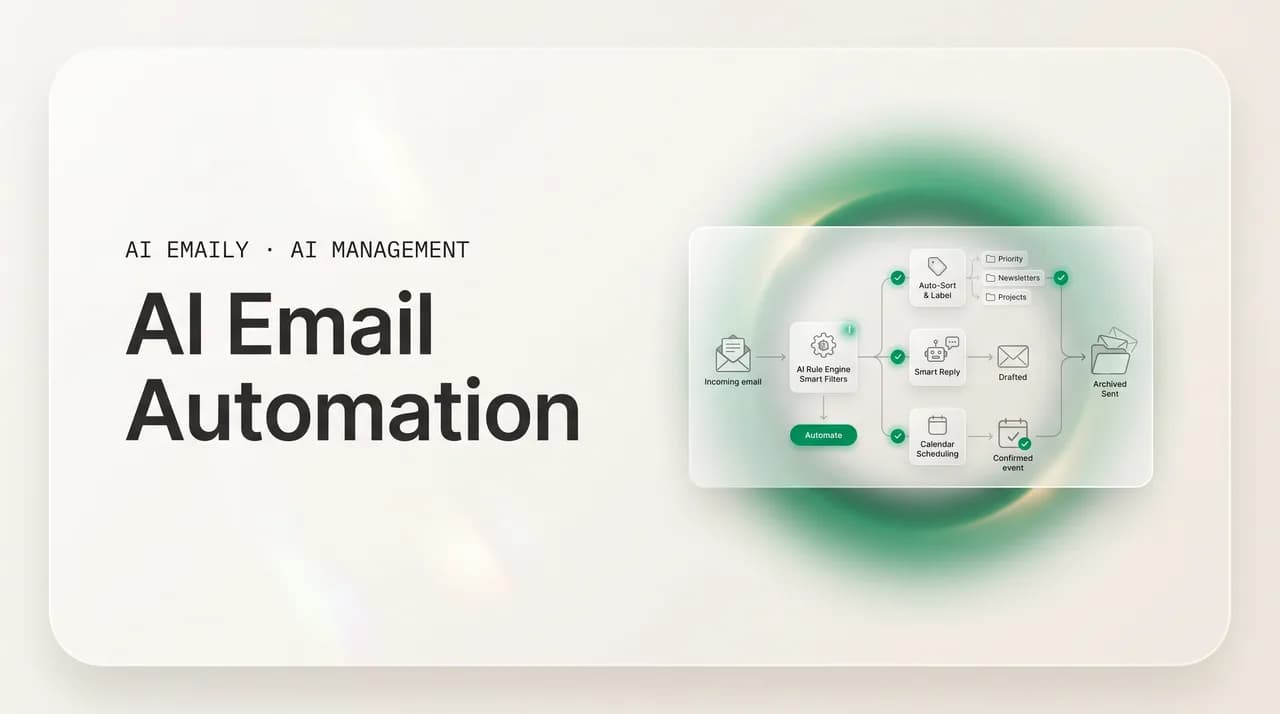
AI email automation hands the repetitive work of your inbox to software: triaging, sorting, labeling, drafting replies, chasing follow-ups, and clearing clutter automatically. Unlike rigid rules that match keywords, AI understands intent and learns your patterns. The winning setup pairs both, automates only low-judgment work, and keeps you in control with approval, undo, and audit.
AI email automation 2026: what to automate, rules vs AI, building workflows, guardrails, and avoiding over-automation. Your guide to a self-running inbox.
On this page
- 01What is AI email automation, exactly?
- 02Rules and filters vs. AI automation: what is the difference?
- 03What can you actually automate in your inbox?
- 04How do you build your first automated email workflow?
- 05What guardrails keep automation safe? Approval, undo, audit, limits
- 06What do real AI email automation recipes look like?
- 07What are the over-automation traps to avoid?
- 08How does AI Emaily automate email the right way?
- 09How do you measure whether automation is actually working?
- 10Conclusion: build an inbox that runs itself — and that you still trust
Email is the rare tool that scales its cost faster than its value. Every new contact, project, subscription, and account adds to the pile, and the pile never sorts itself. The average professional now receives around 121 emails a day and spends close to 11.7 hours a week — roughly 28% of the workweek, near three hours a day — reading, sorting, drafting, and re-drafting. Almost none of that time goes into the part that matters; it goes into overhead: the deciding, the filing, the chasing, the cleanup. That overhead is what automation is for. Automation is leverage applied to repetition — anywhere you do the same low-judgment thing over and over (file every receipt, label every newsletter, nudge the same unanswered thread on day three), you are doing work a machine could do identically, every time, without getting tired. The promise of AI email automation is simple: take the repeating, mechanical layer of your inbox off your plate, so the hours you spend on email shrink to the minutes that genuinely need a human.
There is a catch, and it is the most important thing in this guide: more automation is not automatically better. The same survey research that shows how much time email eats also shows something uncomfortable — even though roughly 64% of organizations now use AI in their email workflows, the average time people spend on email has stayed essentially flat. Adoption is high; impact is low. That gap is what happens when automation is bolted on without judgment — when people automate the wrong things, automate too aggressively, or set up systems they cannot see, trust, or reverse. Done badly, automation creates a new job (babysitting the automation) on top of the old one.
So this guide is about doing it well. We will draw the line between old keyword rules and modern AI automation and explain why the best inbox uses both; be specific about what is safe to automate — triage, sorting, labeling, reply drafting, follow-up, cleanup, scheduling — and what to leave alone; walk through building your first workflow; lay out the guardrails (approval, undo, audit, limits) that make automation safe; give you recipes you can copy; and name the over-automation traps that quietly waste more time than they save. Then we will be precise about how AI Emaily, an AI-native email client, automates email the right way. By the end you will know not just how to make your inbox run itself, but how to keep it running the way you would have run it yourself.
What is AI email automation, exactly?#
AI email automation is the use of software to perform the recurring work of your inbox — deciding, organizing, drafting, and acting — without you doing each step by hand. It sits on top of the email you already have (Gmail, Outlook, or any IMAP account) and takes over the repeating tasks: reading and triaging incoming mail, sorting and labeling it, drafting replies, sending follow-ups, cleaning out clutter, and routing things to the right place or person. The point is not novelty; it is to convert a stream of individual manual decisions into a system that handles the predictable ones for you.
It helps to split the field into three layers, because people lump them together and then get confused about what they are buying. The first layer is generative drafting — software that writes replies and messages for you, in your voice, ready to send or already sent. The second is inbox triage and organization — software that automatically prioritizes, categorizes, labels, and archives mail so the inbox is sorted before you open it. The third is workflow automation — systems that trigger actions based on what arrives or what time it is: follow up if there is no reply in three days, file this kind of message, update a record, snooze that until Monday. Most real value comes from combining all three, because an inbox is not just messages to read or just messages to write; it is a continuous flow that needs sorting, responding, and following through.
One framing will keep you out of trouble: automation is not the same as autonomy. Automating a task means a system performs it instead of you; granting autonomy means it performs the task without asking first. Conflating the two is the source of most automation horror stories. You can automate the drafting of a reply while keeping the sending in your hands, or automate triage entirely while keeping bulk deletion gated behind your approval. The best setups automate broadly but grant autonomy narrowly and gradually — the difference between leverage and recklessness, and a thread we return to throughout this guide.
Rules and filters vs. AI automation: what is the difference?#
Every email client already ships with automation: rules and filters — deterministic instructions of the form "if a message matches a condition, take an action" (if the subject contains "invoice," move it to Finance). Rules are transparent, fast, and genuinely useful for clear, mechanical cases — the right tool for a surprising amount of inbox work, and no honest guide will tell you to throw them out. But they have a hard ceiling, and understanding it tells you exactly where AI earns its place.
The ceiling is that rules match strings, not meaning. A rule reads individual fields — sender, subject keyword, domain — and nothing else. It cannot understand that "can you send the deck," "still waiting on those slides," and "need the presentation before the call" are the same request; to catch every phrasing you would need a separate rule for each, and you would still miss the ones you did not anticipate. Rules are fundamentally reactive: they only know the patterns you have already told them about. Security teams have known this for years — traditional rule-based filters need constant manual updating, and a large share of novel, tailored attacks slip past them because the rule for that exact pattern did not exist yet. The same brittleness that lets phishing through is why your filters keep missing the email that mattered.
There is also a maintenance tax nobody warns you about. Rules are cheap to create and expensive to own. Each one can rot: the vendor changes its sending address, the subject line gets reworded, a new category of mail appears that no rule anticipated. Power users accumulate dozens of overlapping filters that quietly conflict or misfire, and almost nobody audits them. The system you carefully built decays until you intervene — the opposite of what you want from automation.
AI automation works on a different principle. It reads the whole message — body, thread, sender relationship, tone, urgency — and acts on intent rather than keywords. It maps different wordings to the same meaning, detects an implied deadline or a frustrated customer, and weighs who the sender is relative to everyone you deal with. Critically, it learns: it watches what you open, reply to, archive, and ignore, and gets sharper over time instead of staler. Where a rule is static until you edit it, an AI model improves as it observes you — inverting the maintenance curve so the system tends itself rather than demanding you weed it.
The honest conclusion is not that AI replaces rules; they do different jobs and the best inbox uses both — rules to cut raw volume and handle the cases that never need judgment, AI for everything that requires reading the room. The table below lays the two side by side; the recipes later deliberately mix them.
| Dimension | Rules and filters | AI automation |
|---|---|---|
| What it reads | Individual fields — sender, subject keyword, domain | The whole message: body, thread, sender, tone, urgency |
| How it decides | Exact condition match (if X then Y) | Understands intent and meaning, not just keywords |
| New or reworded mail | Misses it — needs a rule for every variation | Maps different wordings to the same intent |
| Urgency and tone | Cannot detect | Reads implied deadlines, frustration, emphasis |
| Over time | Static and decays until you edit it | Learns your behavior and gets more accurate |
| Maintenance | High — filters conflict, rot, and need weeding | Low — adapts to change, improves with corrections |
| Transparency | Total — you can read the exact condition | Explainable, but probabilistic rather than literal |
| Best for | Clear, mechanical, repeating cases | Judgment: priority, needs-reply, what matters now |
Use rules for the obvious, AI for the judgment
What can you actually automate in your inbox?#
"Automate your email" is too vague to act on. It is more useful to see your inbox as a set of distinct, repeating tasks, each of which can be automated independently and to a different degree. Below are the seven that deliver the most leverage, in roughly the order most people should adopt them — the first few low-risk and almost always worth automating fully, the later ones touching the outside world and deserving more care. Reading them as separate decisions rather than one all-or-nothing switch is the biggest mindset shift that separates people who get hours back from people who create a babysitting job for themselves.
A simple heuristic governs all of them, and it is worth memorizing: automate a task if it is repeated often, follows a recognizable pattern, and does not require fresh judgment each time. Filing receipts passes on all three. Replying to an angry customer with a refund dispute fails the third. Most inbox work falls cleanly on one side or the other, and the tasks below are sorted accordingly — the early ones pure pattern-matching overhead, the later ones edging toward judgment and so gated behind your approval by default.
- Triage — score each incoming message for priority and surface what matters first, before you ever open the inbox.
- Sorting and labeling — classify mail by type (work, client, finance, newsletter, receipt) and apply labels or move to folders automatically.
- Reply drafting — generate ready-to-send responses in your voice for the messages that need them, so you approve instead of compose.
- Follow-up — track threads awaiting a reply and send (or draft) a nudge automatically when the deadline you set passes.
- Cleanup — bulk-unsubscribe, archive, and clear clutter, and keep it from rebuilding with standing rules.
- Scheduling — detect meeting requests, propose times, send invites, and snooze mail to resurface when it is actually actionable.
- Routing — send the right messages to the right place or person (a label, a folder, a teammate, a workflow) the moment they arrive.
| Task | What automation does | Risk | Default autonomy |
|---|---|---|---|
| Triage / priority | Reads each message, scores urgency, surfaces VIPs and time-sensitive mail | Low | Full — let it sort |
| Sorting / labeling | Classifies by type and applies labels or moves to folders | Low | Full — let it organize |
| Reply drafting | Writes a ready-to-send reply in your voice for needs-reply mail | Medium | Draft, you approve |
| Follow-up | Tracks unanswered threads and nudges on a set schedule | Medium | Draft or approve the nudge |
| Cleanup | Bulk unsubscribe / archive; standing rules prevent rebuild | Medium | Propose, then act in batches |
| Scheduling | Detects meeting asks, proposes times, sends invites, snoozes mail | Medium | Propose times, you confirm |
| Routing | Sends the right mail to the right label, folder, or person | Low–Medium | Full for filing; approve for handoffs |
How do you build your first automated email workflow?#
The mechanics differ between native features (Gmail filters, Outlook rules, priority views) and a dedicated AI email client, but the shape of a good setup is the same everywhere: get useful automation running fast on what cannot hurt you, prove it, then widen. The one expectation to set before you begin — because judging it too early is the most common reason people abandon AI automation — is that the first days are calibration, not performance. An AI that triages and drafts is forming a model of you (your VIPs, your categories, your voice, what "urgent" means in your world) and cannot do that without watching you for a bit. Treat setup like onboarding a new assistant over their first two weeks; a little patience and a few corrections up front buy you an inbox that runs itself indefinitely afterward.
- 1
Connect your inbox and let it observe
Connect the account (Gmail, Outlook, or any IMAP provider) and give the AI read access so it can learn your patterns — who you talk to, what you open, what you ignore. Expect a short calibration window, typically one to two weeks. Do not judge accuracy on day one; it has not learned you yet.
- 2
Turn on the low-risk automation first
Switch on triage, sorting, and labeling — the tasks that only read and organize. Let the AI score priority, surface VIPs, and file mail by type. Because nothing is sent or deleted, you can grant these full autonomy immediately and watch how well they work on harmless decisions. This alone transforms a wall of unsorted mail into an organized inbox.
- 3
Add a few deterministic rules for the obvious cases
Layer in rules for the mechanical, unambiguous patterns: always file receipts from a vendor, always archive a known notification, always label a specific domain. Keep them few and clear — rules handle the cases that never need judgment, which frees the AI to focus on the messages that do.
- 4
Define your VIPs and your never-miss list
Tell the system the senders and topics that must always surface — key clients, your manager, close collaborators. The AI also infers VIPs from your behavior, but seeding them anchors the priority model around your real stakes from the start, so nothing important is buried during calibration.
- 5
Set up reply drafting and follow-up in approve mode
Now touch the outbound layer, but keep it gated. Let the AI draft replies for needs-reply mail and prepare follow-up nudges for threads going quiet — but hold every send for your explicit approval. You get the speed of having the message ready without surrendering control of what actually leaves your inbox. Correct its drafts; that teaches it your voice.
- 6
Add scheduling and cleanup as proposals
Let the AI detect meeting requests and propose times you confirm, and propose cleanup batches (unsubscribe these, archive those) that you approve before it acts. Both are high-value and tedious, but destructive or outbound, so they suggest rather than execute until you trust them. Clear your backlog once here, then set standing rules so it never rebuilds.
- 7
Correct for two weeks, then widen autonomy where earned
Treat the first fortnight as training: every time the AI mis-sorts or mis-drafts, fix it — each correction is a training signal. After two to three weeks, review whether the top of your inbox is reliably right and the drafts are good enough to send with a glance, then widen autonomy per category — auto-send the truly routine replies, auto-clear the obvious clutter — based on the track record you have actually seen, not a hope.
Do not grant full autonomy on day one
What guardrails keep automation safe? Approval, undo, audit, limits#
Automation without guardrails is how you get the horror stories. In one widely shared case from early 2026, a person's AI agent deleted around 200 emails it had decided were unneeded — confidently, quietly, and wrongly. That is the defining risk of AI automation: it does not fail loudly with an error message; it fails fast and silently while sounding completely sure of itself. The answer is not to avoid automation but to wrap it in four guardrails that make a wrong call cheap and visible instead of catastrophic and invisible. Any tool you trust with your inbox should have all four.
The first guardrail is approval. Anything that touches the outside world or is hard to reverse — sending a reply, forwarding to a person, mass-deleting — should be reviewable before it happens, especially while you are still learning the system's accuracy. The dominant model across serious tools in 2026 is exactly this: AI assists with triage, drafting, and routing while a human stays responsible for anything that goes out, and draft suggestions never silently auto-send. Approval is graduated, not all-or-nothing: let the AI act freely on safe internal operations (sorting, labeling) and hold the consequential ones for a glance and a click.
The second guardrail is undo. Mistakes are inevitable in any system that makes judgment calls — including the human one it replaces. What matters is that every action is reversible: a mis-prioritization re-prioritized, an over-eager archive restored, a sent reply recalled, a deletion undone. Reversibility changes the psychology of delegation entirely — you can let the AI act because you know nothing it does is permanent. Undo turns automation from a leap of faith into a sliding scale you control.
The third guardrail is audit. Over weeks you want a trail — a record of what was triaged, sorted, sent, archived, or deleted, and on what basis. An audit log lets you spot patterns (it keeps under-prioritizing this client), prove what happened if something goes wrong, and build justified confidence as the decisions accumulate. Audit is also what makes widening autonomy responsible: you expand the AI's freedom based on a track record you can see, not a hunch.
The fourth guardrail is limits — hard boundaries the AI cannot cross: never auto-act on mail from these senders or containing these keywords, never delete in batches larger than N without confirmation, never touch anything financial, legal, or client-facing on its own. Security guidance for AI agents frames this as defining a "kill switch" before you deploy — the conditions under which the system must stop and wait for a human. For an inbox, the equivalents are an exclusion list, a batch cap, and a category allowlist. Together the four make automation transparent and reversible: you can always ask why it acted, a wrong call costs one click, and you delegate as much as the track record earns while pulling back instantly if it slips.
| Guardrail | What it prevents | What good looks like |
|---|---|---|
| Approval | Silent sends and irreversible actions you never saw | Outbound and destructive actions wait for a glance and a click |
| Undo | A single mistake becoming permanent | Every action reversible — re-sort, restore, recall, un-delete |
| Audit | Hidden decisions you cannot trace or learn from | A full log of what happened and why, reviewable any time |
| Limits | An over-eager agent reaching high-stakes mail | Exclusion lists, batch caps, and a category allowlist you set |
Automation reads everything — so privacy is non-negotiable
What do real AI email automation recipes look like?#
Principles are easier to trust once you see them as concrete workflows. Below are recipes you can adapt directly — each pairs a trigger (what kicks it off) with an action and an autonomy level (how much the AI does without asking). Notice how they mix deterministic rules and AI judgment, and how the safe ones run on their own while the consequential ones stay gated. These are not exotic; they are the everyday patterns that, stacked together, turn three hours of daily inbox work into a few minutes of review. Read them as a starting menu, not a fixed list — the right set depends on your role, but the structure is identical: identify a repeating, patterned, low-judgment task, decide how much autonomy it has earned, and let the system carry it. Start with the autonomous ones, add the gated ones as trust builds.
What are the over-automation traps to avoid?#
If under-automation wastes your time, over-automation wastes your trust — and often more time than it saves. The flat-results statistic from the start of this guide is the symptom; the five traps below are the causes, each with a simple antidote. The goal is not to automate less out of fear, but to automate deliberately.
The first trap is automating judgment, not just overhead. Cross the heuristic's line — let AI auto-send replies to angry customers, auto-resolve disputes, auto-decide what a strategic email needs — and you have handed away exactly the work that requires a human. Mechanical tasks belong in automation; anything sensitive, financial, legal, relationship-defining, or genuinely novel should stay with you, or at most be drafted for your approval. The antidote: keep the judgment-heavy tasks gated, permanently.
The second trap is silent failure. AI does not fail with a red error; it fails quietly and confidently — the deleted 200 emails, the follow-up sent to the wrong person, the important message mis-filed as noise. The danger compounds because once people over-trust automation they stop watching, which is precisely when a quiet failure does its damage unnoticed. The antidote: an audit log plus a periodic glance to confirm the work is being done right.
The third trap is over-reliance. Trust automation completely and you stop checking your inbox at all — then you miss the thing it was never going to catch: the novel message, the VIP you never named, the edge case outside every pattern. Automation should reduce inbox time to focused review, not to zero. The antidote: a deliberate review rhythm — a few minutes in two or three blocks a day — rather than abandoning the inbox.
The fourth and fifth traps are set-and-forget rot and automating too early. Rules and AI setups drift as your work changes — a filter perfect in January quietly misfires by June — so a light monthly tune-up of what is automated, excluded, and bounded keeps them fitting; automation is a system you maintain lightly, not a monument you build once. And if you automate a task before you understand it — what your triage should prioritize, what your standard reply should say — you just scale your confusion, which is why the right move is to turn on read-only automation first, watch and correct it, and only then automate the outbound and destructive tasks. Calibration before autonomy is what makes the autonomy worth granting.
| Over-automation trap | What goes wrong | The antidote |
|---|---|---|
| Automating judgment | AI auto-acts on sensitive, high-stakes mail it should not own | Keep judgment-heavy tasks gated behind approval, permanently |
| Silent failures | It fails quietly and confidently; damage goes unnoticed | Audit log plus a periodic glance to confirm it is acting right |
| Over-reliance | You stop checking and miss the novel or excluded case | Keep a deliberate review rhythm — focused, not zero |
| Set-and-forget rot | Rules and autonomy drift as your work changes | A light monthly tune-up of what is automated and excluded |
| Automating too early | You scale confusion before you understand the task | Calibrate on read-only tasks first; automate outbound later |
The goal is leverage, not abdication
How does AI Emaily automate email the right way?#
Everything above describes what good automation should do; AI Emaily is an AI-native email client built to do exactly that, with control and privacy as the foundation rather than an afterthought. It is not a chatbot bolted onto the side of your mail — the AI lives inside the client and works your real inbox the moment messages arrive, automating the seven tasks from earlier (triage, sorting, labeling, reply drafting, follow-up, cleanup, scheduling) across whichever provider your mail actually lives on.
The core of how it automates is the pairing this whole guide has argued for: rules and a brain, working together. You write rules in plain English — no rigid filter builder, just describe what you want ("always label invoices from our vendors as Finance," "surface anything from my top accounts immediately," "snooze newsletters to Saturday morning") — and it ships templates so you are not starting from a blank box. That is the deterministic layer, the precision of rules without the maintenance pain. On top of it sits the brain: a learning model that reads the whole message, infers your VIPs, drafts in your voice, and gets sharper at priority and intent every week, matching the right AI capability to each task. You get the obvious cases handled like rules and the judgment cases handled like AI, in one inbox — the hybrid the research keeps pointing to.
Control is built in through three modes — the automation-without-autonomy distinction made concrete. In Manual, the AI sorts and surfaces but stays out of your way; you drive. In Copilot, it drafts ready-to-send replies, prepares follow-ups, and proposes actions, but every send waits for your explicit approval. In Autopilot, for the routine, low-stakes mail you have chosen to delegate, it acts on its own — file, label, snooze, even reply to the truly routine — within the boundaries you set. You move along that spectrum task by task, as trust is earned: automate broadly while granting autonomy narrowly, instead of flipping one reckless switch. And all four guardrails sit underneath — every action has undo, every action is recorded in a full audit trail, and you set the limits the AI must never cross — so the automation can be aggressive without being reckless.
Two things make it work in the real world. It works with every email provider — Gmail, Outlook, and any IMAP account — so your automation is not trapped in one walled garden. And it is private by design: your email is yours, not training data, which is the precondition for letting any AI read deeply enough to automate well. You can start free — the Free plan is $0 — with Pro at $12.42 per month billed annually for the full agent and higher limits, and Autopilot at $20.75 per month billed annually when you are ready to let it act on its own within your boundaries. Connect your inbox at app.aiemaily.com/signup and watch the next message get triaged, sorted, and — if you allow it — replied to, without you deciding a thing you did not want to.
Rules for the obvious, brain for the judgment, you for the line
How do you measure whether automation is actually working?#
If you are going to change how your inbox runs, it is worth knowing what you are getting back — and the honest answer is rarely a single tidy number. The flat-results data from the start of this guide is a warning: it is entirely possible to adopt automation and save no time if it is automating the wrong things or creating review work that cancels the gain. So measure the things that actually indicate leverage, not vanity metrics.
The clearest signal is the "inbox open" test: when you open your inbox, is the right thing already at the top and the noise out of the way? The second is approval load: are the drafts good enough that approving them is a glance, not a rewrite? If you are rewriting every draft, the AI has not learned your voice — keep correcting it. The third is missed-mail rework: count the important emails you found late or lost before automation versus after; a good setup drives this toward zero by never burying a VIP. The fourth is your own checking frequency: are you down to a few deliberate review blocks a day, or still compulsively monitoring? The shift from constant reactive checking to periodic intentional review is where most of the real time savings live.
One caution on the figures quoted around AI email, including some in this article: numbers like "28% of the workweek on email" or "64% adoption" are directional benchmarks from broad studies, not guarantees for your inbox. Your real savings depend on your volume, role, how noisy your mail is, and how well you maintain the automation. Treat them as a reason to expect meaningful time back, then measure your own before-and-after.
Conclusion: build an inbox that runs itself — and that you still trust#
Email is overhead disguised as work. The 11.7 hours a week, the 121 messages a day, the three hours of sorting and chasing and clearing — almost none of it requires you specifically; it requires someone, and a well-built automation is a better someone for the repetitive parts. That is the whole case for AI email automation: take the predictable, patterned, judgment-free layer off your plate so your attention goes only where it is genuinely needed.
But the flat-results gap is the warning that comes with the promise: switching automation on is not the same as setting it up well. The setups that actually return hours all do the same things — they use rules for the obvious and AI for the judgment; automate the low-risk tasks (triage, sorting, labeling) fully and keep the consequential ones (replies, cleanup, sends) gated; wrap everything in approval, undo, audit, and limits; and keep a human in the loop on anything sensitive, novel, or hard to reverse. Automation broadly, autonomy narrowly and gradually — that is the formula.
That is exactly what AI Emaily is built to do: automate triage, sorting, drafting, follow-up, cleanup, and scheduling with plain-English rules plus a learning brain, and Manual, Copilot, and Autopilot modes with undo, audit, and limits on every action — across every provider, private by design. You hand over the work that was never really yours, you keep the few decisions that are, and you can see and reverse everything in between. Connect your inbox free at app.aiemaily.com/signup and let the next message handle itself. The goal is not an inbox you have abandoned; it is an inbox that runs itself and still does what you would have done.
Frequently asked
See it in AI Emaily
Keep reading

Written by
Nafiul HasanNafiul Hasan is an entrepreneur and AI automation system builder with 10+ years of experience turning messy, manual workflows into reliable automated systems. He designs and ships AI enterprise solutions end-to-end — the agent logic, the data plumbing, and the product people actually use — and founded AI Emaily to give busy professionals their attention back. He writes here from the builder's seat: what works, what breaks, and how to put AI to work without giving up control.