How AI Sorts Email: A Plain-English Look at Triage, Labels, and Priority

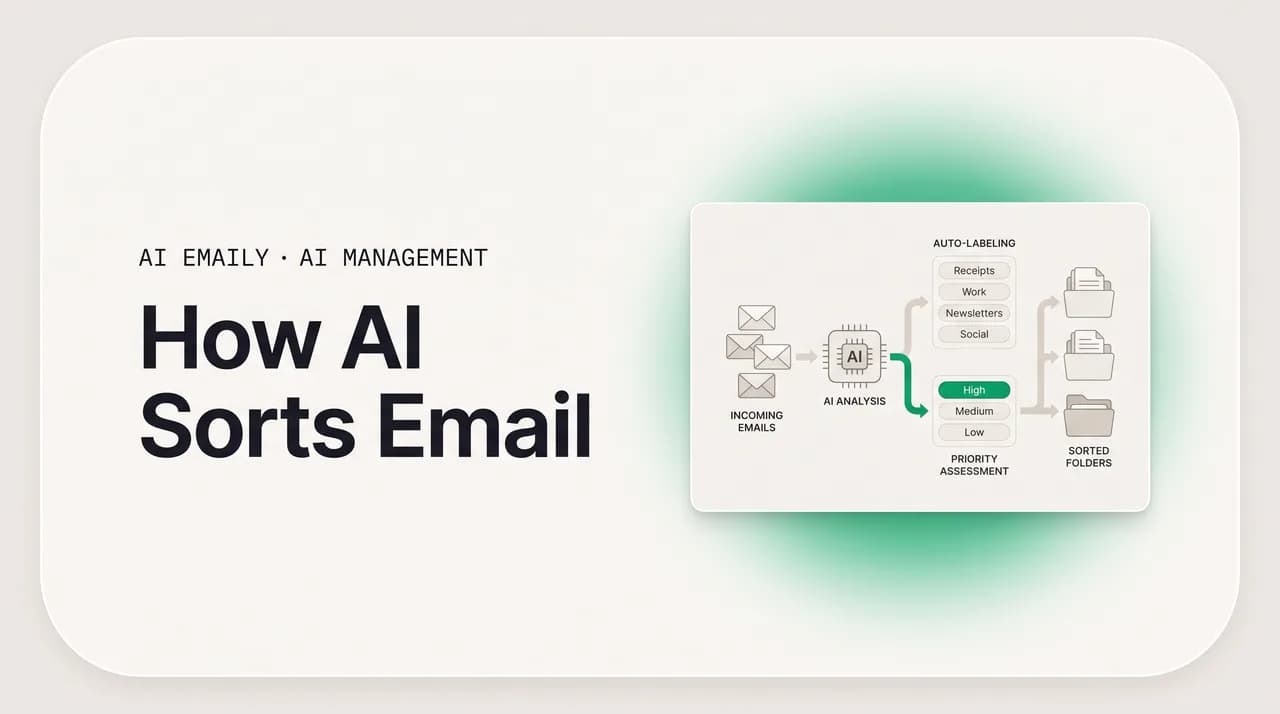
The short answer
AI sorts email by reading five signals on every message, the sender, the content, the apparent intent, your past behavior, and the message's role in its thread, then combining them into a category, a priority, and a spam verdict. Good systems use machine-learning classifiers and language models, not just keyword rules, and let you steer the result.
How AI sorts email, in plain English: the signals it reads, rules vs ML vs LLM, how categories and priority get scored, why it errs, and how to steer it.
On this page
- 01What happens to an email before you ever see it?
- 02What signals does AI read on every email?
- 03Rules vs machine learning vs LLM classification: what is the difference?
- 04How does a message get assigned to a category?
- 05How do priority and spam get scored?
- 06Why does AI sometimes sort email wrong, and what does that tell you?
- 07Can you see and control how AI sorts your email?
- 08How does AI Emaily sort your mail (and let you steer it)?
- 09So how does AI sort email, in one paragraph?
What happens to an email before you ever see it?#
By the time a message lands in your inbox, a surprising amount has already happened to it. Between the instant the sender hits send and the instant the message shows up in front of you, it passes through a series of automated decisions that decide what it is, whether it belongs in your inbox at all, where it sits, and how loudly it announces itself. Most people never think about this layer because it is invisible by design, the whole point is that you open your mail and the obvious junk is already gone, the receipts are tucked into a tab, and the message from your boss is near the top. But there is a machine making those calls, and understanding how it works changes how you use your inbox, how much you trust it, and what you do when it gets something wrong.
This guide is a plain-English explanation of that machine, an honest account of how AI actually sorts email in 2026, written for someone who wants to understand the thing rather than just use it. We will walk through the signals a sorting system reads on each message, the difference between the old keyword rules and the machine-learning and language-model approaches that replaced them, how a message gets assigned to a category, how priority and spam get scored as numbers, why the system sometimes gets it wrong and what that tells you, and how you can see and steer the decisions instead of being subject to them. The aim is that by the end you could explain the whole pipeline to a friend, and decide for yourself which parts you want control over.
The reason this matters now is that the layer got dramatically more capable in the last few years, and most people's mental model has not caught up. The sorting your email did a decade ago was mostly pattern matching, a filter looking for the word "unsubscribe" or a known spam domain. The sorting it does today reads the message the way a person skimming it would, weighs who sent it against how you have treated similar mail, and forms a judgment with reasons behind it. That shift, from matching strings to understanding meaning, explains both why modern sorting is so much better and why, when it errs, the errors look different, more like a reasonable misreading than a dumb rule firing on the wrong word.
One framing to carry through the whole guide: sorting is really three jobs stacked on top of each other, and they often get blurred together. The first is categorization, deciding what kind of message this is, a receipt, a newsletter, a real conversation. The second is prioritization, deciding how much it deserves from you right now, urgent, normal, can-wait. The third is filtering, deciding whether it is legitimate at all or should be quarantined as spam or phishing. Each runs on overlapping signals but answers a different question, and a good inbox does all three. We will take them in turn, starting with the raw material every one of them depends on, the signals.
What signals does AI read on every email?#
An AI sorting system does not look at a message and somehow know what to do with it. It reads a set of observable signals, features, in the jargon, and combines them into a decision. The strength of the modern approach is that it weighs several independent signals at once, the way you would if you had unlimited patience, and leans on whichever ones are clearest for a given email. No single signal decides; they corroborate or contradict each other, and the system's judgment is the resolution of all of them together. There are five families of signal that do almost all of the work, and once you know them, the behavior of any sorting system stops looking like magic.
The first and oldest signal is the sender. Who sent this, and what is already known about them? The system looks at the from-address and its domain, whether the address belongs to a bulk-sending platform or a normal human mailbox, whether the sending server has a good reputation or a history of spam, and whether you have corresponded with this person before and how often. Sender reputation, in particular, works a little like a credit score for mail servers: legitimate senders that consistently send wanted, authenticated mail build a high reputation, while servers that blast unwanted volume earn a low one, and that score weighs heavily before a word of the body is read. Sender signal alone gets a large fraction of mail right, which is why even the crudest filters lead with it.
The second signal is content, the actual text and structure of the message, and this is where modern AI pulled decisively ahead. Rather than scanning for keywords, a language model reads the message the way a person does. A body full of product imagery, a prominent unsubscribe footer, and a "shop now" button reads as a promotion no matter who sent it; an order number, a total, and a delivery date reads as a receipt; a direct question with no marketing scaffolding reads as a real message that wants something. Structure carries as much meaning as the words, the ratio of links to prose, a list-unsubscribe header, the formatting that marks a template versus a typed note, and a model trained on email reads those cues natively. This is the difference between reading the envelope and reading the letter.
The third signal is intent, which sits a level above content: not just what the message says but what it is trying to get you to do. Two messages can share a topic and differ entirely in intent, a vendor confirming a meeting versus a vendor asking you to pick a time; the first is an update you can note and move past, the second is an action that needs you. Reading intent is what lets AI sorting do something keyword filters never could, separate the mail that merely informs you from the mail that requires you, the single most useful cut in any inbox. It is also what makes a "needs reply" category possible at all, because those are defined by what the sender wants, not by who they are or what the message is about.
The fourth signal is your past behavior, the feedback loop that makes the system yours rather than generic. How have you treated mail like this before? If you reliably archive a sender's updates unread, the system learns to deprioritize them; if you reply within minutes to one client and within days to another, that feeds priority; every time you open, click, reply to, star, or ignore a message, you log a vote that nudges future decisions. This is why two people with identical inboxes end up with different sorting, the system is not applying a fixed rulebook, it is modeling how you, specifically, treat your mail. The longer it watches, the more the categories and priorities reflect your actual habits rather than a vendor's defaults.
The fifth signal is the thread, the message's role in the conversation it belongs to. An email is rarely an island; it is a reply, a forward, the third message in a chain, the start of a new topic, and that position carries meaning a one-shot read would miss. A reply on a thread you started is almost certainly something you care about; the latest message in a long back-and-forth where the other party is now waiting on you is high priority by definition; a forward that adds you mid-stream is a different beast from a fresh message addressed to you alone. Thread context also tells the system when a topic is resolved versus still open, the difference between a conversation that needs you and one that has run its course. Good sorting reads the whole thread, not just the newest message in isolation.
The table below lays out the five signal families, what each reads, and the question it helps answer. The practical insight is that they are complementary: a message can be flagged promotional from four directions at once, bulk sender, heavy imagery, unsubscribe footer, and a history of you archiving these unread, and that convergence is what gives the system confidence. When one signal is ambiguous, the others carry the call, which is why comprehension-era sorting handles the messy middle that string-matching filters always got wrong.
| Signal | What it reads | What it helps decide |
|---|---|---|
| Sender | From-address, domain, server reputation, bulk vs human, contact or stranger, how often you correspond | Likely class and trustworthiness, before the body is read |
| Content | The text and structure, link-to-prose ratio, unsubscribe headers, imagery, template vs typed note | What the message is, by comprehension rather than keywords |
| Intent | What the sender wants from you, to inform, confirm, ask, or sell | Whether the message needs you or merely updates you |
| Your behavior | How you have treated similar mail, opened, replied fast, archived unread, starred, ignored | Personalized priority and category, tuned to you specifically |
| Thread role | Reply vs new topic, position in the chain, who is waiting on whom, resolved vs open | Whether a conversation is live and owed by you, or finished |
No single signal decides
Rules vs machine learning vs LLM classification: what is the difference?#
Email sorting has gone through three broad eras of technology, and most inboxes today run a blend of all three rather than any one in isolation. Understanding the three approaches, and what each is good and bad at, is the clearest way to see why modern sorting behaves the way it does, where it is reliable, and where it surprises you. The three are deterministic rules, classical machine-learning classifiers, and language-model classification, and they sit on a spectrum from rigid-but-predictable to flexible-but-probabilistic.
The first approach is rules, also called filters. A rule is an explicit instruction you or an administrator writes: if the from-address contains this string, or the subject contains that word, do this, file it, label it, delete it. Rules are deterministic, they fire exactly the same way every time, which is their great strength: they are predictable, auditable, and instant, and for cases you can describe precisely they are unbeatable. "Mail from my accountant always goes to Finance" is a rule, and you want it to be a rule, because you want certainty, not a probability. Their weakness is that they are brittle. A rule matches only the patterns you anticipated. The filter you wrote to catch one newsletter does nothing when the publisher switches domains, and the rule that files anything with "invoice" in the subject also misfiles the colleague who writes "re: that invoice question." Rules match strings, not meaning, and the share of real mail that fits a pattern you predicted in advance is smaller than it feels.
The second approach is classical machine learning, the statistical classifiers that powered the first generation of good spam filters and category tabs. Instead of following hand-written rules, these models learn patterns from large volumes of labeled examples, this set of messages is spam, this set is not, and infer the statistical fingerprints that distinguish them. The classic example is the Bayesian filter, which learns the probability that a message is spam given the words and features it contains, and updates as it sees more mail. These models are a huge step up from rules because they generalize: they catch variations they were never explicitly told about, and they adapt as patterns shift. Bayesian and related classifiers reach roughly 95 to 98 percent accuracy on spam with very little compute, which is why they have been the workhorse of email filtering for two decades. Their limit is that they read features and frequencies more than meaning, so they can be fooled by messages that statistically resemble legitimate mail, and they struggle with the genuinely ambiguous middle where the words alone do not settle the question.
The third and newest approach is language-model classification, where a model that genuinely understands text reads the message and judges it. This is the comprehension era. A large language model, or a smaller specialized one, can read the subject and body and decide whether the message is legitimate, promotional, a receipt, or a phishing attempt, and crucially it can reason about intent, the thing rules and frequency-based classifiers cannot see. A related technique, embeddings, turns each message into a list of numbers that captures its meaning, so messages with similar meaning sit close together in a mathematical space and new mail is sorted by where it lands relative to examples. Modern research consistently finds that transformer and language-model approaches outperform older methods on content-heavy and intent-aware tasks, classifying by meaning rather than surface features. Their cost is real, though: they are slower and pricier to run than a Bayesian filter, they can be inconsistent in a way deterministic rules never are, and they raise governance and privacy questions because the model is reading your actual content.
Because each approach has a distinct strength, the best systems do not pick one, they layer all three. Deterministic rules sit on top as guardrails for the cases you want guaranteed; a fast machine-learning classifier handles the high-volume, well-understood decisions like obvious spam cheaply; and a language model is reserved for the harder, meaning-dependent calls where comprehension earns its keep. A common and sensible design is a two-stage pipeline: a cheap, fast filter first removes the clear-cut spam, then a comprehension-grade model semantically categorizes and prioritizes the legitimate mail that remains. That gives you the predictability of rules where you need certainty, the efficiency of classical ML at scale, and the understanding of a language model exactly where the older methods fall down, more than any single approach delivers alone.
The table contrasts the three eras directly. The headline is that none of them is obsolete, each does a job the others do worse. When you hear that an inbox "uses AI to sort," what that almost always means in practice is this blend, rules for the guaranteed cases, statistical classifiers for the cheap bulk decisions, and a language model for the judgment calls, rather than one monolithic brain doing everything.
| Approach | How it decides | Strength | Weakness |
|---|---|---|---|
| Rules / filters | Explicit if-this-then-that on addresses and keywords | Deterministic, instant, auditable, perfect for cases you can name | Brittle; only catches patterns you predicted, blind to meaning |
| Classical ML (e.g. Bayesian) | Learns statistical fingerprints from labeled examples | Generalizes, adapts, ~95–98% on spam at very low cost | Reads features more than meaning; fooled by lookalikes |
| Language-model / embeddings | Reads and understands the text; can reason about intent | Comprehension and intent, handles the ambiguous middle | Slower, costlier, less consistent, raises privacy questions |
| Layered (real systems) | Rules as guardrails, ML for bulk, LLM for hard calls | Predictability, efficiency, and understanding together | More complex to build and tune than any single method |
How does a message get assigned to a category?#
Categorization is the first of the three jobs, and it is the one most people picture when they think about AI sorting: the system deciding that this message is a receipt, that one is a newsletter, this one is a real conversation. Mechanically, it works by taking the signals from earlier, the sender, the content, the intent, your history, the thread, and mapping them to the most likely category from a defined set. The model effectively asks, of all the categories I know, which one best fits everything I can observe about this message? and assigns the winner. Where it is confident, it commits; where it is torn between two, it can hedge, which we will come back to.
The set of categories itself comes in two flavors. Some are mutually exclusive, a message is in Promotions or in Primary, not both, the way Gmail's tabs and Outlook's Focused/Other split work; exclusive categories give a clean top-level cut but force a single winner when a message is genuinely two things at once. Others are additive labels, tags a single message can carry several of at once, so one email can be Client and Project-Atlas and Invoice all at once without being copied anywhere. Reading content well is what makes auto-labeling possible, because applying three accurate labels to every message by hand is the chore nobody sustains, while a classifier that comprehends the message can stack them effortlessly on arrival.
An important subtlety is where the categories come from. Default categories, Primary, Social, Promotions, Updates, are designed for the average inbox, which means they fit almost no one exactly. The whole advantage of a flexible AI sorter over fixed tabs is that the taxonomy can bend to you: a freelancer wants Clients and Invoices, a recruiter wants Candidates and Hiring-Managers, a founder wants Investors and Team kept distinctly apart. There are two ways a modern system learns a custom category, by example, where you point at a handful of messages and it generalizes the pattern even when the wording varies, and by instruction, where you describe the category in plain language and a comprehension-based classifier follows it because it understands the distinction. Both beat the old condition-and-action filter for exactly the categories that hinge on what a message means rather than what words it contains.
Behind the scenes, the assignment is almost always a confidence score, not a hard yes-or-no. The model does not simply declare "receipt"; it produces something closer to "receipt, 0.93" alongside lower scores for the other candidates, and a threshold decides whether that is confident enough to act on. This is why categorization can feel decisive on clear-cut mail and hesitant on the ambiguous middle, the underlying number is high in the first case and a close call between two categories in the second. Knowing that a probability sits under every category assignment is the key to understanding both why the system is usually right and why, when it errs, it tends to err on the genuinely borderline messages rather than the obvious ones.
Categorization is the foundation everything else builds on, which is why getting it right matters disproportionately. Priority is often computed within a category, and smart views, live saved searches like "unread client mail that needs a reply," compose categories and labels together. If the underlying category is wrong, every view and priority that depends on it inherits the error. That dependency is why a good sorter invests so heavily in reading the message accurately, and why your corrections to categorization are the most valuable feedback you can give it.
How do priority and spam get scored?#
Categorization tells you what a message is; prioritization and filtering put a number on how much it deserves from you and whether it belongs in your inbox at all. Both are scoring problems, and seeing them as scores rather than labels demystifies a lot of inbox behavior. Let us take spam first because it is the older and better-understood of the two, then priority.
Spam filtering is, under the hood, a scoring system with a threshold. The classic open-source example, SpamAssassin, runs hundreds of independent tests against each message, and each test adds or subtracts points: a forged header adds points, a known-bad link adds points, a valid authentication record subtracts points, a clean sender reputation subtracts points. The points sum to a single score, and a threshold, 5.0 by default in SpamAssassin, decides the verdict: below it the message is delivered, above it the message is quarantined as spam. Modern filters layer a learned Bayesian component on top of the fixed tests, so the score also reflects what the system has learned from the spam and the legitimate mail it has seen before, and it adapts as new patterns emerge. The mechanics differ across providers, but the shape is the same everywhere: many signals, one combined score, a threshold that decides.
That threshold is the heart of the matter, because it forces an unavoidable trade-off between two kinds of error, and that trade-off is why no filter is perfect. Set the threshold low, aggressive, and you catch nearly all the spam (high recall) but you also catch some legitimate mail in the net (false positives, the worst kind of error, because a real message vanishes into the spam folder). Set it high, lenient, and you almost never lose a legitimate message (high precision) but more spam slips through. There is no setting that gives you both, catch all spam and never touch a real message, because the two goals pull in opposite directions. Every filter is a chosen point on that curve, and sensible ones lean toward never losing legitimate mail, because a stray spam costs a second to delete while a real message lost to the spam folder can cost you a deal. When you evaluate any filter, the question is not whether it errs but which way it is tuned to err.
Priority scoring works on the same principle, a single score combined from many signals, but it answers a different question and reads more of your personal signals. Where spam asks "is this legitimate," priority asks "how much does this deserve from me right now," and the inputs that matter most are tied to you: whether the sender is someone you treat as important (a VIP, a frequent correspondent, your boss), whether the message is a reply on a thread you now owe, whether the intent is an action directed at you versus a passive update, and how you have historically responded to mail like this. A direct question from a known client on an open thread scores high; a no-reply notification you always ignore scores low. The system surfaces the high-scoring mail and mutes the low-scoring mail, the cut that actually saves you time, because it separates the handful of messages that need you today from the long tail that can wait.
A useful way to hold all of this together is that categorization, priority, and spam are three different questions asked of the same signals, with three different outputs. The table makes the parallel explicit. The thing they share is the scoring logic, many inputs combined into a number, a threshold or ranking that turns the number into an action, and the thing that distinguishes them is which signals weigh most and what the output is for. Once you see that priority and spam are both scores with thresholds, the occasional surprise, an important message ranked too low, a newsletter that slipped past the spam line, stops looking like a malfunction and starts looking like what it is: a borderline score landing on the wrong side of a threshold, which is exactly the kind of thing your feedback can fix.
| Job | Question it answers | Heaviest signals | Output |
|---|---|---|---|
| Categorization | What kind of message is this? | Content, sender, intent | A category and stackable labels, by confidence |
| Prioritization | How much does this deserve from me now? | Your behavior, VIP status, thread role, intent | A priority score, surfaced or muted |
| Spam / phishing filtering | Is this legitimate at all? | Sender reputation, authentication, content red flags | A spam score vs a threshold, deliver or quarantine |
Every filter trades false positives against missed spam
Why does AI sometimes sort email wrong, and what does that tell you?#
No sorting system is perfect, and any tool that claims it never errs is selling you something. Independent estimates put email filter misclassification at roughly one message in five across the board, and the rate has been creeping up as AI-generated mail makes the legitimate and the unwanted harder to tell apart. So errors are not a sign that a particular tool is broken; they are inherent to the problem, and the useful skill is understanding why they happen, because the reasons tell you how to use and correct the system.
The first and biggest source of error is genuine ambiguity. A great deal of real mail does not cleanly belong to one category, an email about a billing problem, a technical bug, and a cancellation can share almost identical vocabulary while needing completely different handling, and a message that is half receipt and half support request is genuinely two things. When the underlying confidence score is a near-tie between two categories, the system has to pick one, and sometimes it picks the one you would not have. This is not the model being dumb; it is the model resolving an ambiguity a human might also get wrong, and it is why the bulk of errors cluster on borderline messages. The clear-cut mail, the obvious promotion, the unmistakable receipt, almost never gets misfiled.
The second source is intent misreading. Because intent is inferred from language, sarcasm, indirection, or a question buried at the bottom of a long message can lead the model to misjudge what the sender wants, marking an action item as a passive update or vice versa. The third is the cold start: any system that personalizes to you begins generic, leaning on broad patterns and your contacts, and in the first week or two it makes calls that feel slightly off because it has not yet learned your habits, which clients are urgent, which newsletters you actually read. The fourth is drift: the world changes, a sender you used to ignore becomes important, a project ends, and a model that was right last month can be subtly wrong this month until it catches up. None of these are exotic failures; they are the predictable ways a meaning-based system goes wrong, and they are all addressable.
Two kinds of error are worth distinguishing because they cost you differently, and good systems are tuned with that asymmetry in mind. A false positive in a low-stakes category, a real-but-minor message that lands in Promotions, is cheap; you find it when you skim that category and nothing was lost. A false negative on something important, a real message buried in a category you never check or a priority too low to surface, is the expensive error, the missed client reply, the invoice routed to a folder you ignore. Sensible sorting is cautious in exactly the right direction: it would rather leave a borderline message visible than risk hiding something that needed you, because over-filing the important stuff costs far more than under-filing the trivial stuff. When you evaluate a tool, watch how it handles uncertainty, the good ones hedge toward visibility and surface low-confidence calls for your review instead of guessing silently.
Correction is where a system either earns trust or loses it, and this is the single most important property to test. The mechanics should be trivial, move a message to the right category, change a label, mark a sender as a VIP, and the consequence should be twofold: this message is fixed now, and messages like it are handled better next time. That second half is the whole point of a learning loop. A correction is the most valuable kind of training signal, because it tells the system exactly where its judgment diverged from yours, and a tool built around feedback folds that in so the same mistake fades rather than repeating. If correcting a tool feels like bailing water, fixing the same misfile every week with no improvement, the model is not learning from you and you are doing the work the AI was supposed to remove. The error rate is not the headline number; the correction loop is.
- Filters misclassify roughly one message in five, and the rate is rising with AI-generated mail, so errors are inherent to the problem, not a sign one tool is broken.
- Most errors cluster on genuinely ambiguous mail where two categories nearly tie; clear-cut messages almost never get misfiled.
- Intent misreading, cold-start (the first week or two), and drift over time are the other predictable failure modes, and all are addressable.
- A minor message in Promotions is cheap; an important one buried in an ignored category is the expensive error, good tools hedge toward visibility.
- The decisive property is the correction loop: a fix should repair this message and teach the system, so the same misfile fades instead of repeating.
Judge the correction loop, not the error rate
Can you see and control how AI sorts your email?#
There is a fair worry behind a lot of skepticism about AI sorting: if a machine is deciding what I see and in what order, am I handing over control of my own inbox to a black box I cannot inspect or override? It is a reasonable concern, and the honest answer is that it depends entirely on the tool. Some systems are opaque, they sort silently and give you little more than the ability to drag a message somewhere else. Others are built around transparency and control, and the difference is one of the most important things to look for, because an inbox is too central to your work to cede to a process you cannot see or steer.
Transparency means the system can tell you why it did what it did. Instead of a category appearing by fiat, a transparent sorter can show its reasoning, marked promotional because it came from a bulk sender, carried an unsubscribe footer, and you archive these unread, so a decision you disagree with is a thing you can understand and argue with rather than a verdict from nowhere. This matters for trust, you extend far more trust to a system whose calls you can audit, and it matters practically, because understanding why a message was misfiled tells you exactly which signal to adjust. The best modern guidance on deploying AI in the inbox is explicit that maintaining transparency with people about the AI's role, and giving them a clear way to see and correct its decisions, is not optional polish but a core requirement.
Control comes in several layers, and a well-designed system gives you all of them. The lightest is per-message correction, moving a misfiled message, changing a label, which both fixes the instance and feeds the learning loop. Above that is per-sender and per-category control, marking someone a VIP so their mail always surfaces, telling the system a whole class of a sender's updates belongs elsewhere, which fixes a pattern in one move. Above that are explicit rules, the deterministic guardrails from earlier, plain-language instructions like "mail from my accountant is always Finance and never archived" that fire every time with no probability involved, so the cases you cannot afford to get wrong are pinned by certainty rather than left to a best guess. And the strongest systems give you an audit trail and an undo, a record of what the AI did and a way to reverse it, so automation never means losing the ability to see and roll back what happened.
The principle that ties these together is that AI should propose and you should be able to dispose. A sorting system that personalizes well is enormously useful, but its usefulness depends on you remaining the authority: the AI handles the open-ended majority by comprehension, and you retain explicit control over the cases you care about and full visibility into the rest. That layering, deterministic rules and VIP designations on top, AI judgment underneath, an audit trail and undo around the whole thing, is what turns a black box into a tool.
Two correction habits make the biggest practical difference, whatever tool you use. First, correct at the pattern level, not message by message: if a whole class of mail is misfiled, fix the rule for the sender or category rather than re-filing each message, because one rule beats a hundred drags. Second, set your guarantees explicitly rather than hoping the model infers them: name your VIPs, your never-miss categories, and your hard exclusions. Do those two things and the residual error rate drops to the point where sorting genuinely fades into the background, the only state in which it has actually solved the problem.
- Transparency means the system can show why it sorted a message, so a call you disagree with is one you can understand and adjust, not a verdict from nowhere.
- Control comes in layers: per-message correction, per-sender and per-category rules, explicit deterministic guardrails, and an audit trail with undo.
- Deterministic rules pin the cases you cannot afford to get wrong, VIPs, never-miss categories, hard exclusions, with certainty, not probability.
- The right model is AI proposes, you dispose: the AI handles the open-ended majority, you keep authority over what matters and visibility into the rest.
- Correct at the pattern level and set guarantees explicitly, and the residual error rate drops until sorting fades into the background.
An inbox you cannot inspect is one you do not control
How does AI Emaily sort your mail (and let you steer it)?#
Everything above describes how AI sorting works in general; AI Emaily is one implementation built around the principles this guide argues for, comprehension-grade sorting that you can see, steer, and reverse. It is an AI-native email client, meaning your mail lives inside it and the sorting happens on arrival, in the place you actually read, rather than in a separate dashboard you have to check. The relevance is concrete: the five signals, the layered approach, the scored priority, and the transparency and control we have been describing are the actual design, a worked example of the abstract pipeline.
Sorting reads all five signals at once. Every message that arrives is classified by sender, content, intent, your past behavior, and its role in the thread, the way this guide describes, and assigned to a category, the broad cut that separates real conversations from receipts, newsletters, notifications, and promotions, so your main view holds the mail actually addressed to you. Labels are applied automatically and they stack, client, project, invoice, needs-reply, all on one message, capturing the multidimensional reality of mail without you tagging anything by hand. Priority is scored on top, surfacing the handful of messages that need you now and muting the long tail, and because the classifier reads meaning rather than matching the from-address, it handles the messy middle, the receipt that is also a support thread, that rigid filters always misfiled.
The layering this guide recommends, deterministic rules over AI judgment, is exactly how rules and the brain work together. The brain is the personalization layer: it learns from how you treat your mail, which senders you prioritize, which categories you read, which you ignore, and folds every correction back in so the categories and priorities converge on your judgment rather than a generic default, the learning loop that turns a one-in-five-style error rate into a system that gets quietly more accurate the longer you use it. On top of that you set rules in plain language, "label anything about Project Atlas as Atlas," "mail from my accountant is always Finance and never archived," and AI Emaily follows them every time, combining the certainty of deterministic guardrails with the coverage of AI comprehension underneath.
Crucially, you stay in control, which is the part this guide treats as non-negotiable. AI Emaily is transparent about what it did and reversible when you disagree: you correct a misfile with a move and it teaches the brain, you pin VIPs and never-miss categories with explicit rules, and because it is an agent and not just a sorter, anything it does on your behalf comes with your approval, full undo, and an audit trail. The same understanding that categorizes and prioritizes a message can act on it, turn a needs-reply into a drafted response, file or archive on a rule, but the human-in-the-loop design means automation never means losing oversight. That is the AI-proposes-you-dispose principle built into the product rather than bolted on.
Two facts make this materially different from the built-in tabs and Focused Inbox most people start with. First, it works across every provider, Gmail, Outlook, iCloud, Fastmail, Proton, IMAP, so you get one consistent system of categories, labels, priority, and rules over all your inboxes at once. Second, it is private by default: the sorting is grounded in your own mail, inside a client you control, and your email is never used to train models, so you get comprehension-grade sorting without the disclosure cost of routing your correspondence through a consumer chatbot, the privacy trade-off that makes most people hesitate to let AI near their inbox.
The plans are simple. The Free plan is $0 and includes AI sorting, categorization, and priority, so you can put automatic, comprehension-based organization on your real inbox without paying anything and see the pipeline this guide describes working on your own mail. Pro is $12.42 per month billed annually and adds the deeper automation, custom rules at scale, the full agent that can act on mail with your approval and audit trail, and the cross-provider power-user features. If you have read this far because you wanted to understand how AI sorts email, the most direct way to finish the lesson is to watch it happen on your inbox, which is a couple of minutes away at app.aiemaily.com/signup.
- AI-native client: sorting runs on arrival, inside the inbox you read, reading all five signals at once, no separate dashboard.
- Automatic categorization plus stacking labels plus a priority score, so the main view holds the mail addressed to you.
- Rules in plain language over a learning brain: deterministic guardrails atop AI comprehension, the layered approach this guide recommends.
- You stay in control: correct a misfile and it teaches the brain, pin VIPs with rules, and every agent action has approval, undo, and audit.
- Works across Gmail, Outlook, iCloud, Fastmail, Proton, and IMAP, one consistent system over every inbox.
- Private by default, sorting is grounded in your own mail and your email is never used to train models.
- Free is $0 with AI sorting, categorization, and priority; Pro is $12.42/mo billed annually for the full agent and power-user features.
So how does AI sort email, in one paragraph?#
If you take one thing from this guide, take the shape of the pipeline. AI sorts email by reading five signals on every message, who sent it and their reputation, what the message says and how it is structured, what the sender appears to want from you, how you have treated mail like it before, and where it sits in its thread, and combining those signals into three decisions: what kind of message it is (a category, with stackable labels), how much it deserves from you right now (a priority score), and whether it is legitimate at all (a spam score against a threshold). It does this with a blend of three technologies, deterministic rules for the cases you can name, statistical classifiers for the cheap high-volume calls, and language models for the meaning-dependent judgment, rather than one monolithic brain.
It is not magic and it is not infallible. Roughly one message in five gets misclassified somewhere across the board, almost always on the genuinely ambiguous middle rather than the obvious mail, and the property that separates a good system from a frustrating one is not a fictional perfect score but whether your corrections stick and generalize, and whether you can see and steer the decisions instead of being subject to them. A sorter you can inspect, pin with rules, and reverse with an audit trail is a tool; one that sorts silently and ignores your feedback is a liability for something as central as your inbox.
AI Emaily is the version of this built around those principles, reading all five signals, layering rules over a learning brain, scoring priority, working across every provider, private by default, and keeping you in control with approval, undo, and an audit trail. The Free plan puts the whole pipeline on your real mail for $0, so the most direct way to understand how AI sorts email is to watch it sort yours, which is a couple of minutes away at app.aiemaily.com/signup.
The whole pipeline in a sentence
Frequently asked
See it in AI Emaily
Keep reading
Sources
- Mailbird: How machine learning spam filters analyze your email (2026)
- Unboxd: AI email sorting, how machine learning organizes your inbox
- Springer: An LLM-driven framework for email spam detection using DistilBERT embeddings
- Prospeo: SpamAssassin score guide, rules, thresholds and fixes (2026)
- Fini Labs: How AI email triage platforms auto-classify tickets (2026 analysis)

Written by
Nafiul HasanNafiul Hasan is an entrepreneur and AI automation system builder with 10+ years of experience turning messy, manual workflows into reliable automated systems. He designs and ships AI enterprise solutions end-to-end — the agent logic, the data plumbing, and the product people actually use — and founded AI Emaily to give busy professionals their attention back. He writes here from the builder's seat: what works, what breaks, and how to put AI to work without giving up control.