How to respond to Airbnb guest inquiries faster (and protect your Superhost status)

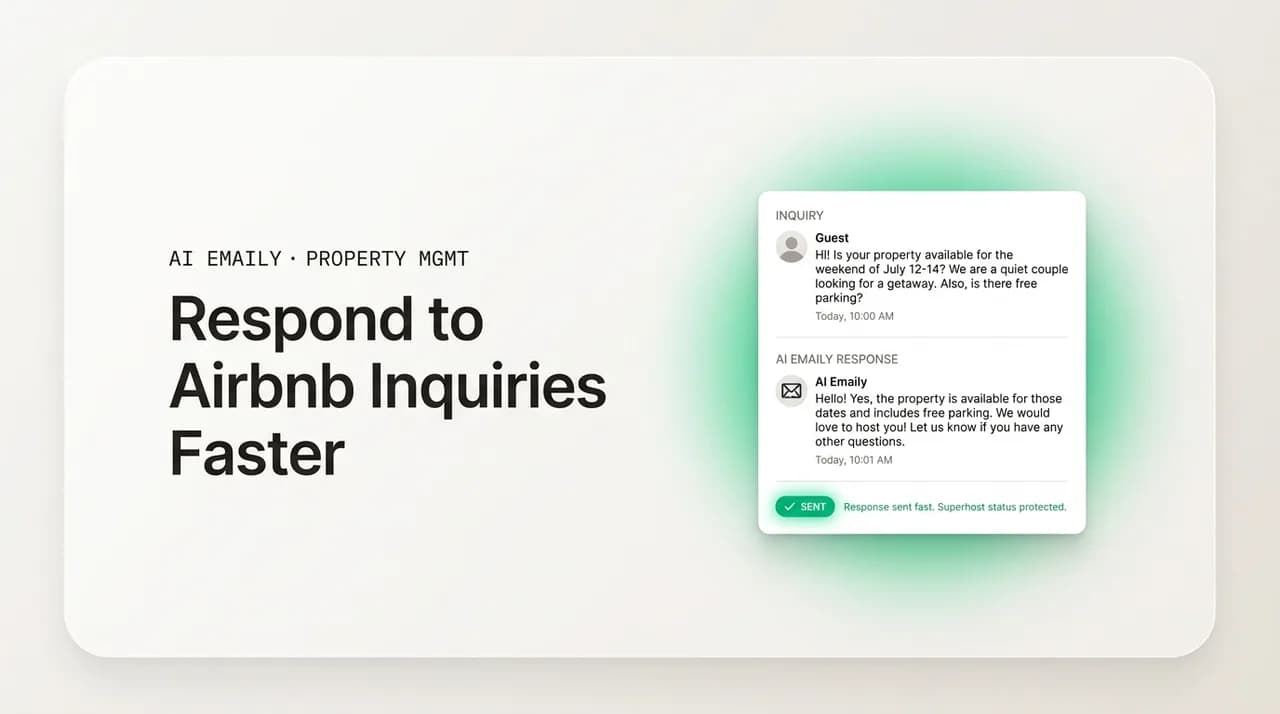
The short answer
To respond to Airbnb guest inquiries faster, answer within an hour (ideally minutes): speed lifts your search ranking, protects the 90%-within-24-hours response rate Superhost requires, and wins the booking, because guests message several hosts and usually book the first solid reply. Use an instant acknowledgment plus a fast personal answer, save templates for repeat questions, and let automation handle the routine so a human only touches what needs judgment.
How to respond to Airbnb guest inquiries faster: why response time drives search ranking, Superhost status, and bookings, plus a fast-response system, templates, and automation that stays personal.
On this page
- 01Why does responding to Airbnb guest inquiries faster matter so much?
- 02How does response time affect your Airbnb search ranking?
- 03How does response time affect Superhost and Premier Host status?
- 04How does response speed affect booking conversion?
- 05Why are Airbnb hosts so often slow to respond?
- 06What does a fast-response system look like?
- 07What should an instant acknowledgment say versus a personal reply?
- 08What templates should every host keep ready?
- 09How do you automate guest responses without sounding like a robot?
- 10How does AI Emaily help you respond to guest inquiries faster?
- 11Putting it all together
Why does responding to Airbnb guest inquiries faster matter so much?#
If you host on Airbnb or VRBO, response speed is not a nicety, it is a ranking signal, a status requirement, and a conversion lever all at once. When a guest sends an inquiry, the clock starts, and almost everything that happens next, whether your listing climbs or sinks in search, whether you keep your Superhost badge, whether that specific guest books you or the next host, is shaped by how fast you reply. Learning to respond to Airbnb guest inquiries faster is one of the highest-return skills a host can build, because a single slow reply can quietly cost you a booking you never even knew you were in the running for.
The uncomfortable truth is that guests rarely message just one host. They fire off inquiries to three, four, five listings at once and then book whichever host gives them a fast, confident, complete answer first. You are not competing on price or photos in that moment, you are competing on speed. The host who replies in four minutes with a warm, specific answer usually gets the reservation before the host who replies four hours later has even opened the app. Everything that host did to earn the click, the photography, the pricing, the reviews, gets handed to a faster competitor at the finish line.
This guide breaks down exactly how response time affects your Airbnb search ranking, your Superhost status, and your booking conversion, then explains why hosts are structurally slow (day jobs, multiple platforms, and time zones that put inquiries at 2 a.m.), and finally lays out a concrete fast-response system: instant acknowledgment versus the personal answer, templates you can reuse, and how to automate the repetitive 70 to 90 percent of guest messaging without sounding like a robot. At the end we cover, honestly, where an AI email client like AI Emaily fits and where it does not.
One number frames the whole problem. Across short-term rental operators, the fastest hosts, those replying in under five minutes, sit in roughly the top tenth of all hosts, and that speed is not a vanity metric, it correlates directly with more bookings. Meanwhile the platforms themselves publish a hard floor: to qualify as a Superhost, Airbnb expects you to respond to 90 percent of new messages within 24 hours. Between the 24-hour floor that keeps your badge and the five-minute ceiling that wins the booking sits an enormous gap, and most of the money is made by closing it.
So the goal of this article is not just "reply faster" as a slogan. It is to give you a repeatable system that gets a helpful first response out in minutes, every time, day or night, without chaining you to your phone. That means separating the instant acknowledgment (which a machine can send in one second) from the considered personal reply (which sometimes needs you), building a small library of templates for the questions you answer over and over, and automating the parts that are genuinely repetitive so your attention goes only to the messages that actually need a human.
The one-hour rule of thumb
How does response time affect your Airbnb search ranking?#
Airbnb's search algorithm is a black box in its exact weights, but the platform is open about the general principle: it ranks listings to maximize the chance a guest books and has a great stay, and fast, reliable hosts get surfaced more. Response rate and response time are among the signals it uses. A host who consistently replies quickly is a host Airbnb can confidently show to a guest, because the platform has learned that a fast reply is the difference between a booked trip and an abandoned search. Slow hosts create dead ends, and the algorithm routes traffic away from dead ends.
There are two distinct metrics at play, and it helps to keep them straight. Response rate is the percentage of new inquiries and booking requests you reply to within 24 hours, measured over a rolling window. Response time is how quickly you typically reply, which Airbnb displays on your listing in buckets like "within an hour," "within a few hours," or "within a day." Both are visible or inferable to guests and both feed the ranking system. A listing that says "Response time: within an hour" signals reliability before a guest has even sent a message, and that badge is earned purely by your behavior over time.
The compounding effect is what makes this matter. A slightly higher ranking means more impressions, more impressions mean more inquiries, and more inquiries answered quickly means an even better response profile, which lifts you further. The reverse spiral is just as real: miss a few messages during a busy week, watch your response rate dip, slide down the results, get fewer inquiries, and lose the very volume that would have let you recover. Speed is not a one-time fix, it is a flywheel, and the algorithm rewards the hosts who keep it spinning.
It is worth being precise about what actually counts against you, because hosts often panic about the wrong thing. On Airbnb, the response-rate clock is driven by new inquiries and booking requests, the first message in a thread, not every back-and-forth reply within an ongoing conversation. Declining a request still counts as responding, as long as you act within 24 hours, so you are never forced to accept a bad booking to protect your stats. What hurts you is letting that first message sit unanswered past the window. Understanding this lets you focus your speed where the algorithm is actually watching.
VRBO runs a parallel system under a different name. Its Premier Host program, the rough equivalent of Superhost, evaluates hosts on booking volume, review scores, cancellation rate, and, crucially, responsiveness, expecting hosts to reply to inquiries promptly to stay in good standing. If you list on both platforms, you are being graded on speed twice, by two algorithms, against two sets of competitors, which is exactly why hosts on multiple channels feel the response-time pressure most acutely.
How does response time affect Superhost and Premier Host status?#
Superhost is the clearest, most concrete place where speed becomes a pass/fail line. Airbnb evaluates hosts every quarter against four criteria, and one of them is response rate: you must have responded to at least 90 percent of new messages within 24 hours over the assessment period. Miss that threshold and you lose the badge, regardless of how spotless your reviews are or how many stays you have hosted. The other criteria (a 4.8+ overall rating, a completed-trips minimum, and a cancellation rate under one percent) get most of the attention, but response rate is the one that a single distracted week can quietly break.
The badge is not decorative. Superhost listings get a visible marker in search, tend to rank better, and convert at a higher rate because guests read the badge as a trust signal. Airbnb has periodically attached perks to it as well. Losing it is not just a cosmetic downgrade, it can measurably reduce your inquiries and bookings. And because the 90-percent response-rate requirement is measured on a rolling window, the damage from a slow stretch follows you for the next assessment period, not just the current one.
VRBO's Premier Host works the same way in spirit. It rewards hosts who are responsive, well-reviewed, and reliable with a badge and better visibility, and it can be lost if your responsiveness or other metrics slip below the program's bar. The pattern across both platforms is identical: speed is not optional at the top tier, it is a maintenance requirement. You do not earn elite status once and keep it, you re-earn it every assessment cycle, and response rate is the criterion most within your direct control day to day.
The 90-percent-in-24-hours line is unforgiving
How does response speed affect booking conversion?#
Ranking and status are upstream metrics. Conversion is where speed turns into money, and it is the most immediate reason to respond to Airbnb guest inquiries faster. When a guest sends an inquiry, they are in an active buying moment, phone in hand, comparing options, ready to commit. That window is short. The longer you take to reply, the more likely they are to have booked somewhere else, lost interest, or moved their trip planning to tomorrow, at which point your listing is competing against a night's sleep and a dozen new tabs.
The behavioral pattern is well documented across hospitality: response speed and booking probability move together, and the effect is steep in the first hour. A reply within a few minutes catches the guest while they are still deciding. A reply a few hours later often arrives after they have already put money down elsewhere. This is not about being pushy, it is about being present at the exact moment a stranger is willing to trust you with their vacation and their payment. Miss the moment and no amount of charm in a late reply gets it back.
There is a portfolio-level version of this that scales dramatically. Analyses of hospitality operations have found that improving a response rate from the high 80s toward 100 percent can yield double-digit and even triple-digit percentage increases in instant bookings, because every inquiry you would previously have dropped or answered too late becomes a booking you actually capture. For a single listing that is a few extra reservations a year. For a management company running dozens of doors, closing that gap is the difference between hitting occupancy targets and missing them, and it is achievable purely by getting a good first reply out faster.
Speed also shapes the review you get after the stay, which then feeds back into ranking and conversion. Guests remember how they were treated before they arrived. Communication is consistently rated as one of the single most important factors in a guest's experience, and a host who replied instantly to the booking question sets a tone of competence and care that colors the entire stay. Conversely, a guest who waited hours for a reply before booking starts the trip already slightly wary, and that wariness surfaces in the communication star rating and sometimes the written review.
So the return on a fast first reply is not one thing, it is a stack: you win the booking, you set up a better review, that review lifts your rating and ranking, the higher ranking brings more inquiries, and answering those quickly protects your Superhost status, which lifts conversion again. Every layer of that stack starts with the same tiny action, getting a helpful response to a stranger faster than the host down the street. The table below shows how the outcomes shift as response time slips.
| Response time to a new inquiry | Effect on booking & ranking |
|---|---|
| Under 5 minutes | Top ~10% of hosts. Highest booking-conversion; you usually reply before competing hosts even open the app. Reinforces a "within an hour" badge and strong ranking signal. |
| Within 1 hour | Still strong. Guest is often still deciding; solid conversion. Comfortably supports the "within an hour" response-time badge and keeps you well inside Superhost limits. |
| 1 to 6 hours | Conversion starts slipping, many guests have messaged and booked another listing by now. Response-time badge drops toward "within a few hours." Still safe for the 24-hour Superhost rule. |
| 6 to 24 hours | Booking likely lost for time-sensitive trips. Badge shows "within a day." You are still technically counted as responded for Superhost, but the ranking and conversion cost is real. |
| Over 24 hours | Counts as a missed response for your response rate. Repeated misses drop you below the 90% Superhost threshold and pull your listing down in search. Booking almost always gone. |
Why are Airbnb hosts so often slow to respond?#
If speed is this valuable, why is anyone slow? Not because hosts are lazy, but because the structure of hosting fights against fast replies. Understanding the specific reasons is the first step to designing a system that beats them, because each cause has a countermeasure. The three big ones are competing demands on your time, the sprawl of multiple platforms, and the simple physics of time zones. Almost every slow reply traces back to at least one of these.
The first is the day job. A huge share of Airbnb hosts do not host full-time, they have careers, families, and other responsibilities, and the listing is a side income. An inquiry that lands during a meeting, a commute, a school pickup, or dinner competes with everything else in a full life, and it frequently loses, not because the host does not care, but because they physically cannot pull out their phone and craft a thoughtful reply in that moment. The guest, of course, does not know or care that you were in a meeting. From their side you simply went quiet, and they moved on.
The second is platform sprawl. A guest inquiry might arrive through the Airbnb app, VRBO, a direct-booking site, Booking.com, SMS, WhatsApp, or plain email, and many hosts juggle several of these at once. Each has its own inbox, its own notifications, and its own quirks, and messages fall through the cracks between them constantly. You answer the Airbnb ones because that app pings loudest, and the VRBO inquiry sits unseen for six hours because you did not have that tab open. The more channels you add to grow, the harder it becomes to be fast on any single one of them.
The third is time zones, and it is the most brutal because no amount of discipline solves it. Your guests come from everywhere, which means inquiries arrive around the clock. A traveler in Tokyo browsing your Lisbon apartment sends a booking question at what is, for you, three in the morning. You are asleep, as any reasonable person should be. By the time you wake up and reply eight hours later, they have booked a competitor who happened to be awake, or whose system answered for them. For a listing that draws international guests, a meaningful slice of your inquiries land while you are unconscious, and those are inquiries a purely manual host will always be slow on.
Stack these together and the picture is clear: the average host is being asked to provide instant, around-the-clock, multi-channel customer service on top of a full life, using their thumbs, for free. It is not a discipline problem, it is a design problem. Hosts who try to solve it with willpower, by checking the app more obsessively, burn out and still miss the 3 a.m. inquiries. Hosts who solve it with a system, separating what a machine can do instantly from what a human needs to do thoughtfully, get their evenings back and their response times down at the same time. The rest of this guide is that system.
Speed and burnout are the same problem
What does a fast-response system look like?#
The core insight behind every fast-response system is that not all speed is the same. There are two different jobs hiding inside "reply fast," and hosts who conflate them stay slow. The first job is the instant acknowledgment: letting the guest know, within seconds, that their message landed and a real answer is coming. The second is the considered personal reply: the specific, accurate answer to what they actually asked. The mistake is thinking you must do both at once, which means you do neither until you have time to do both, which is often hours later.
Separate them, and the whole problem gets easier. An instant acknowledgment can be sent in one second by a template or an automation, twenty-four hours a day, with zero effort from you. It buys goodwill, signals reliability, and, on some platforms, can even count toward your response metrics, all while the guest waits calmly instead of messaging your competitors. Then the personal reply can follow at human speed, minutes later when you are free, or instantly if the question is one a machine can safely answer on its own. You have decoupled "the guest feels attended to" from "the guest gets their exact answer," and that decoupling is where the speed comes from.
Here is the system, laid out as steps. Read it as a set of layers, each one catching messages the previous layer did not, so that by the end almost nothing reaches you slowly or unnecessarily.
- 1
Consolidate every channel into one inbox
You cannot be fast on a channel you are not watching. Bring Airbnb, VRBO, direct bookings, SMS, WhatsApp, and email into a single unified inbox so no inquiry hides in a tab you forgot to open. One place to watch means one place to be fast.
- 2
Fire an instant acknowledgment on every new inquiry
The moment a new message lands, the guest should get a friendly "Thanks for reaching out, I'm on it and will have a full answer for you shortly" within seconds, automatically. This is the single highest-leverage move: it converts a silent wait into a reassured one and stops the guest from booking elsewhere while you gather details.
- 3
Auto-answer the genuinely repetitive questions
Check-in time, Wi-Fi, parking, pet policy, early check-in, the same three house rules, these are asked constantly and have fixed answers. Let automation reply to these instantly and completely, so the guest gets their real answer at 3 a.m. and you never see the message at all.
- 4
Draft the rest for one-tap human approval
For questions that need judgment, a discount request, an unusual date change, a complaint, have the system prepare a suggested reply in your voice, ready for you to glance at, tweak if needed, and send with one tap. This collapses a five-minute writing task into a five-second review.
- 5
Escalate the true exceptions loudly
A genuine emergency, a safety issue, an angry guest mid-stay, should break through with a loud, unmistakable notification so a human handles it immediately. The point of automating the routine is precisely to free your attention for the messages that actually deserve it.
- 6
Review and refine weekly
Once a week, skim what got auto-answered and what got escalated. Add new templates for questions that keep recurring, tighten any auto-reply that felt off, and adjust what escalates. The system gets faster and more accurate the more you tune it.
Notice how the layers work together. Consolidation makes sure you see everything. The instant acknowledgment covers the emotional need ("did anyone hear me?") for one hundred percent of inquiries with zero delay. Auto-answers cover the informational need for the big, repetitive majority. Drafts collapse your effort on the judgment cases from minutes to seconds. Escalation makes sure the rare real problem never gets lost in the automation. By the time a message reaches you needing genuine, slow human thought, it is a small fraction of your total volume, and you can afford to be thoughtful because you are no longer drowning in the routine.
This is also the structure that lets a solo host or a lean management team behave like a 24/7 concierge desk without hiring one. The 3 a.m. Tokyo inquiry gets an instant acknowledgment and, if it is a standard check-in question, a complete answer, before you wake up. The discount request that came in during your meeting is drafted and waiting for your thumb the moment you are free. Nothing sat silent, nothing was answered carelessly, and you did not have to be superhuman. That is the whole game.
What should an instant acknowledgment say versus a personal reply?#
The instant acknowledgment and the personal reply have different jobs, so they should read differently. The acknowledgment's only goal is to buy time and reassurance: confirm the message arrived, promise a real answer soon, and, ideally, front-load an answer to the most common question so it is sometimes all the guest needs. It should be warm, short, and generic enough to fit any inquiry, because it fires before anyone (human or machine) has read the specifics. Think of it as a friendly "got it, hang tight," not an answer.
The personal reply, by contrast, is specific. It answers the actual question, references the guest's actual dates or situation, and sounds like you, not like a form letter. This is the one that wins the booking or resolves the issue, and it is where a template can still help but must be personalized before it goes out. The failure mode to avoid is sending a personal-reply-shaped message that is actually generic, guests can tell instantly when they have been handed a canned paragraph that ignores what they asked, and it reads as worse than a slower but genuine answer.
Here is an instant acknowledgment that works for almost any new inquiry. It reassures, sets a timeframe, and slips in the single most-asked detail so it occasionally closes the loop entirely on its own.
And here is a personal reply to a real booking question, the version that follows the acknowledgment (or replaces it when you are available to answer directly). Notice how it names the guest's specific dates and question rather than answering in the abstract. That specificity is the whole difference between a reply that converts and a reply that gets ignored.
Front-load your top question into the acknowledgment
What templates should every host keep ready?#
Templates are the workhorse of fast responses, because the same handful of questions make up the overwhelming majority of guest messages. If you write each answer fresh every time, you are re-solving a solved problem several times a day. Build a small library once, personalize it at send time, and you cut your effort per message dramatically while staying consistent. The trick is to keep templates as skeletons with clear placeholders, so personalizing them is a five-second fill-in, not a rewrite.
You do not need dozens. A tight set covering the recurring moments of the guest journey handles the vast majority of your volume. Keep each one short, warm, and specific, and use placeholders like {guest_first_name} and {check_in} so the personalization is obvious and fast. Here are the templates worth having ready before you need them.
- Instant acknowledgment. The friendly "got your message, full answer coming" that fires on every new inquiry, ideally with your top FAQ answer baked in.
- Availability confirmation. "Yes, your dates are open," with a nudge to book and an offer to answer anything else, the reply that most directly wins the reservation.
- Pre-booking FAQ answers. Short, ready responses for check-in and checkout times, parking, Wi-Fi, pets, the neighborhood, and your top few house rules.
- Booking confirmation and welcome. A warm note once they reserve, setting expectations and telling them what to expect before arrival.
- Check-in instructions. The full arrival details, address, access code or key process, parking, sent automatically a day or two before check-in.
- During-stay check-in. A brief "settling in okay?" that heads off small problems before they become one-star reviews.
- Checkout reminder. Checkout time and a short, friendly list of any checkout steps, sent the evening before.
- Post-stay thank-you and review request. A warm goodbye that gently invites a review while the good experience is fresh.
The reason templates and speed reinforce each other is that a template removes the writing bottleneck. When the words are already 90 percent done, the only thing standing between an inquiry and a reply is a few seconds of personalization and a tap. That is what makes sub-five-minute responses sustainable across dozens of messages a day, and it is what a manual, from-scratch host can never match no matter how fast they type. We have a full library of these in our companion guide to Airbnb message templates for hosts, but even the eight above will transform your response times.
One caution: templates are a floor, not a ceiling. Guests notice when a reply ignores what they actually asked, so always let the template bend to the specific message. The best setups treat the template as a starting draft that gets adjusted for this guest, this question, this trip, rather than a fixed script sent unchanged. That balance, the efficiency of a template with the specificity of a real reply, is exactly what good automation is designed to preserve, which is where we turn next.
How do you automate guest responses without sounding like a robot?#
Automation is where hosts get nervous, and the fear is reasonable: nobody wants to send guests cold, robotic, obviously-canned replies that make the experience feel like calling a utility company. But the choice is not between "personal and slow" or "automated and robotic." Done well, automation is what makes it possible to be both personal and fast, because it removes the repetitive typing that was eating the time you could have spent on the messages that need you. The goal is to automate the labor, not the humanity.
The key distinction is between rules-based automation and intelligent automation. Rules-based automation is the old model: a scheduled message that fires at a fixed time regardless of context, or a keyword trigger that sends a fixed block of text. It is useful for scheduled touches like check-in instructions, but it is brittle and impersonal when a guest asks something even slightly off-script, because it cannot read the actual question. Intelligent automation, driven by AI, reads what the guest actually wrote, drafts a reply that addresses their specific question in your voice, and either sends it or hands it to you for approval. That is the difference between a robot and an assistant.
Industry analyses now estimate that AI tools can handle 70 to 90 percent of guest messaging on autopilot, precisely because so much of it is genuinely repetitive and answerable from your listing's known facts. The remaining 10 to 30 percent, the judgment calls, the complaints, the unusual requests, is where a human belongs. A good automation setup routes those to you and quietly handles the rest, which is what lets a solo host or a lean team give every guest a fast, on-brand reply without personally typing every one.
The way you keep automation from sounding robotic comes down to a few principles, and they matter whether you use a purpose-built tool or an AI email client. Get these right and guests genuinely cannot tell a message was assisted; get them wrong and the automation announces itself embarrassingly.
- Learn the host's actual voice. The replies should sound like you, your warmth, your phrasing, your level of formality, not like generic hospitality boilerplate. Automation trained on how you actually write is the single biggest factor in not sounding robotic.
- Answer the specific question, not a category. A good system reads the actual message and responds to what was asked, referencing the guest's real dates and details, rather than pattern-matching to a canned block.
- Keep a human in the loop for anything sensitive. Money, conflict, safety, and unusual requests should be drafted for approval, not auto-sent. Reserve full autosend for the routine, factual questions where the answer is unambiguous.
- Personalize the small things. Using the guest's first name, referencing their trip, and matching their tone (excited, anxious, terse) makes an automated reply feel written for them, because functionally it was.
- Always keep an override and an audit trail. You should be able to see exactly what was sent on your behalf, undo or correct it, and step in at any point. Automation you cannot inspect or reverse is automation you should not trust with your guests.
The mental model that keeps this honest is escalation, not replacement. You are not handing your guest relationships to a machine, you are letting a machine handle the parts of guest communication that were never really relationship work in the first place, telling someone the Wi-Fi password, confirming check-in is at three, sending the parking instructions. Those tasks felt like hospitality only because you were doing them by hand. Automated, they free you to spend your actual attention on the guest who has a real problem, a special occasion, or a question that deserves a thoughtful human answer. The guests who need you get more of you, not less.
This is also the safest way to protect your ranking and status while you scale. Autosend covers the routine so your response rate stays comfortably above the Superhost line and your response-time badge stays at "within an hour," even overnight and on holidays. Human review covers the exceptions so you never send something tone-deaf to a guest in a delicate moment. You get the speed metrics of a machine and the judgment of a person, which is exactly the combination the platforms reward and guests remember.
How does AI Emaily help you respond to guest inquiries faster?#
This is the honest part. AI Emaily is an AI-native email client, an autonomous chief of staff for your inbox, and a large share of Airbnb and VRBO communication flows through email: the inquiry notifications, the direct-booking messages, the guest emails, the vendor and cleaner coordination, the platform alerts. Where that communication lives in an inbox you connect (Gmail, Outlook, iCloud, Fastmail, Proton, or any IMAP account), AI Emaily is built to do exactly the fast-response work this guide describes: read what came in, draft a reply in your voice, and either send it or hold it for your approval, around the clock.
Concretely, it maps onto the system above. It triages incoming guest and vendor mail into one place so nothing hides in a forgotten tab. It fires fast, on-brand acknowledgments and drafts specific replies to the repetitive questions, check-in, parking, Wi-Fi, availability, from the facts it learns about how you write and what you usually say. Because short-term-rental messaging is one of the most repetitive, most automatable communication jobs there is, with an estimated 70 to 90 percent of guest messages routine enough to handle end to end, it is close to a best-case use of an AI email assistant. The routine gets handled instantly, and the messages that need your judgment rise to the top.
Crucially, it works the way the rest of the product does, with Manual, Copilot, and Autopilot modes, so you decide how much to hand over. In Copilot, every reply is drafted for you to review and send with one tap, which alone collapses a five-minute writing task to a five-second approval. In Autopilot, you let it send the routine, factual replies on its own while escalating anything sensitive, always with undo and a full audit trail of what it did and why. Because human approval is mandatory before any send in the default flow, you are never one bad automation away from an embarrassing message to a guest.
A fair boundary: AI Emaily is an email client, so it shines wherever your guest and operational communication touches email, and it pairs naturally with a dedicated property-management system for the parts of hosting that live entirely inside the Airbnb or VRBO app. Many hosts run both, the PMS for calendars, pricing, and in-app platform messaging, and AI Emaily for the sprawling email side, the direct bookings, the vendors, the guest emails, the everything-else that a channel-specific tool ignores. We would rather tell you that plainly than pretend one tool does everything.
What it removes is the part of hosting that never needed you: retyping the same check-in instructions at midnight, drafting the same availability confirmation for the fifth time this week, remembering which inbox a message came in on. Those are exactly the tasks that make hosts slow and tired, and they are exactly what an autonomous email assistant is built to absorb. You can try it free at app.aiemaily.com/signup, with a Free plan at no cost and Pro at $12.42 per month on the annual plan, and see how much of your guest inbox it can carry.
Putting it all together#
Response speed is the cheapest, highest-return lever you have as a host, because it sits at the intersection of everything that matters: search ranking, Superhost and Premier Host status, and the booking conversion that turns an inquiry into income. Guests message several hosts and book the fastest solid reply, the platforms rank and badge you on how quickly and reliably you answer, and Superhost hangs on responding to 90 percent of new messages within 24 hours. Slow is not a small flaw, it is a compounding tax on every part of your business.
Hosts are slow for structural reasons, day jobs, multiple platforms, and time zones that put inquiries at 3 a.m., which means the fix is a system, not more willpower. Separate the instant acknowledgment from the personal reply, consolidate every channel into one inbox, auto-answer the genuinely repetitive questions, draft the judgment calls for one-tap approval, and escalate the true exceptions loudly. Keep a small library of templates, personalize them at send time, and let intelligent automation handle the routine 70 to 90 percent while a human keeps the voice and the judgment.
Do that, and you get the speed metrics of a machine with the warmth of a real host: instant, around-the-clock, on-brand replies that protect your badge, lift your ranking, win more bookings, and give you your evenings back. Whether you build the system by hand, lean on a property-management tool, or let an AI email client like AI Emaily carry the email side for you, the goal is the same, never again lose a booking, a badge, or a night's sleep to a message you were too slow to answer.
Frequently asked
See it in AI Emaily
Keep reading
Sources

Written by
Nafiul HasanNafiul Hasan is an entrepreneur and AI automation system builder with 10+ years of experience turning messy, manual workflows into reliable automated systems. He designs and ships AI enterprise solutions end-to-end — the agent logic, the data plumbing, and the product people actually use — and founded AI Emaily to give busy professionals their attention back. He writes here from the builder's seat: what works, what breaks, and how to put AI to work without giving up control.