Mail Merge vs AI Personalization: Why Merge Fields Don't Sound Personal

The short answer
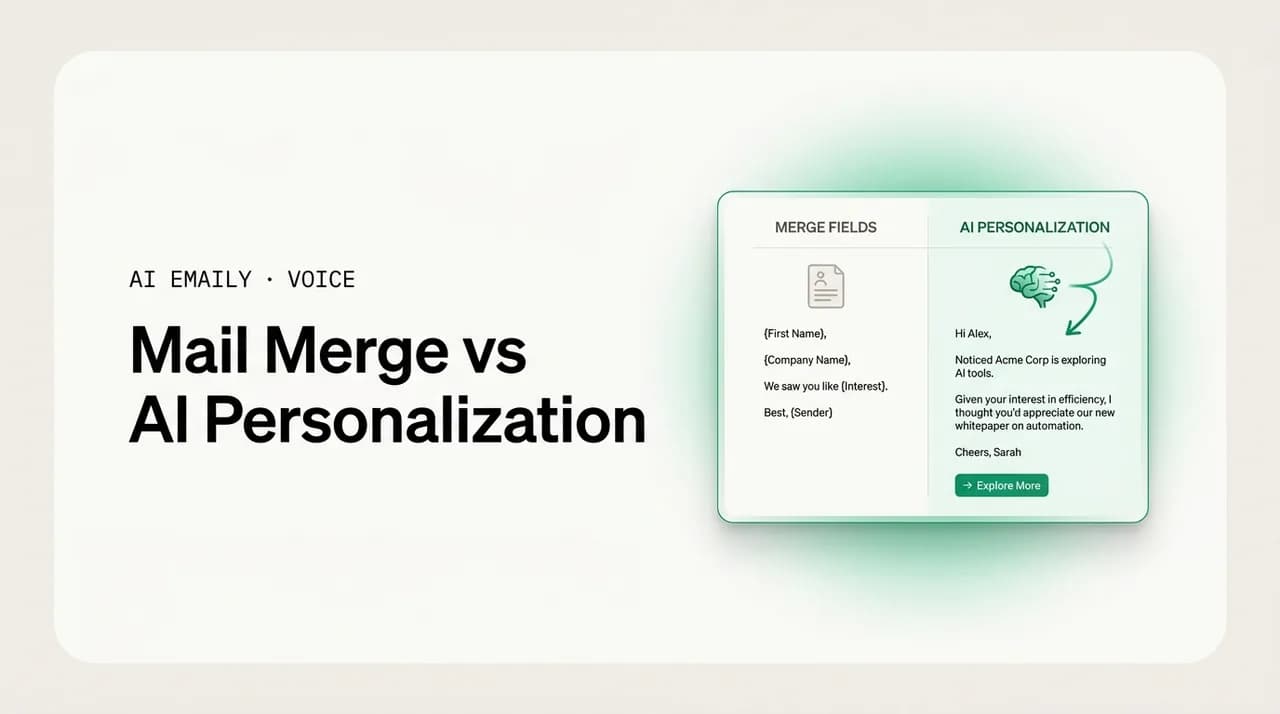
Mail merge vs AI personalization comes down to swap versus write. Mail merge drops saved fields like {{FirstName}} into a fixed template — fast and fine for true bulk. AI personalization reads context and generates different content per recipient. Use merge for simple blasts; use AI when relevance actually matters.
Mail merge vs AI personalization, compared honestly: what merge fields do well, where they fall flat, and when context-aware AI that writes per-recipient content is worth it. Plus where each one fits — and why "Hi {{FirstName}}" fools no one.
On this page
- 01What is mail merge, exactly?
- 02Which tools do mail merge, and how?
- 03What is AI personalization in email?
- 04How do mail merge and AI personalization actually compare?
- 05What are the pros and cons of mail merge?
- 06What are the pros and cons of AI personalization?
- 07When should you use mail merge instead of AI?
- 08When does AI personalization actually earn its keep?
- 09Why does "Hi {{FirstName}}" fool nobody anymore?
- 10Where does AI Emaily fit — and where doesn't it?
- 11How do you choose between mail merge and AI personalization?
- 12The bottom line on mail merge vs AI personalization
You have a list of two hundred people and one thing to say to all of them. So you write the email once, drop in a {{FirstName}} where the name goes, maybe a {{Company}} in the opening line, and let the tool fan it out. Two hundred messages go out, each one addressed to the right person. That is mail merge, and it has been the workhorse of bulk email for decades — in Word, in Gmail with an add-on, in GMass and Yet Another Mail Merge, in every email service provider on the market.
It also produces the single most recognizable opening line in all of email: "Hi {{FirstName}}, I hope this email finds you well." Everyone who has worked in an inbox knows that line. They know it is a template. They know two hundred other people got the same one with their own name slotted in. The personalization is real — the name is correct — and somehow it reads as less personal than no name at all, because it advertises that a machine filled in a blank and a human did not stop to think about you specifically.
That gap — between a field that is technically correct and a message that actually feels written for someone — is the whole subject of this guide. On one side is mail merge: a template plus token substitution, the same words for everyone with a few variables swapped. On the other is AI personalization: a system that reads context about the recipient and generates different content for each one, not just a different name in the same sentence. They are not the same tool, they do not do the same job, and confusing them wastes money on one end and effort on the other.
We are going to be honest about both, including about ourselves. AI Emaily is not a bulk mail-merge tool, and this guide will not pretend it is. If your job is to send the same announcement to five thousand subscribers, you want an ESP or a merge tool like GMass or YAMM, and we will tell you so plainly. What AI Emaily is built for is the other half of email — the personalized, one-to-one relationship messages where a swapped first name is not enough and the words themselves need to fit the person. By the end you will know exactly which tool each of your sending jobs belongs to, and why the line "Hi {{FirstName}}" stopped fooling anyone years ago.
What is mail merge, exactly?#
Mail merge is one of the oldest tricks in document software, and the mechanics have barely changed since it lived in word processors. You write a single template — the body of your email — and inside it you place placeholders, also called merge fields or personalization tags. They look like {{FirstName}}, {{Company}}, %FirstName%, or [[first_name]] depending on the tool. You attach a data source, usually a spreadsheet or a contact list, where each row is one recipient and each column is one field. When you run the merge, the tool walks down the list row by row, copies the template, and replaces each placeholder with that row's value. The result is a stack of near-identical emails, each one carrying that recipient's specific values.
The crucial thing to understand is that mail merge does not generate language. It does substitution. The sentence structure, the word choice, the argument, the tone — all of it is fixed in the template, written once by you. The only thing that varies between recipient one and recipient two is whatever sits inside the curly braces. If your template says "Hi {{FirstName}}, congratulations on {{Company}}'s recent funding," then everyone gets congratulated on their company's funding, whether they raised a round last week or have never raised a dime. The tool does not know or care; it just swaps the token.
This is why mail merge is fast, cheap, and predictable. There is no model deciding what to write, no per-recipient generation cost, no risk of the system inventing a sentence you did not approve. You can preview exactly what every recipient will receive because it is your template with their values dropped in — nothing more. That determinism is a genuine strength, and we will come back to it. But it is also the source of every limitation that follows, because a system that only swaps tokens can only ever be as personal as the tokens you stored.
Merge field vs personalization tag vs variable
Which tools do mail merge, and how?#
Mail merge shows up in a surprising number of places, and it helps to know who does what, because the right merge tool depends entirely on volume, deliverability needs, and where your list lives. The classic implementation is in word processors: Microsoft Word's Mail Merge wizard pulls from an Excel sheet or Outlook contacts and can produce letters, labels, or emails sent through Outlook. It is fine for a few dozen letters and clumsy for email at any real scale.
For email specifically, the popular modern tools split into two camps. The first is Gmail add-ons that turn your own inbox into a merge engine. GMass and Yet Another Mail Merge (YAMM) both live inside Gmail, read a Google Sheet as the data source, and send through your Gmail account — which means messages come from your real address and land in a normal inbox-to-inbox path. GMass leans toward cold outreach and sales, with scheduling, follow-up sequences, and open tracking; YAMM leans toward simpler personalized blasts from a sheet. Mailmeteor is a similar Gmail-based option. These are excellent when you want personalized bulk email that still looks like it came from a person, within Gmail's daily sending limits.
The second camp is the email service providers — Mailchimp, Brevo, Klaviyo, HubSpot, Constant Contact, and the rest. These are not usually called "mail merge" tools, but personalization tags like *|FNAME|* (Mailchimp's syntax) are the exact same mechanism: a placeholder swapped for a stored field at send time. ESPs add the things a Gmail add-on cannot do well — true bulk volume into the tens of thousands, list management, unsubscribe handling, deliverability infrastructure, templates, and analytics. If you are sending a newsletter or a product announcement to a large opted-in list, an ESP is the correct tool, and its personalization tags are mail merge under a marketing label.
| Tool / category | Where it sends from | Best for |
|---|---|---|
| Microsoft Word merge | Outlook / printed letters | A few dozen letters, labels, or simple emails |
| GMass | Your Gmail account | Cold outreach, sales sequences, follow-ups from a sheet |
| YAMM (Yet Another Mail Merge) | Your Gmail account | Simple personalized blasts from a Google Sheet |
| Mailmeteor | Your Gmail account | Lightweight Gmail merges with tracking |
| Mailchimp / Brevo / Klaviyo | ESP infrastructure | Newsletters and announcements to large opted-in lists |
| HubSpot / Salesforce | CRM-connected sending | CRM-driven sequences with stored contact fields |
Notice what every one of these has in common: the personalization is a stored value swapped into a fixed template. Whether the syntax is {{FirstName}}, *|FNAME|*, or %first_name%, and whether it sends from Gmail or a dedicated ESP, the model of personalization is identical. The differences between these tools are about volume, deliverability, list hygiene, and where your data lives — not about how personal the message actually reads. That distinction matters, because it means upgrading from Word to a fancier ESP does not make your email more personal. It makes it more scalable. Those are different problems.
Pick the merge tool by volume and origin
What is AI personalization in email?#
AI personalization is a different machine doing a different job. Instead of swapping a stored value into a sentence you wrote, it reads context about the recipient and the situation, then generates the content itself — sentences, structure, the actual argument — shaped to that specific person. The variable is not just the name inside a fixed sentence; the variable is the sentence. Two recipients can receive emails that share an intent but differ in wording, emphasis, and which point leads, because the system wrote each one against what it knows about that person rather than filling a blank in a shared draft.
Where mail merge has a data source of columns, AI personalization has context: the thread you are replying to, the recipient's previous emails, notes about the relationship, a CRM record, the product they use, what they last asked about. A good AI personalization system grounds its writing in that context rather than inventing it — which is the difference between a message that genuinely reflects the relationship and one that hallucinates a detail and embarrasses you. The point is not that the AI is creative; it is that the AI can compose a relevant message because it has read the relevant inputs, the same way a person would skim the last exchange before replying.
That capability is why AI personalization can do things merge fields structurally cannot. It can reference what someone actually said in their last message and respond to it. It can adjust tone for a warm contact versus a cold one. It can lead with the point that matters to this recipient instead of the generic point that matters to the average recipient. It can write a reply that sounds like you wrote it by hand, because it has learned your voice from emails you have actually sent. None of that is token substitution. It is generation, grounded in context, constrained by your voice and your approval.
Read those two outputs back to back and the difference is not subtle. The merge version is correct — the name is right, the company is right — and it is also obviously a template that two hundred people received. The AI version responds to something Dana actually said, references a real change, and proposes a next step that fits where the relationship already is. The first one had two variables. The second one is the variable: the whole message was composed for this recipient. That is the line between substitution and generation, and it is the line this entire comparison turns on.
Generation needs grounding, or it backfires
How do mail merge and AI personalization actually compare?#
It is tempting to frame this as old versus new, or worse versus better. That framing is wrong and it will lead you to use the expensive tool for the cheap job. The honest comparison is that they optimize for different things. Mail merge optimizes for scale, speed, cost, and predictability: send the same message to many people, fast, for almost nothing, with exactly the output you previewed. AI personalization optimizes for relevance: make each message genuinely fit its recipient, at the cost of more compute, more context, and a generation step you have to review.
The table below lays out where each one wins. Read it as a map of tradeoffs, not a scoreboard. A tool that costs more per message and needs context to work is not "losing" — it is solving a problem mail merge cannot touch, and if you do not have that problem, you should not pay for that solution.
| Dimension | Mail merge | AI personalization |
|---|---|---|
| What varies per recipient | Stored field values only | The actual sentences and structure |
| How it works | Template + token substitution | Reads context, generates content |
| Cost per message | Effectively zero | Higher (generation + context) |
| Speed at bulk | Instant, thousands at once | Slower; built for considered sends |
| Predictability | Exact — you preview the template | Per-recipient output; needs review |
| Relevance ceiling | As personal as your stored tokens | As personal as the context it reads |
| Best volume | Hundreds to tens of thousands | One-to-one and small, high-value sends |
| Fails when | Recipients notice the template | Context is missing or it hallucinates |
The row that matters most is "relevance ceiling." Mail merge can only ever be as personal as the data you stored, because that data is all it has to swap in. If you have first name and company, your personalization ceiling is "first name and company." You can store more fields — last purchase, signup date, plan tier — and merge those too, and that genuinely helps, but every one of them is still a value dropped into a sentence you wrote in advance. AI personalization's ceiling is the context it can read, which is far higher, but only if that context exists and is accurate. Neither tool can manufacture relevance out of nothing; they just have very different raw materials.
More merge fields ≠ AI personalization
What are the pros and cons of mail merge?#
Mail merge earned its place by being genuinely good at a specific job, so let us give it full credit before the criticisms. Its strengths are real and they are the reason it is still everywhere. It is fast: you write once and send to thousands in seconds. It is cheap: substitution costs nothing, so the marginal cost per email is effectively zero. It is predictable: what you preview is exactly what each recipient gets, with no model in the loop deciding anything you did not write. It is controllable: every word is yours, which matters for legal, compliance, and brand-sensitive sends where the message must be exact. And it scales linearly without getting more expensive per message, which is precisely what bulk communication needs.
The costs show up the moment the recipient is supposed to feel addressed as an individual rather than as a row in a list. The first and largest is the obvious-template problem: people recognize merge syntax instinctively now, and a correctly-merged name on a generic body reads as less sincere than no personalization at all, because it performs effort that was not spent. The second is the relevance ceiling we covered — it can only personalize on stored fields, so it cannot respond to what someone said, adapt to context, or lead with what matters to this person. The third is the brittle-data failure: a missing or wrong field produces "Hi {{FirstName}}," literally, or "Hi ," or "Hi John" sent to Jane, and those errors are public and embarrassing. The fourth is that it cannot hold a conversation — it is built to broadcast, not to reply, so it is the wrong tool entirely for one-to-one threads.
| Mail merge — strengths | Mail merge — limitations |
|---|---|
| Fast: write once, send to thousands | Reads as an obvious template to recipients |
| Cheap: ~zero marginal cost per email | Relevance ceiling = the fields you stored |
| Predictable: preview equals output | Cannot respond to context or what was said |
| Controllable: every word is yours | Breaks visibly on missing or wrong data |
| Scales linearly to large lists | Built to broadcast, not to hold a conversation |
The fair conclusion is that mail merge is excellent at what it was designed for and bad at what it was not. For a genuine bulk send — an announcement, a newsletter, a status update, an event invite to an opted-in list — the strengths dominate and the limitations barely matter, because nobody expects a newsletter to be a personal letter. The limitations only bite when you try to make merge do relationship work: a first sales touch that should sound human, a reply in an ongoing thread, a message where being recognized as an individual is the entire point. There, the template tells on you.
What are the pros and cons of AI personalization?#
AI personalization inverts the profile. Its strengths are exactly where merge is weak. It produces genuine relevance — messages that respond to context, reference what was actually said, and lead with what matters to this recipient — which is what makes a message feel written rather than generated. It adapts tone to the relationship, warm for a contact you know and measured for a stranger, without you maintaining separate templates. It can match your voice, learning from emails you have actually sent so a draft reads like you wrote it by hand. And it handles the conversational case merge cannot: replying inside a thread, where every message depends on the last one.
The costs are just as real and worth stating plainly. Generation is more expensive per message than substitution, because there is compute behind each draft and context to assemble — so it does not make economic sense for true bulk. It is slower for the same reason, which is fine for considered sends and wrong for a ten-thousand-recipient blast. It needs context to be good: with no thread, no notes, and no CRM record, the AI has little to personalize against and you are paying for generation that produces something close to generic anyway. And it carries a risk merge does not — hallucination, where the system invents a plausible detail that is false, which is worse than a blank because a confident wrong specific damages trust. That risk is why human approval before sending is not optional for relationship email.
| AI personalization — strengths | AI personalization — limitations |
|---|---|
| Genuine relevance: responds to context | Higher cost per message than substitution |
| Adapts tone to the relationship | Slower; wrong tool for true bulk volume |
| Matches your voice from sent email | Needs real context or output drifts generic |
| Handles replies inside live threads | Can hallucinate — needs human approval |
| No separate templates to maintain | Quality depends on grounding and review |
Never auto-send AI-personalized email to anyone who matters
So the AI personalization profile is the mirror image of merge: excellent for relevance, conversation, and voice; poor for cheap bulk broadcast; and dependent on good context plus a review step to avoid its one serious failure mode. That mirror image is the whole reason the two tools coexist rather than one replacing the other. They are good at opposite things, and a sensible email operation uses both — merge for the broadcasts, AI for the relationships.
When should you use mail merge instead of AI?#
Use mail merge whenever the job is genuinely one-to-many and nobody is expecting a personal letter. The clearest signal is that the message is the same for everyone by design — you want every recipient to receive the same announcement, the same newsletter, the same update — and personalization is just a courtesy layer (the right name, the right company) rather than the substance. In those cases merge is not a compromise; it is the correct, efficient tool, and reaching for AI would be slower and more expensive for no gain the reader would notice.
Concretely, mail merge is the right call for: a product or company announcement to your customer base; a newsletter or digest to opted-in subscribers; an event invitation or reminder to a registered list; a transactional or status update where the content is fixed; and a high-volume cold-outreach send where you accept that it will read as outreach and you are optimizing for reach and follow-up sequencing rather than per-message craft. For all of these, GMass or YAMM (if you are sending from Gmail) or a full ESP (if you need volume, unsubscribe handling, and deliverability infrastructure) is the right tool. We will say it directly: AI Emaily is not the tool for these jobs, and you should use a dedicated merge tool or ESP.
The deciding question is simple. If you replaced the personalization fields with nothing — no name, no company, just the generic body — would the message still do its job? For a newsletter, yes: the content carries it and the name is a nicety. That is a merge job. If removing the personalization would gut the message because the whole point was that it spoke to this specific person, that is not a merge job, and no number of stacked tokens will make it one.
When does AI personalization actually earn its keep?#
AI personalization is worth its higher cost when relevance is the point — when the message has to fit this specific recipient or it fails, and being recognized as an individual is the substance rather than a garnish. That is the inverse of the merge test: if removing the personalization would gut the message, you are in AI territory. These are the messages where a template reads as an insult and a genuinely fitted message reads as care.
Concretely, AI personalization earns its keep for: replies in ongoing one-to-one threads, where each message depends on what was just said; first-touch outreach to a small, high-value list where the per-recipient relevance is the difference between a reply and the trash; relationship maintenance with clients and key contacts, where tone and history matter; and any message where the recipient should plausibly believe you wrote it by hand for them. The economics flip here: these are lower-volume, higher-stakes sends where one extra reply or one preserved relationship is worth far more than the cost of generation, and where a merge template would actively cost you the outcome you wanted.
There is also a hybrid worth naming, because it confuses people. Some sales tools do "AI-assisted bulk" — generating a personalized first line per prospect, then dropping it into an otherwise templated body. That is a real and useful middle ground, but be clear-eyed about it: it is mail merge with one AI-generated token, not full per-recipient generation, and recipients increasingly recognize the formula ("a personal-sounding first line, then the pitch"). It raises the merge ceiling without crossing into genuine one-to-one. Use it knowingly for scaled outreach; do not mistake it for the relationship email that AI personalization is actually built for.
The one-question test
Why does "Hi {{FirstName}}" fool nobody anymore?#
The "Hi {{FirstName}}" trap deserves its own section because it is the most common and most expensive mistake in personalized email, and it comes from a genuine misunderstanding. The misunderstanding is this: people equate personalization with personal data. They think that because the email knows your name, it is personalized, and because it is personalized, it will feel personal. But familiarity is not the same as relevance. A stranger who shouts your correct name across a parking lot has used your personal data; it does not feel personal, it feels invasive and a little off. Email merge fields hit the same uncanny note.
There are a few reasons the trick stopped working. First, ubiquity: everyone has received thousands of "Hi [Name]" emails, so the pattern is burned in and instantly recognized as automated. Second, the mismatch tell: a perfectly personalized greeting on a generic body creates a jarring contrast — the opening promises a personal message and the body delivers a form letter, and the gap reads as insincere. Third, the visible failures: the moment anyone has seen "Hi {{FirstName}}," rendered literally, or gotten the wrong name, the whole category becomes suspect, because now the seams show. Fourth, and most fundamentally, a name is the lowest-effort possible personalization — it signals that the sender ran a tool, not that the sender thought about the recipient. People can feel the difference between data and attention.
The fix is not a better merge field; there is no token that makes a template feel hand-written, because the problem is not the token, it is that the body is the same for everyone. The fix is to either accept that bulk is bulk and not dress it up as personal — a clean, honest newsletter beats a fake-personal one — or to actually write content that fits the recipient, which means generation against context, not substitution. "Hi {{FirstName}}" fails because it tries to buy the feeling of a personal message at the price of a token, and that exchange rate has never been real.
Personalization is attention, not data
Where does AI Emaily fit — and where doesn't it?#
Here is the honest placement, because using the wrong tool for the job is the whole failure this guide is trying to prevent. AI Emaily is not a bulk mail-merge tool. It does not send the same message to five thousand subscribers, it does not manage unsubscribe lists or large-list deliverability, and it does not try to. If that is your job, use a dedicated merge tool — GMass or Yet Another Mail Merge if you are sending personalized bulk from Gmail, or a full ESP like Mailchimp, Brevo, or Klaviyo if you need true volume, list management, and sending infrastructure. We would rather tell you that than sell you the wrong fit.
What AI Emaily is built for is the other half of email: the personalized, one-to-one relationship messages where a swapped first name is not enough and the words themselves have to fit the person. It is an AI-native email client that drafts your replies and messages by reading the real context — the thread you are in, the recipient's previous emails, the relationship — and generating content shaped to that specific person, in your voice. It learns how you actually write from the emails you have sent, so a draft comes back sounding like you wrote it by hand, not like a template with a name slot. That is generation grounded in context and constrained by your voice — the AI-personalization side of this comparison, not the merge side.
Three things make it fit the relationship-email job specifically and keep it honest about its scope. It uses context and variables together: real grounding (the thread, notes, what was said) plus the structured details that matter, so the relevance is earned rather than invented. It is voice-matching by default, which is what keeps the output reading as you across every message instead of drifting into generic AI tone. And it keeps a human in the loop: in its default Copilot mode, AI Emaily drafts the message with the right tone and content and waits — nothing sends until you approve it — which is exactly the guardrail that AI personalization needs, because it lets you catch a hallucinated detail before it goes out. It works across every account you connect — Gmail, Outlook, and any IMAP provider — and it is private by design: your mail is used to draft for you, not to train models for anyone else.
So the clean division is this: when the job is broadcast, use a merge tool or ESP; when the job is a relationship — a reply that has to respond to what someone said, a first touch that has to sound human, a client message where history and tone matter — that is what AI Emaily is for. You can start free at app.aiemaily.com/signup: the Free plan is $0 and connects your inbox with AI drafting, and Pro is $12.42/month billed annually when you want it across everything you send. The point is not to replace your ESP. It is to handle the email your ESP was never meant to write.
Run both, on purpose
How do you choose between mail merge and AI personalization?#
Pull it together into a decision you can make in one pass over any send. Start with volume and intent, not with the tool. If the message is the same for everyone by design and you are sending to many people, it is a merge job — pick the merge tool by where you send from and how much volume you need. If the message has to fit a specific person or it fails, it is an AI-personalization job, and you want generation against real context with a review step. The hybrid (AI first line on a templated body) sits in between for scaled outreach, but do not mistake it for true one-to-one.
The steps below are the order to think in. They are deliberately about the job, not the brand, because the job determines the tool — and getting that right is what saves you from both the fake-personal blast and the overengineered newsletter.
- 1
Name the job, not the tool
Is this a broadcast (same message to many) or a relationship (a message that must fit one person)? Decide this before you open any tool — it determines everything downstream.
- 2
Apply the deletion test
Mentally delete every personalization field. If the message still works, it is a merge job. If deleting the personalization guts it, the relevance is the substance and you need AI personalization.
- 3
For broadcasts, pick by volume and origin
Sending personalized bulk from your Gmail? GMass or YAMM. Need true volume, unsubscribe handling, and deliverability infrastructure? An ESP like Mailchimp, Brevo, or Klaviyo. AI is the wrong tool here.
- 4
For relationships, require context and review
Use AI personalization only where it can read real context (the thread, notes, history) and where a human approves before send. That is what makes it relevant rather than generic, and safe rather than hallucinated.
- 5
Watch for the hybrid case
AI-generated first line on a templated body is fine for scaled cold outreach, but it is enhanced merge, not one-to-one. Use it knowingly; recipients increasingly recognize the formula.
- 6
Run both tools, not one
Keep your ESP for newsletters and announcements, and use a voice-matching AI client like AI Emaily for the one-to-one relationship email. Each covers what the other cannot.
The bottom line on mail merge vs AI personalization#
Mail merge and AI personalization are not two points on one spectrum where newer is better. They are two tools that do opposite jobs well. Mail merge swaps stored values into a fixed template — fast, cheap, predictable, and exactly right for broadcasting the same message to many people who are not expecting a personal letter. AI personalization reads context and generates content per recipient — more expensive, slower, dependent on good grounding and a review step, and exactly right for the one-to-one relationship email where being recognized as an individual is the substance.
The mistake that costs people is forcing one tool to do the other's job: dressing up a bulk blast as a personal letter with a {{FirstName}} that fools nobody, or laboring over AI-generated copy for a newsletter where the content carries it and the name is a courtesy. The deletion test cuts through it every time — if removing the personalization would still leave a working message, merge it; if removing it would gut the message, generate it. Use GMass, YAMM, or an ESP for the broadcasts. Use a voice-matching AI client for the relationships.
AI Emaily lives squarely on the relationship side and is honest about it: it is not a bulk merge tool, it is built to draft the one-to-one email that fits the person and sounds like you, with a human approving before anything sends. If that is the email you keep stalling on — the reply that has to respond to what someone actually said — that is the half we built for. For everything else, the right merge tool is one tab over, and that is exactly as it should be.
Frequently asked
See it in AI Emaily
Keep reading
Sources

Written by
Nafiul HasanNafiul Hasan is an entrepreneur and AI automation system builder with 10+ years of experience turning messy, manual workflows into reliable automated systems. He designs and ships AI enterprise solutions end-to-end — the agent logic, the data plumbing, and the product people actually use — and founded AI Emaily to give busy professionals their attention back. He writes here from the builder's seat: what works, what breaks, and how to put AI to work without giving up control.