Support Ticket Escalation Email: 8 Templates

The short answer
A support ticket escalation email should say four things: the ticket is escalated and why, the named person who owns it now, what happens next, and exactly when the customer will hear from you again. Skip promises of priority you cannot keep. Name a person and an update cadence instead.
A support ticket escalation email tells the customer who owns it now, why it moved, and when they'll hear next. Eight copy-paste templates.
On this page
- 01When should you send an escalation email?
- 02What should an escalation confirmation include?
- 03Which escalation email template do you need?
- 04Template 1: Internal escalation confirmed to the customer
- 05Template 2: Handing a ticket to engineering
- 06Template 3: Assigning a named owner
- 07Template 4: Specialist or account-team handoff
- 08Template 5: The escalation the customer demanded, granted
- 09Template 6: The escalation the customer demanded, not needed yet
- 10What is the hard version of this situation?
- 11Template 7: Executive escalation acknowledgement
- 12Template 8: De-escalating an angry thread once the fix lands
- 13What should you do if the customer does not reply?
- 14Where does AI Emaily fit?
Most escalation emails fail in the same way. They announce that the ticket has been escalated, add a sentence about how much you value the customer, and say nothing the customer can act on or check. From the customer's side, nothing has changed except that a word was used.
A good support ticket escalation email replaces that word with facts: a name, a reason, a next step and a time. Below are eight templates you can copy, with the placeholders [TICKET ID], [NEW OWNER], [WHY IT ESCALATED] and [UPDATE CADENCE] to fill in. One of them covers the hardest case, a customer who has already emailed your CEO.
When should you send an escalation email?#
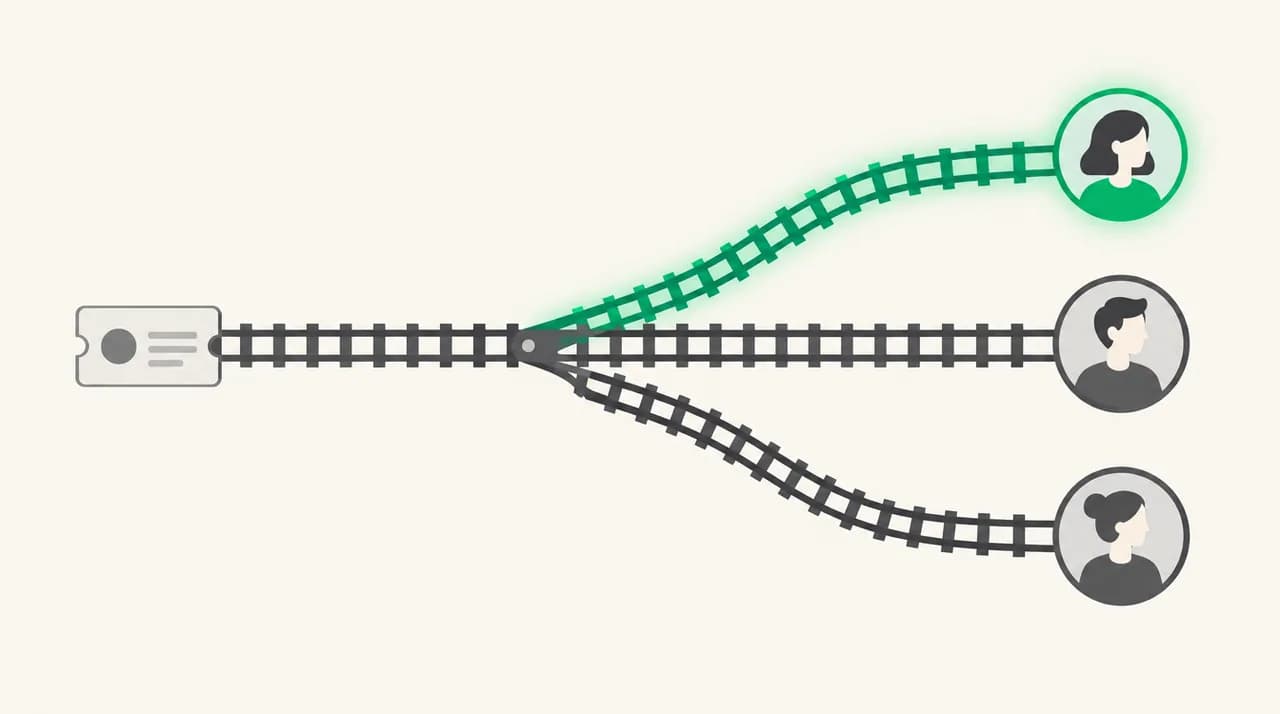
Send one the moment ownership changes, not when the fix arrives. The customer is waiting on a person, and if that person has changed, the customer needs to know before the old thread goes quiet. Silence after a handoff is what turns a technical problem into a trust problem.
The Atlassian Incident Management Handbook puts the principle bluntly in its list of incident values: escalate, and don't hesitate to do it. It also notes that incident issues are typically created by a support engineer in response to a customer ticket. The handbook is written for incident teams, but the lesson carries over to support. Escalating early is normal, and the customer should hear about it as routine, not as an emergency.
Send the email on any of these triggers: the ticket moves to a different team, a different named person takes over, the severity changes, the customer asks for escalation, or someone senior at the customer's company or yours has stepped in. If none of those happened, you do not need an escalation email. You need a normal status update.
What should an escalation confirmation include?#
Five things, in this order. Each answers a question the customer is already asking, and leaving any of them out generates a follow-up email you would rather not receive.
| Element | The question it answers | What goes wrong without it |
|---|---|---|
| Plain statement that it has moved | Is anything actually different now? | The email reads as a stalling tactic |
| Reason in one sentence | Why was my ticket not solved at the first level? | The customer fills the gap with the worst assumption |
| Named owner | Who do I deal with from here? | The customer replies to the old agent, who is no longer watching |
| What happens next | What is the team doing right now? | The email promises attention but not work |
| Update cadence | When will I hear from you again? | The customer chases you at the moment they choose, usually angrily |
Two things stay out. First, any promise of priority you do not control: 'top priority' is a claim the customer cannot check, and it is the first thing they quote back when the fix takes longer than hoped. Second, an apology that carries the whole email. One sincere sentence is enough. The rest of the space belongs to the facts above.
The cadence matters more than most writers expect. 'We will update you by [UPDATE CADENCE]' makes the next silence a broken promise or a kept one, which gives the customer something concrete to hold you to. Set a cadence you can keep even when there is no news, and say so: 'If there is nothing new, you will still hear from us.'
Which escalation email template do you need?#
Match the template to the situation. The first six below cover routine escalations. Templates 7 and 8 sit in the hard-version section further down, because they deal with a customer who is already upset.
| # | Template | Send it when |
|---|---|---|
| 1 | Internal escalation confirmed | The ticket moves up a support tier |
| 2 | Handing to engineering | The ticket needs a fix from the product team |
| 3 | New named owner | The person handling the ticket has changed |
| 4 | Specialist or account-team handoff | Billing, security or an account manager must take over |
| 5 | Escalation the customer requested, granted | The customer asked for escalation and it is warranted |
| 6 | Escalation the customer requested, not needed yet | The customer asked, but the current owner can still solve it |
| 7 | Executive escalation acknowledgement | The customer emailed your CEO or a senior leader |
| 8 | De-escalation after it lands | The fix is in and the thread is still tense |
Template 1: Internal escalation confirmed to the customer#
Use this when a ticket moves up a tier inside support. It is the baseline email, and every other template is a variation on it.
Subject: Your ticket [TICKET ID] has been escalated
Hi [Customer name],
I am writing to confirm that ticket [TICKET ID] has moved to our senior support team. The reason: [WHY IT ESCALATED].
[NEW OWNER] now owns this ticket and can see everything you have already sent us, so you do not need to repeat any of it. They are working on [NEXT STEP] first.
You will hear from us by [UPDATE CADENCE], even if the update is that we are still working. You can reply to this email and it will reach [NEW OWNER] directly.
[Your name], [Your Company]
Template 2: Handing a ticket to engineering#
Customers rarely care that engineering exists as a team. They care that someone who can change the product now knows about their problem. Say what you have established and what you have not, and do not promise a fix date that engineering has not given you.
Subject: [TICKET ID] is now with our engineering team
Hi [Customer name],
We have reproduced the problem you reported, or we have enough detail to investigate it, and ticket [TICKET ID] is now with our engineering team. What we know so far: [WHAT WE KNOW]. What we do not know yet: [WHAT WE DO NOT KNOW].
[NEW OWNER] is your point of contact while engineering works on it. I will stay copied so nothing gets lost.
I cannot give you a fix date yet, because I do not want to guess. What I can promise is an update by [UPDATE CADENCE], and a workaround as soon as we have one that is safe to recommend.
[Your name], [Your Company]
Template 3: Assigning a named owner#
This one is for a plain change of hands: the original agent is leaving the ticket, going off shift for several days, or being replaced by someone better placed to solve it. The mistake to avoid is letting the customer discover the change by getting a reply from a stranger.
Subject: [NEW OWNER] is taking over ticket [TICKET ID]
Hi [Customer name],
A quick change on ticket [TICKET ID]: [NEW OWNER] is now your owner, taking over from me. The reason is [WHY IT ESCALATED], and they are the right person for it because [WHY THEY ARE THE RIGHT PERSON].
I have given them the full history. If anything in it is wrong or missing, tell them and they will fix it.
Their next update to you lands by [UPDATE CADENCE]. Reply to this thread any time and it goes straight to them.
[Your name], [Your Company]
Template 4: Specialist or account-team handoff#
Billing disputes, security questions and contract issues often leave the support queue entirely. The customer should know that the person they were talking to is not abandoning them, and that the new person has authority the old one did not.
Subject: Ticket [TICKET ID] is moving to [TEAM NAME]
Hi [Customer name],
Your ticket [TICKET ID] needs a decision that support cannot make on its own: [WHY IT ESCALATED]. It has moved to [TEAM NAME], and [NEW OWNER] will handle it from here.
They can [WHAT THEY CAN DO THAT SUPPORT CANNOT], which is why I handed it over instead of keeping it.
[NEW OWNER] will contact you by [UPDATE CADENCE]. If you would rather talk than write, reply with a good time and they will arrange a call.
[Your name], [Your Company]
Template 5: The escalation the customer demanded, granted#
When a customer writes 'escalate this now', and the ticket does deserve it, grant it plainly. Do not make them argue for something you were going to do anyway.
Subject: Re: Escalating [TICKET ID], done
Hi [Customer name],
You asked for this to be escalated, and it has been. Ticket [TICKET ID] is now with [NEW OWNER], and the reason on the record is [WHY IT ESCALATED].
Here is what changes: [WHAT CHANGES]. Here is what does not change: the problem still has to be diagnosed, and that takes however long it takes. I will not pretend otherwise.
You will have an update from [NEW OWNER] by [UPDATE CADENCE].
[Your name], [Your Company]
Template 6: The escalation the customer demanded, not needed yet#
This is the one most teams get wrong, because the honest answer is not the one the customer wants. Refusing escalation without explanation makes things worse. The right shape is a clear reason, a clear next step and an open door.
Subject: Re: Escalating [TICKET ID]
Hi [Customer name],
I understand why you want this escalated, and I will tell you directly what I think. At the moment, I can solve ticket [TICKET ID] myself, and moving it would add a handoff and a delay without adding anyone who knows more than I do. The next step is [NEXT STEP], and I expect to have a result by [UPDATE CADENCE].
If that deadline passes without a result, or if you still want a senior person involved, tell me and I will escalate it the same day. You do not need to argue for it.
[Your name], [Your Company]
What is the hard version of this situation?#
The hardest escalation is the one where the customer skips the process and emails your CEO. It feels like an attack, and the instinct is either to defend the support team or to over-apologise on behalf of the company. Both make the reply worse.
What works is boring and specific. The reply comes from the person who will actually own the problem, not from the CEO's inbox forwarding it with a note, and it names that person and a cadence rather than promising priority. A CEO cannot promise a fix date any more than your agent could, and a customer who is told 'the CEO has asked us to make this a priority' hears pressure, not progress.
Template 7: Executive escalation acknowledgement#
Send this within the same working day the executive forwards the message. Copy the executive if they asked to stay informed, and keep the tone calm and factual. Do not quote the customer's anger back at them.
Subject: Re: Your message to [EXECUTIVE NAME], ticket [TICKET ID]
Hi [Customer name],
[EXECUTIVE NAME] passed your message to me, and I am sorry it reached this point. I am [NEW OWNER], and I now own ticket [TICKET ID] from start to finish. I have read the whole history, and I am not asking you to repeat any of it.
As I understand it, the problem is [PROBLEM IN ONE SENTENCE], it has affected you since [DATE], and what you need is [WHAT THE CUSTOMER NEEDS]. If I have any of that wrong, correct me and I will adjust.
Here is what I am doing today: [ACTION TODAY]. You will hear from me by [UPDATE CADENCE], and that is a commitment I will keep even if the update is that we are still working.
You can reach me directly at [DIRECT CONTACT].
[Your name], [Your Company]
Do not promise what only engineering can deliver
Template 8: De-escalating an angry thread once the fix lands#
Fixing the problem does not end the tension. The customer has spent days being ignored or handed around, and a short 'it's fixed' email can read as the company closing the door. This follow-up does three jobs: it confirms the result, it owns what went wrong with the process, and it tells the customer what happens next.
Subject: [TICKET ID]: fixed, and what we are changing
Hi [Customer name],
The problem on ticket [TICKET ID] is fixed as of [DATE]. Here is what we did: [WHAT WE DID]. Please try it and tell me if anything still looks wrong, because I would rather hear it from you now than discover it later.
You also dealt with delays and handoffs that should not have happened. The specific failure was [WHAT WENT WRONG IN OUR PROCESS], and we are changing it by [WHAT WE ARE CHANGING].
I will check back with you on [DATE] to confirm the fix has held. After that I will close the ticket unless you tell me otherwise.
[Your name], [Your Company]
For the closing message itself, our sibling guide on the support ticket closure email covers the wording once everyone is satisfied.
What should you do if the customer does not reply?#
Silence after an escalation email does not mean the matter is closed. Often it means the customer is still annoyed, has moved to a different channel, or is waiting for you to do something. Treat the quiet as information.
Keep to the cadence you promised. If you said you would update the customer by Thursday, send the update on Thursday even if the customer has not answered the last message. Short is fine: what has changed, what has not, and when the next update will arrive.
If a week passes with no reply and the ticket is still open, send one direct message: 'I want to make sure this is solved for you, not just closed. Is it still happening?' Then give a clear date after which you will close the ticket, and say how to reopen it. Closing without that warning is how an escalated ticket comes back as a complaint.
Where does AI Emaily fit?#
Everything above is wording and judgement, and none of it needs software. But if escalations reach you by email, the repetitive part is rebuilding the same message each time: pulling the ticket ID, the reason, the owner and the cadence into a draft that reads as if you wrote it for this customer.
AI Emaily can draft that reply from your template and the thread in front of it, with your Personal Context and per-client profiles setting the tone. You approve before anything sends, and undo-send is there if you spot a wrong placeholder. We build AI Emaily, so weigh that accordingly.
It is an email client, not a helpdesk. It does not replace your ticketing system or assign tickets for you, and it will not decide whether a ticket deserves escalation. The judgement stays with you. There is a 7-day free trial on Pro and Autopilot, card required, and the details are on the pricing page at /pricing, with an overview at the homepage, /.
Frequently asked
See it in AI Emaily
Keep reading

Written by
Nafiul HasanNafiul Hasan is an entrepreneur and AI automation system builder with 10+ years of experience turning messy, manual workflows into reliable automated systems. He designs and ships AI enterprise solutions end-to-end — the agent logic, the data plumbing, and the product people actually use — and founded AI Emaily to give busy professionals their attention back. He writes here from the builder's seat: what works, what breaks, and how to put AI to work without giving up control.