AI Tone Matching for Email: Adapt Your Voice to Every Recipient Automatically

The short answer
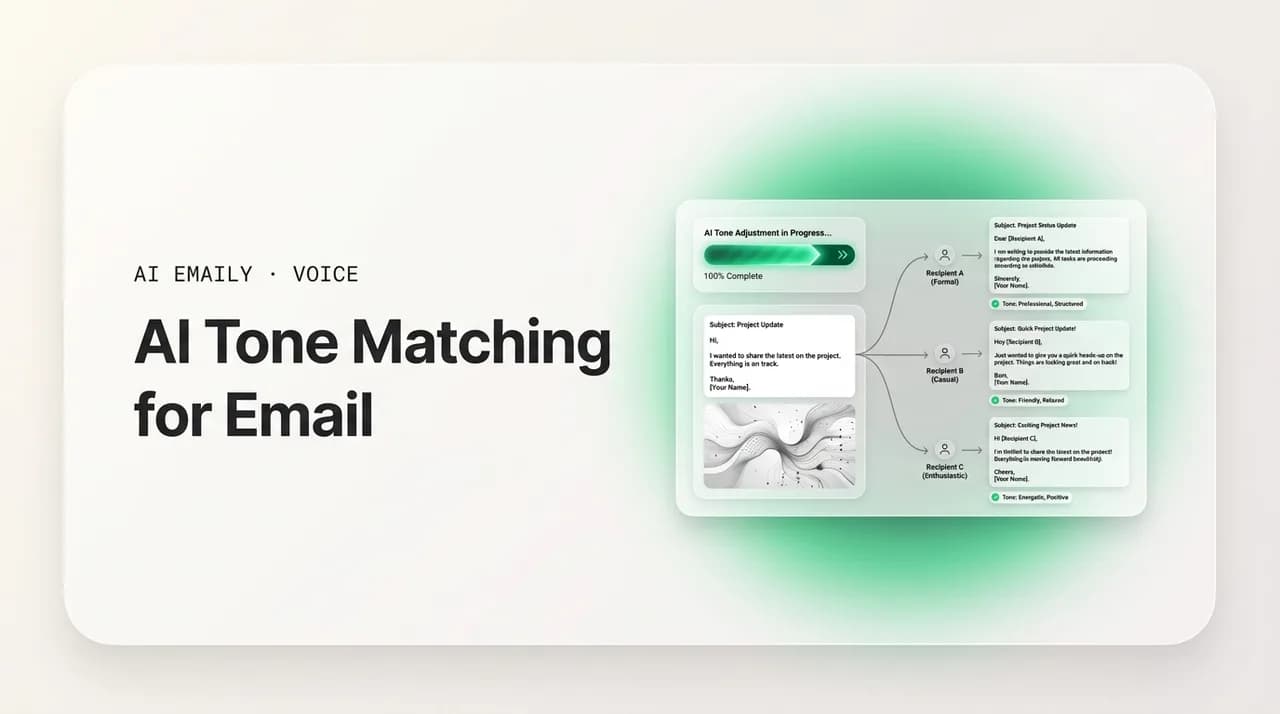
AI tone matching email means the assistant reads the recipient and the thread, then drafts in the register that fits — measured for a client, relaxed for a teammate, calm for a complaint — instead of one default voice. Done right it adjusts warmth and directness while keeping your own voice underneath. Done wrong it sounds robotic.
AI tone matching reads the message and the relationship, then drafts in the right register — formal for a client, warm for a teammate. Here's how.
On this page
- 01What is AI tone matching for email?
- 02Why does matching tone to the recipient matter so much?
- 03How do you match email tone to the recipient? (the relationship map)
- 04What does tone matching look like in practice? (before & after)
- 05What dimensions does email tone actually move on?
- 06What prompts make AI match the tone you want?
- 07What are the most common tone-matching mistakes?
- 08Can AI really read the incoming tone of an email?
- 09How does AI Emaily match tone to your voice and every recipient automatically?
- 10The bottom line on AI tone matching for email
You write to a new client and a teammate you message twenty times a day from the same inbox, with the same fingers, in the same five minutes. The two emails should not sound the same — one wants measured and careful, the other wants quick and warm — and most of the time you adjust without thinking about it. You soften the ask to the client, you drop the pleasantries with the teammate, you match the energy of whoever just wrote to you. That constant, invisible re-tuning is tone matching, and you do it all day without naming it.
The trouble starts when you hand drafting to an AI. Most assistants have exactly one voice: a polite, slightly stiff, slightly over-eager register that is fine for nobody and right for no one. It writes the same email to your closest collaborator and to a regulator. It opens with "I hope this email finds you well" whether the thread is a tense escalation or a Friday-afternoon "sounds good." The output is grammatically clean and tonally deaf — and the moment a reader feels that flatness, the whole message reads as automated, regardless of what it actually says.
AI tone matching for email is the fix. It is the difference between an assistant that writes in one register and one that reads the situation — who you are writing to, what they just said, how close you are, what the email is doing — and drafts in the tone that fits. This guide is the complete reference: a clear definition, the two halves of it (matching the recipient and reading the incoming thread), a tone-by-relationship map you can use immediately, before-and-after examples, the dimensions tone moves on, the prompts that get a model to adjust, and the mistakes that make it backfire.
We will keep it concrete — no abstract talk about "AI understanding emotion," just the specific levers (warmth, directness, formality, length) that move an email's tone and how to pull them. Near the end we look at the part that matters most in practice: doing this on every email is exhausting, and what an AI-native email client does so the right tone lands automatically, matched to your voice and the person.
What is AI tone matching for email?#
AI tone matching for email is when an assistant adjusts the register of a draft to fit the recipient and the situation, rather than writing every message in one fixed voice. Instead of a single polite default, the AI produces a measured, careful email for a senior external contact and a relaxed, direct one for a peer you work with daily — the same way a thoughtful person naturally would. Tone here means the emotional and social register of the writing: how warm or cool it reads, how formal or casual, how direct or hedged, how long or terse.
It is useful to separate tone matching into two distinct jobs, because tools do them to very different degrees. The first is matching the recipient — adapting your register to the relationship and context before you have even read a reply: a first cold email to a prospect gets one tone, a note to your manager another, a message to a teammate another still. The second is reading the incoming tone — when you are replying, sensing the register of the message you received (urgent, frustrated, casual, formal) and answering in a tone that fits it rather than colliding with it. A good system does both; most do neither well.
Tone matching is not the same as voice. Your voice is the stable, recognizable you — the rhythm, the vocabulary, the habits that make an email sound like it came from you specifically. Tone is the dial you turn within that voice depending on who is reading. The same person sounds like themselves writing to a client and to a friend, but the tone shifts: warmer here, more measured there. Good tone matching moves the dial without losing the underlying voice — you still sound like you, just like the version of you that fits the moment. An assistant that nails voice but ignores tone writes every email in your one register; one that chases tone but ignores voice writes a different stranger each time. You want both.
And tone matching is not tone policing or sentiment scoring. It is not the AI deciding your email is "too negative" and sanding off every edge. It is alignment: producing a draft whose register suits the recipient and the message's purpose, so the reader feels read correctly instead of processed by a template. When it works, the recipient cannot tell a machine helped — not because the AI hid it, but because the tone fits the relationship the way a human's would.
Tone vs. voice, in one line
Why does matching tone to the recipient matter so much?#
Because tone is most of how an email lands. Two messages can carry the identical facts — same deadline, same request, same answer — and one reads as warm and easy to say yes to while the other reads as cold or pushy, purely on register. The reader processes tone before content; by the time they have parsed your actual ask, they have already decided how they feel about it. A mismatched tone does not just sit there neutrally — it works against the message, adding friction the words themselves did not intend.
The mismatches are specific and they cost you. Too formal with a close teammate reads as cold or passive-aggressive, like you are annoyed and being stiff about it. Too casual with a senior stranger reads as not taking them seriously — a breezy "Hey, quick q" to a regulator or a prospective investor lands as presumptuous. Too warm with someone you have never met can feel like forced intimacy, a salesperson's false friendliness. Too direct in a culture or relationship that expects softening reads as blunt or rude. Each of these is a small tax on the relationship, paid on every message that gets the register wrong.
The flip side is quiet and powerful. When the register fits, the reader feels understood — the email reads as written by someone who knows them and the context, which makes them more inclined to reply, to help, to trust the next message. This matters more the thinner the relationship: with a close colleague, tone has slack because the relationship absorbs mistakes; with a new client, a cold prospect, or a senior leader, tone is doing real work and there is little slack to absorb a miss. Those are exactly the emails where an off-key AI draft does the most damage.
There is also the volume problem, which is the real reason this is hard. Getting tone right once is easy — you sit with one important email and tune it. The difficulty is that you write to a dozen relationship types a day, switching register message to message, and each individual miss is small enough to ignore but, across hundreds of emails, shapes how people experience you. An assistant that only writes in one tone does not save you that work — it produces drafts you then have to re-tone yourself.
Where tone has the least slack
How do you match email tone to the recipient? (the relationship map)#
The fastest way to get tone right is to classify the relationship first, then let the tone follow. Most professional email falls into a handful of recipient types, and each has a default register that fits it. You are not inventing a tone for every message — you are recognizing which bucket the recipient is in and writing in that bucket's voice. The map below covers the relationships that account for the overwhelming majority of work email, with the tone each one wants and a quick read on what to watch for.
Read the table as defaults, not rules. The point is to start in the right neighborhood — formal for the stranger, relaxed for the peer — and then adjust for the specific message. A favor to a teammate warms up; bad news to a teammate steadies. But the relationship sets the baseline register, and starting from the right baseline is most of the battle.
| Recipient | Default tone | Warmth / directness | Watch for |
|---|---|---|---|
| New client / first contact | Formal, measured, polished | Warm but professional · indirect asks | Don't over-familiarize; earn casual over time |
| Established client | Warm-professional, confident | Genuinely warm · direct but courteous | Drifting too casual once rapport builds |
| Your manager | Respectful, concise, clear | Moderate warmth · direct on substance | Over-hedging; bury the ask in pleasantries |
| Direct report | Supportive, clear, warm | High warmth · very direct on expectations | Sounding cold when giving feedback |
| Close teammate / peer | Casual, brief, direct | Warm · maximally direct | Over-formality reads as passive-aggressive |
| Cross-team colleague | Friendly-professional | Warm · direct with context | Assuming shared context they don't have |
| Senior leader / exec | Concise, deferential, sharp | Measured warmth · lead with the point | Rambling; making them dig for the ask |
| Vendor / supplier | Cordial, clear, businesslike | Neutral-warm · direct | Either too chummy or coldly transactional |
| Cold prospect | Respectful, low-pressure, brief | Light warmth · soft, easy-out asks | False intimacy; high-pressure 'urgency' |
| Upset customer / complaint | Calm, empathetic, accountable | High warmth · direct on the fix | Defensiveness; matching their heat |
A few patterns hold across the whole map. Warmth and directness move somewhat independently — you can be very warm and very direct at the same time (the supportive manager giving clear feedback), or cool and indirect (the careful first email to a stranger). Formality tends to scale with distance and seniority: the further the relationship and the higher the rank, the more polish the reader expects, up to a point. And the rule when you are genuinely unsure which bucket someone is in: start one notch more formal than feels necessary and let the relationship relax it. It is far easier to warm up from measured than to recover from too-casual with the wrong person.
Notice too that the trickiest entries are not the extremes but the middle — the cross-team colleague, the established client whose rapport has grown. Those are where tone drifts, because the relationship changed and your register did not follow it. An email to a client you have traded forty friendly messages with should not still open like a cold first contact; that mismatch reads as oddly stiff. Tone matching is partly remembering where the relationship is now, not where it started.
Classify, then write
What does tone matching look like in practice? (before & after)#
Defaults are easier to feel than to describe, so here is the same underlying message — a request for figures by a deadline — written in the flat, one-size AI register, then re-toned for three different relationships. The facts never change. Only the warmth, directness, formality, and length move. Watch how each version says the identical thing while reading as a completely different relationship.
The flat version is what most assistants produce by default: technically polite, tonally generic, equally wrong for everyone. It is not bad English — it is just nobody's actual voice, aimed at no one in particular. The three matched versions below show what reading the recipient does to it.
Look at what moved. The client version keeps a soft opener, frames the ask indirectly ("when you have a moment, could you"), gives a reason, and closes formally — warmth plus distance. The manager version drops pleasantries to near zero and leads with the ask — respect for their time expressed as concision. The teammate version is almost a text message: contractions, abbreviations, no preamble, because the relationship carries what the words leave out. Same request, three registers, each fitting its reader.
Now the second axis: reading the incoming tone and answering it. When you are replying, the message you received already has a register — and your job is to meet it, not steamroll it. The examples below show one incoming line and a reply that reads it correctly versus one that does not. The mismatched replies are not wrong on facts; they are wrong on register, and that is what the reader feels.
The cheerfulness trap
What dimensions does email tone actually move on?#
"Tone" sounds vague until you break it into the specific dials it is made of. There are really four that do almost all the work, and once you see them as separate levers you can adjust tone deliberately instead of guessing. Every tone instruction — "more professional," "friendlier," "more confident" — is just some combination of these four moving. Naming them is also what lets you tell an AI exactly what to change instead of hoping "make it nicer" lands.
The first dial is warmth: how much human friendliness the writing carries — greetings, acknowledgments, well-wishes, the small social glue. High warmth opens with "Hope your week's going well" and closes with genuine thanks; low warmth is purely transactional. The second is directness: how quickly you get to the point and how plainly you state the ask. High directness leads with the request; low directness softens and circles it ("I was wondering if it might be possible to…"). The third is formality: vocabulary, contractions, sentence structure, salutations — "Dear Ms. Okafor / I would be grateful" at one end, "hey / can you" at the other. The fourth is length and density: how much you say and how tightly. A senior exec wants three sentences; a confused customer wants the full walkthrough.
These dials move semi-independently, which is the whole reason tone is expressive. You can be warm and direct (the good manager), cool and indirect (the cautious first contact), warm and long (the patient support reply), or cool and terse (the clipped "Noted."). Most tone targets are a recipe of the four. The table maps common tone requests to the dial settings underneath them, which is exactly what you would tell an AI to hit them.
| Tone goal | Warmth | Directness | Formality | Length |
|---|---|---|---|---|
| More professional | Medium | Medium-high | High | Tighter |
| Friendlier / warmer | High | Medium | Lower | Slightly longer |
| More confident | Medium | High | Medium | Shorter, no hedging |
| More formal | Medium-low | Medium | High | Fuller sentences |
| More casual | High | High | Low | Short |
| More empathetic | Very high | Medium | Medium | Longer, acknowledging |
| More concise / to the point | Lower | Very high | Medium | Much shorter |
| Calm / de-escalating | High | High (on the fix) | Medium | Measured |
Two of these dials deserve special attention because they trip people up most. Directness and confidence are tightly linked: the fastest way to sound more confident is to remove hedging — "I think maybe we could possibly" becomes "Let's," and "Sorry to bother you" disappears entirely. Most under-confident email is over-hedged email, not weak-vocabulary email. And warmth is not the same as length: a warm email can be short ("Love this — let's do it. Thanks!"), and a long email can be cold (a wall of formal text with no human signal). When you ask an AI to be "warmer," you usually want more human acknowledgment, not more words; specifying the dial prevents it from padding the email to fake warmth.
The practical upshot: when a draft's tone is off, diagnose which dial is wrong rather than rejecting the whole thing. Too stiff? Formality too high, warmth too low — relax both. Too pushy? Warmth low, plus pressure language to cut. Sounds unsure? Hedging to remove. Reads cold despite being long? Add warmth, not length. This is also the difference between vague and useful AI prompts — the next section.
Confidence is mostly subtraction
What prompts make AI match the tone you want?#
If you are using a general chatbot to adjust tone, the prompt is everything — and "make this sound better" is the prompt that gets you the flat default. The model has no idea who the reader is, how close you are, or what the email is doing, so it reaches for safe-polite-generic. You get good tone matching out of a chatbot only by feeding it the context it cannot see: the relationship, the recipient's likely state, the specific dials you want moved, and ideally a sample of how you actually write. The prompts below go from worst to best.
The pattern that works names the recipient, the relationship, the situation, and the target tone in dial terms. Instead of "more professional," say "this goes to a client we've worked with for a year — warm but polished, lead with the ask, no hedging, keep it under five sentences." The more of the invisible context you supply, the closer the output lands. And to keep your voice rather than the model's, paste two or three of your real sent emails and tell it to match your style, not just the tone — otherwise you get the right tone in a stranger's voice.
A reusable structure helps when you are doing this repeatedly. Tell the model four things in order: who it is writing to (relationship + seniority), what the situation is (favor, bad news, follow-up, complaint), the tone in dial terms (warmth, directness, formality, length), and a constraint to keep it honest ("do not invent details," "keep the facts identical," "match my sample voice"). That last constraint matters because models drift — asked to be warmer, they will happily add cheerful claims you never made, which is its own tone failure.
But notice what you are doing here: you are manually re-supplying, on every single email, the context the model has no access to — who the person is, your history with them, how you write. That is the real limitation of tone-matching by prompt. It works, but it is the same work you were trying to offload, plus a context tab. The prompts are genuinely useful for one-off important emails. They do not scale to the hundred messages a week where the whole point was to not stop and think. That gap is exactly what an email-native tool closes, which we come to shortly.
A copy-paste tone prompt skeleton
What are the most common tone-matching mistakes?#
Tone matching fails in predictable ways, and knowing them is most of avoiding them — whether you are toning emails by hand or steering an AI. The mistakes cluster into a handful of repeat offenders, each with a tell you can catch on a reread. Run through them before you send anything that matters, and you will catch the ones that quietly cost you.
The biggest is the one flat voice — using the same register for everyone because it is easier, which means it is too stiff for half your readers and too casual for the other half. Right behind it is over-correction: asked to be "professional," the writer (or the AI) cranks formality to maximum and produces something cold and stilted; asked to be "friendly," it overshoots into forced cheer and exclamation-point spam. Then there is mismatching the incoming tone — answering a frustrated email with chipper positivity, or a casual one with stiff formality — which reads as not listening. The table lays out the full set with the fix for each.
| Mistake | What it looks like | Fix |
|---|---|---|
| One flat voice for all | Same register to a CEO and a teammate | Classify the relationship first, then tone to it |
| Over-formalizing | "I am writing to kindly request…" to a peer | Match the actual closeness; relax to the relationship |
| Forced cheer | Exclamation points, "so excited!", emoji spam | Warmth ≠ peppiness; one genuine warm line beats five fake ones |
| Ignoring incoming tone | Chirpy reply to a frustrated message | Read their register first, then match the gravity |
| Over-hedging | "Sorry to bother, just wondering if maybe…" | Cut hedges; state the ask plainly |
| Faux intimacy | Over-warm first email to a stranger | Earn warmth over time; start measured |
| Losing your voice | Right tone, but sounds like a textbook | Supply your real writing; match voice, not just tone |
| Tone drift mid-thread | Cold open to a client you know well | Tone to where the relationship is now, not its start |
| Padding to fake warmth | Longer email mistaken for warmer | Add human acknowledgment, not word count |
| Matching someone's heat | Replying angry to an angry email | Stay calm and direct; de-escalate, don't mirror |
Two of these are worth lingering on because they are the ones that survive a reread when you are not looking for them. Tone drift mid-thread is sneaky: you nailed the register on email one, but by email twelve the relationship has warmed and your tone has not, so you are still opening with cold formality to someone you now know well. The reader notices the gap even if they cannot name it. And losing your voice is the tax of using a generic AI for tone — it gives you the correct register in a voice that is not yours, so the email is tonally right and recognizably not you, which is its own kind of off.
The meta-lesson across the list: tone failures are almost never about vocabulary. They are about reading the relationship and the moment wrong, then writing the technically-fine email to a situation that is not the one you are in. That is why a tone adjuster that only rewrites words — a humanizer, a "make it professional" button — can only do so much. It does not know the recipient, your history, or the incoming tone, so it polishes the register without knowing which register is right. Reading the situation has to come from somewhere — the next section is about where.
The reread that catches tone misses
Can AI really read the incoming tone of an email?#
To a meaningful degree, yes — and this is the half of tone matching that has improved most. Modern language models are genuinely good at classifying the register of an incoming message: whether it reads as frustrated, urgent, casual, formal, appreciative, or tense. They pick up on the signals humans use — short clipped sentences and "the third time" reading as frustration, "no rush 😅" reading as casual, "per my last email" reading as pointed — and they can be steered to answer in a fitting register rather than a flat one. The reading is reliable enough to be useful, especially for the clear cases that matter most.
There are real limits to be honest about. Tone is partly context the words do not carry — sarcasm, in-jokes, a curt message that is curt because the sender is busy and not because they are upset. A model reads the text; it does not know that this client is always brusque and means nothing by it, or that "fine." from this particular colleague is a warning sign. It can over-read neutral messages as negative, or miss dry humor entirely. So AI tone reading is a strong first pass, not a final judgment — best treated as a draft of the register that you, knowing the person, confirm or adjust.
The bigger gap is not reading tone but knowing the relationship. A chatbot can tell an incoming email sounds formal; it cannot tell you this is your manager, a client of three years, or a cold prospect, because it has never seen your inbox. That relationship context — who this is, how you have written to them before, the register you have settled into together — is exactly what determines the right tone, and exactly what a model in a separate tab does not have. This is where a general assistant tops out and an email-native one keeps going.
So the honest answer: AI reads the words' tone well, reads relationship and history not at all unless told, and reads pure context (sarcasm, the sender's quirks) imperfectly. Good systems lean on what AI does well — classifying register, adjusting dials, matching a voice you supply — while getting relationship context from where it lives, your mailbox. That combination is what makes tone matching work in practice instead of in a demo.
What AI reads well — and what it doesn't
How does AI Emaily match tone to your voice and every recipient automatically?#
Here is the gap everything above keeps circling. Tone matching by hand or by chatbot works, but it asks you to do, on every email, the very thing you wanted off your plate: classify the relationship, read the incoming tone, set the dials, re-supply your voice, then write. A general AI in a separate tab cannot see your inbox, so it cannot know that this is a client of three years or a teammate you message hourly — you have to tell it, every time. That is not tone matching automated; it is tone matching with extra steps.
AI Emaily closes that gap because it is an AI-native email client, not a chatbot bolted onto your inbox — the AI lives where your mail and your relationships already are. It learns your writing voice from the emails you have actually sent, so drafts come back sounding like you and not like a model's polite default. And because it reads the thread you are replying to, it adjusts the register to the message in front of you: a frustrated escalation gets a calm, accountable reply; a casual "no rush 😅" gets a light one back. Voice underneath, tone on top, both handled in the draft.
The part a chatbot cannot do is the relationship context, and that is what AI Emaily's Context & Variables Engine supplies. Instead of you pasting in who the recipient is, it grounds each draft in your actual mailbox — who this person is, the history you have with them, the register you have settled into together — so a first email to a new client comes back measured and polished, while a reply to a peer you write to daily comes back brief and direct, the way you would have written each yourself. The tone is matched to the real relationship, not guessed from the words alone, because the engine knows the relationship and the model only sees the message.
You can also set the rails. Through Rules & Brain you tell AI Emaily your standing preferences — how warm to default, how formal with clients, sign-offs to use, openers to avoid — and it holds them across every account you connect, so your tone does not drift between "Best," "Cheers," and whatever you typed last. It works across Gmail, Outlook, and any IMAP inbox in one place, so the same voice and tone discipline follow you wherever you write. And it is private by design: your mail is used to draft for you, not to train models for anyone else.
You stay in control the whole way. In its default Copilot mode, AI Emaily reads the thread, matches the tone to the recipient, drafts in your voice, and then waits — nothing sends until you approve it, so you can nudge the register or the wording before it goes. You can start free at app.aiemaily.com/signup: the Free plan is $0 and connects your inbox with AI drafting, and Pro is $12.42/month billed annually when you want it across everything you send. The point is not that a machine guesses your tone — it is that the right register, matched to your voice and the actual person, lands without you stopping to re-tune it on every email.
See the tone shift on your own inbox
The bottom line on AI tone matching for email#
Tone is most of how an email lands, and matching it to the recipient is what separates writing that reads as considered from writing that reads as automated. The whole skill comes down to two moves: match the register to the relationship before you write, and read the incoming tone before you reply. Do both and the reader feels understood; do neither and even a factually perfect email reads cold, pushy, or tone-deaf. The four dials underneath — warmth, directness, formality, length — are what you actually adjust, and naming which one is off is how you fix a draft instead of rejecting it.
A generic AI can help, but only as far as you carry it: feed it the relationship, the situation, the dials, and your real voice, and it will hit the register; leave that out and it reverts to the flat polite default that fits no one. The catch is that supplying all that context on every email is the same work you were trying to skip. That is the real limit of tone-matching by prompt — it scales to the one important email, not to the hundred a week.
Which is the case for letting the tool live in your inbox. AI Emaily reads the thread, knows the relationship from your actual mail, and drafts in your voice at the register the recipient calls for — measured for the client, brief for the teammate, calm for the complaint — while you keep final say before anything sends. Either way, the principle holds: stop writing every email in one voice. Match the tone to the person in front of you, and the same words will do far more work.
Frequently asked
See it in AI Emaily
Keep reading
Sources

Written by
Nafiul HasanNafiul Hasan is an entrepreneur and AI automation system builder with 10+ years of experience turning messy, manual workflows into reliable automated systems. He designs and ships AI enterprise solutions end-to-end — the agent logic, the data plumbing, and the product people actually use — and founded AI Emaily to give busy professionals their attention back. He writes here from the builder's seat: what works, what breaks, and how to put AI to work without giving up control.