How to Make AI Email Not Sound Robotic (Generic AI Email Fixes That Work)

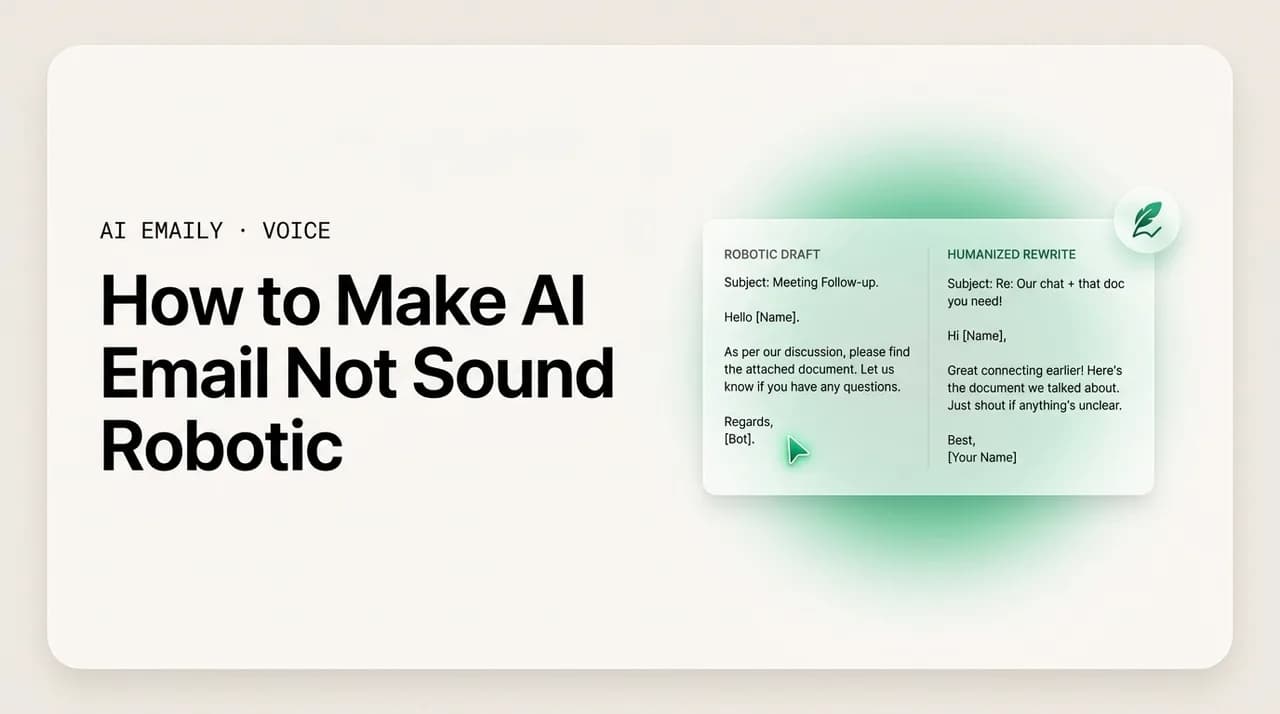
The short answer
How to make AI email not sound robotic: cut the giveaways — over-formality, hedging, "I hope this finds you well," generic openers, em-dash overuse, and vague filler with no specifics. Feed the model real context, tell it your tone, then edit one pass to trim. Or use a tool that drafts in your actual voice.
AI email sounds robotic from over-formality, hedging, generic openers and no specifics. The telltale signs, and the prompt and editing fixes that work.
On this page
- 01Why does AI email sound robotic in the first place?
- 02What are the telltale signs an email was written by AI?
- 03How do you fix robotic AI email with better prompts?
- 04How do you edit an AI draft so it sounds human?
- 05Why does injecting specifics matter more than anything else?
- 06How do you make AI email match your tone, not the model's?
- 07Robotic phrases and their human rewrites
- 08What does a before-and-after de-robotizing look like?
- 09Why does the chatbot workflow keep producing robotic email?
- 10How does AI Emaily keep AI email from sounding robotic?
- 11The bottom line on making AI email sound human
You typed a quick request into a chatbot — "write a reply telling Marcus the deck is delayed to Friday" — and what came back was technically correct and completely lifeless. "I hope this email finds you well. I wanted to reach out regarding the status of the deck. I am writing to inform you that, due to unforeseen circumstances, the timeline has been adjusted." Three sentences in and it has said nothing. It is polite, padded, hedged, and unmistakably not you. You would never open an email to Marcus — who sits four feet away — with "I hope this email finds you well."
That gap is the whole problem with AI email in 2026. The models can write. What they cannot do, out of the box, is sound like a specific person writing to a specific other person about a specific thing. Left alone, they default to a flat, over-formal, hedge-everything register that reads as generic the instant a human eye lands on it. Recipients clock it fast — and once they clock it, the email loses the thing that makes email work: the sense that a real person took a moment to write to them.
This guide is about closing that gap. First we name the tells — the specific, repeatable signs that an email was written by AI and not by you, so you can spot them in a draft before they reach anyone. Then we fix them, in order: the prompt changes that stop the robotic output at the source, the fast editing passes that strip what slips through, the single most important move (injecting real specifics and context), and how to get the draft to match your actual tone instead of the model's house style. There is a robotic-phrase-to-human-rewrite table you can keep, before-and-after examples, and a clear-eyed look at why the paste-into-a-chatbot workflow keeps producing robotic email no matter how good your prompt is.
We will keep it practical. No "just be more human" hand-waving — concrete edits you can make on the next draft you write. Near the end we look at what an AI-native email client does differently: instead of a blank model guessing at a default voice, it drafts from the emails you have actually sent and the real context already sitting in your mailbox, so the output starts in your voice with the specifics filled in — and you are editing, not rescuing.
Why does AI email sound robotic in the first place?#
Before you can fix robotic email, it helps to understand why it happens — because the cause is not a bug, it is the model behaving exactly as trained. A general-purpose language model is optimized to produce text that is safe, broadly acceptable, and statistically typical of the writing it has seen. For email, the most typical writing it has seen is formal business correspondence, customer-service templates, and the kind of padded, careful prose that fills the open web. So when you ask for an email with no other guidance, it gives you the average of all of that: maximally polite, maximally hedged, maximally generic. The average email is robotic because robotic is the safe center of the distribution.
Three forces compound it. First, the model has no idea who you are. It does not know that you write short, that you skip the pleasantries with your team, that you say "quick one" instead of "I wanted to reach out." With nothing to anchor on, it falls back to its default voice, which is nobody's actual voice. Second, the model has no idea what you are talking about. It does not know the deck is for the Q3 board review, that Marcus already asked about it twice, that Friday is the real deadline because the print vendor closes at noon. Lacking specifics, it writes around the gap with vague connective tissue — "regarding the matter," "the relevant details," "as discussed" — which is exactly the language that reads as filler.
Third, the model is trained to be agreeable and complete, which pushes it toward over-explaining and over-softening. It hedges ("I think," "perhaps," "if possible") because hedging is rarely wrong. It pads openers and closers because more politeness is rarely penalized. It restates your request back to you before answering it because that pattern appears constantly in formal correspondence. None of these are mistakes in isolation — they are just the wrong instincts for a short, direct email between two people who know each other. Stack them up and you get the unmistakable AI register: correct, courteous, and hollow.
The good news in all of this: every one of those causes has a fix, and the fixes are not exotic. Tell the model who you are and it stops using the default voice. Give it the specifics and it stops writing filler around the gap. Tell it to be direct and trim, and it stops hedging and padding. The rest of this guide is those fixes, concrete and in order — starting with how to recognize the problem on sight.
The root cause in one line
What are the telltale signs an email was written by AI?#
Robotic AI email is not random — it fails in the same predictable ways every time. Once you can name the tells, you can spot them in a draft in seconds and fix them before anyone else reads them. Here is the field guide: the specific patterns that make an email read as machine-written, why each one lands wrong, and the human alternative. Run a draft against this list and you will catch most of the problem.
The opener tells come first because they hit the reader first. "I hope this email finds you well" is the single most recognizable AI-and-template phrase in email — it is the digital equivalent of clearing your throat, it says nothing, and to many readers in 2026 it now actively signals "a machine or a mass-sender wrote this." Close behind: "I am reaching out regarding," "I wanted to touch base," "I am writing to inform you that," and "Per my last email." These are not wrong, exactly — they are just empty, and they delay the actual point by a full sentence. A human writing to someone they know usually leads with the point.
Then the body tells. Over-formality where the relationship is casual — "Dear Mr. Chen" to a teammate, full sentences where you would normally fire off a fragment. Hedging stacked on hedging — "I think it might perhaps be possible that we could potentially," which buries a simple statement under qualifiers. Vagueness: "the relevant materials," "the matter we discussed," "various stakeholders" — language that gestures at specifics without ever naming one, the surest sign the writer (or model) did not actually have the details. Restating the obvious back to the reader before answering. And a monotone rhythm — every sentence the same medium length, no short punchy line, no natural variation — which is what a human ear hears as "flat" even when it cannot say why.
Two more that 2026 readers notice specifically. Em-dash overuse: the model loves the em-dash and sprinkles it through every other sentence — three or four in a short email is a tell, because most people use one sparingly if at all. And tidy tricolons everywhere — "clear, concise, and compelling," "efficient, effective, and reliable" — the rule-of-three rhythm that sounds polished in isolation and mechanical in bulk. None of these is damning alone. But two or three together and the reader's pattern-matcher fires: this was generated, not written. The table puts the whole field guide in one place.
| The tell | Why it reads robotic | What a human does instead |
|---|---|---|
| "I hope this email finds you well" | Empty throat-clearing; now a near-universal AI/template signal | Skip it, or lead with a specific: "Thanks for the quick turnaround on X" |
| "I am reaching out regarding…" | Delays the point by a full sentence; says nothing | Open with the point: "The deck slips to Friday — here's why" |
| Over-formality with people you know | "Dear Mr. Chen" to a teammate reads stiff and off | Match the real relationship: "Hi Marcus," or "Hey Sam," |
| Stacked hedging | "I think it might perhaps be possible" buries the point | State it once: "We can ship Thursday" or "I'm not sure yet" |
| Vague filler nouns | "the relevant materials," "various stakeholders" name nothing | Name the thing: "the Q3 deck," "Priya and the print vendor" |
| Restating the request back | "You asked about the timeline. The timeline is…" wastes a line | Just answer: "Timeline: Friday EOD" |
| Monotone sentence rhythm | Every sentence the same length reads flat and machine-even | Vary it — a short line after a long one creates a human pulse |
| Em-dash overuse | Three or four in a short email is a 2026 generation tell | Use one at most; swap the rest for commas, periods, or parentheses |
| Tidy tricolons everywhere | "clear, concise, and compelling" rhythm reads templated in bulk | Break the pattern; one list is fine, three in a row is not |
| Over-padded sign-off | "Please do not hesitate to reach out" is filler everyone skips | "Let me know if anything's unclear" or just "Thanks, [name]" |
One meta-tell worth flagging: the email is grammatically perfect and somehow says nothing memorable. Real email between real people has texture — a specific detail, a slightly informal aside, a sentence that runs short because the writer was in a hurry. AI email, untouched, is smooth and frictionless and forgettable. If you read a draft back and cannot point to a single line only you would have written, that is the tell underneath all the others. The fixes that follow are about putting that texture back.
The five-second scan
How do you fix robotic AI email with better prompts?#
The cheapest place to fix robotic email is before it is written — in the prompt. A bare prompt ("write an email to Marcus about the delay") gets you the model's default register, which is the robotic one. A prompt that tells the model who is writing, to whom, with what specifics, and in what register gets you something far closer to usable on the first pass. You are not asking the model to be creative; you are removing the gaps it fills with filler.
Start with the four things every email prompt should carry. They map directly onto the causes from earlier: identity (who you are and how you write), recipient and relationship (so it picks the right register), the specifics (so it stops writing around the gap), and explicit style constraints (so it does not default to formal-and-padded). Give it those and the output changes immediately. Here is the workflow.
- 1
Tell it who you are and how you write
Add a line like: "I write short, direct emails. I skip pleasantries with my team. I use contractions and rarely use em-dashes." This is the single highest-leverage instruction — it overrides the model's default voice with yours.
- 2
Name the recipient and the relationship
"This is to Marcus, a teammate I message daily — casual and brief" produces a completely different email than the same request with no recipient context. The model picks formality from the relationship you describe.
- 3
Hand it the actual specifics
List the real facts: the deck is for the Q3 board review, Friday is the deadline because the print vendor closes at noon, Marcus asked twice already. The model can only stop writing vague filler if you give it concrete details to use.
- 4
Set explicit anti-robotic constraints
Add: "No 'I hope this finds you well.' No restating my request. Don't hedge. Lead with the point. Vary sentence length. At most one em-dash." Naming the tells directly is more reliable than asking it to "sound natural."
- 5
Ask for the point in the first line
"Open with the actual news, not a preamble." This kills the "I am reaching out regarding" opener at the source and forces the email to earn its first sentence.
- 6
Show it a sample of your real writing
Paste one or two emails you actually sent and say "match this voice." A concrete example teaches the model your rhythm and defaults far better than any adjective list — though you will have to repaste it every new session.
A note on the limits of this. Prompting works, and it is the right first move, but it is repetitive and fragile. The good instructions — your voice description, your style rules, your sample emails — have to be supplied again every single time, because a chat session starts from zero. Miss the recipient context on one email and you are back to the default register. Forget the anti-hedging line and the hedges return. The more emails you write this way, the more you feel the friction of re-teaching the model who you are on every message. Hold that thought; it is the gap an email-native tool is built to close, and we come back to it at the end.
Also worth knowing: "make it sound natural" or "make it less robotic" as a prompt tends to underperform naming the specific tells. The model's idea of "natural" is still drawn from its training average. "Don't open with a pleasantry, don't hedge, lead with the point, keep it under five sentences" gives it something concrete to do. Vague instructions get vague compliance; specific instructions get specific results.
One reusable instruction block
How do you edit an AI draft so it sounds human?#
Even a well-prompted draft slips in a few tells, and sometimes you are working with output you cannot re-prompt. So the second skill is editing — a fast, repeatable pass that strips the robotic markers in under a minute. The goal is subtraction, not rewriting: most robotic email is too long and too padded, and the fix is cutting, not adding. Read the draft once and make these passes, roughly in order.
The passes below are deliberately mechanical so you can run them on autopilot. Most of them are deletions. By the end you will usually have cut a quarter to a third of the words, and what remains reads like a person wrote it because the filler that signaled "machine" is gone.
- 1
Delete the opener if it's hollow
Cut "I hope this email finds you well," "I am reaching out regarding," and "I wanted to touch base." Start the email at the first sentence that says something real. This one edit fixes the most-recognizable tell instantly.
- 2
Cut every hedge you can
Delete "I think," "just," "perhaps," "if possible," "I was wondering if," "it might be." Say the thing plainly. "I think we could maybe ship Thursday" becomes "We can ship Thursday." Keep a hedge only where you are genuinely uncertain.
- 3
Replace vague nouns with the real ones
Find every "the relevant materials," "the matter," "various stakeholders," "as discussed" and swap in the actual thing: "the Q3 deck," "the print deadline," "Priya and Marcus." Specifics are what make email read as human.
- 4
Break the monotone rhythm
If every sentence is the same medium length, split one in two and merge two others. Put a short sentence after a long one. The variation is what a reader's ear registers as a human voice rather than a flat machine cadence.
- 5
Thin the em-dashes and tricolons
Keep at most one em-dash; turn the rest into commas, periods, or parentheses. If you see two or three "X, Y, and Z" lists in a row, rewrite all but one. These are the specific 2026 generation tells.
- 6
Cut the padded sign-off
Replace "Please do not hesitate to reach out should you have any questions" with "Let me know if anything's unclear" or nothing. End on a real close and your name, not boilerplate.
- 7
Read it out loud (or in your head)
The final pass: would you actually say this to this person? If a line sounds like a press release when read aloud, rewrite it the way you'd say it. Your spoken voice is the human voice the email is missing.
When in doubt, cut
Why does injecting specifics matter more than anything else?#
If you do only one thing from this guide, do this: put real specifics into the email. It is the single biggest lever, bigger than any prompt trick or editing pass, because vagueness is the deepest root of the robotic feel. A model with no facts can only produce generic connective language, and generic language is what reads as machine-written. The moment an email names a real name, a real date, a real number, a real prior exchange, it stops sounding like it could have been sent to anyone and starts sounding like it was written to this person about this thing.
Think about what makes a human email feel human. It is rarely the phrasing — it is the texture of detail only the sender would know. "Thanks for catching the off-by-one in the export job" could not have been generated cold; it required knowing what happened. "Friday works, but let's start at 2 so I can make the school pickup" is unmistakably a real person with a real life. AI cannot invent these. It can only use them if you supply them — which means the quality of an AI email is capped by the specifics you give it, and the fastest way to de-roboticize a draft is to add three concrete facts it did not have.
There are two kinds of specifics, and both matter. Factual specifics are the data: names, dates, amounts, deadlines, the document in question, the decision that was made. Relational specifics are the context of the relationship: what the recipient already knows, what they asked last time, the running joke, the fact that you owe them a reply from Tuesday. Factual specifics make the email accurate; relational specifics make it feel like a continuation of a real conversation rather than a cold open. Robotic email is missing both — it floats free of any actual exchange, which is precisely why it feels like it came from nowhere.
Here is the catch with the chatbot workflow, and it is a big one: supplying specifics by hand is tedious and error-prone. To give a model the relational context, you have to find the original thread, copy the relevant parts, paste them into the chat, and hope you got the details right. Most people skip it — which is exactly why most paste-into-a-chatbot email comes out generic. The specifics that would fix it are sitting right there in the inbox, but the chatbot cannot see the inbox, so the human has to ferry them over one copy-paste at a time. An email client that can read the thread you are replying to closes that gap automatically; we will get there.
How do you make AI email match your tone, not the model's?#
Specifics fix the "says nothing" problem. The other half of robotic is the "sounds like nobody" problem — the default register that is not your register. Two people can write the same correct email and sound nothing alike: one is warm and uses exclamation points, one is terse and never does; one opens with "Hey," one with "Hi [Name],"; one writes in fragments, one in full sentences. The model has a house style, and unless you override it, every email it writes for you carries that house style instead of yours. Matching your tone means teaching it — or showing it — who you are.
The most reliable way to convey tone to a model is by example, not adjective. "Make it friendly" is interpreted a hundred ways; pasting two emails you actually sent and saying "write in this voice" gives the model your real defaults — your greeting, your sign-off, your sentence length, your willingness to be informal. Examples carry a thousand implicit decisions that no list of tone words captures. If you only have adjectives, be specific and behavioral: "short sentences, contractions, no exclamation points, gets to the point in the first line, signs off with just my first name" beats "professional but approachable."
Tone is also relative to the recipient, which is where a single fixed voice setting falls short. You do not write to your manager the way you write to a vendor or a close teammate — your real voice flexes by relationship while staying recognizably you. A genuinely tone-matched email is your voice adjusted to this reader: warmer for the teammate, a notch more measured for the new client, direct-but-respectful for the boss. Asking a chatbot to do this means describing the relationship every time, on top of describing your voice — more re-teaching, more friction, the same fragility as before. The table shows what consistent tone-matching looks like across recipients.
| Recipient | Your voice, flexed | What stays constant (you) |
|---|---|---|
| Close teammate | "Hey Sam — quick one. Can you eyeball the deck before 2?" | Short, direct, contractions, first-name close |
| New client | "Hi Dana, happy to walk through the timeline. Friday works on my end — does that suit you?" | Still direct, still warm, just a notch more measured |
| Your manager | "Hi Priya — heads up the deck slips to Friday. Data came in late; I'd rather not ship unchecked numbers." | Direct, gives the reason, no over-apologizing |
| Someone who helped you | "Thanks for catching that, Marcus — saved me a bad Monday. Owe you one." | Genuine, specific, light, unmistakably you |
Notice what is constant down that right-hand column: the directness, the contractions, the lack of throat-clearing, the specific detail. That is the voice. The greeting and the warmth dial up or down by recipient, but the core writer is recognizable across all four. That is the target — not one rigid setting applied to everyone, and not a different person for each email, but one consistent voice that flexes. Getting a chatbot there on every message is a lot of repeated instruction; getting there once and having it hold is the job of a tool built around your sent mail. That is the next section.
Voice is constant, register flexes
Robotic phrases and their human rewrites#
Here is a reference you can keep open while you edit — the most common robotic phrases mapped to what a person would actually write. The pattern across all of them: the robotic version is longer, more formal, and more hollow; the human version is shorter, plainer, and carries an actual point. When you see the left column in a draft, reach for the right.
Use this two ways. As an editing checklist — scan a draft for the left-column phrases and swap them. And as a calibration tool — if your own writing drifts toward the left column when you are tired or rushed, the right column is the reset. The human versions are not "casual"; several are perfectly professional. They are just direct, which is the quality robotic email lacks.
| Robotic phrase | Human rewrite | Why it's better |
|---|---|---|
| I hope this email finds you well. | (delete) or "Thanks for the quick reply." | Removes the universal AI tell; opens on something real |
| I am reaching out to inquire about… | "Quick question about…" or just ask it | Drops the preamble; gets to the point in word one |
| I wanted to touch base regarding… | "Checking in on…" or "Where are we on…" | Plain verb instead of corporate filler |
| Please find attached… | "I've attached…" or "Attached:" | How a person actually says it |
| I am writing to inform you that… | Just state the thing | The whole phrase is throat-clearing |
| Per my previous email… | "Following up on my note from Tuesday —" | Less passive-aggressive, names the actual message |
| At your earliest convenience | "by Friday" or "when you get a sec" | Vague urgency becomes a real (or honestly relaxed) ask |
| Do not hesitate to reach out | "Let me know if anything's unclear." | Says the same thing without the boilerplate |
| It might perhaps be possible that we could… | "We can…" or "I'm not sure — let me check." | Cuts stacked hedging down to one clear statement |
| I would like to take this opportunity to… | (delete the phrase, keep the point) | Pure filler; the point survives without it |
| Thank you for your understanding in this matter. | "Thanks for being flexible on this." | Specific and warm instead of canned |
| We value your continued partnership. | (say the specific thing you value) | Generic gratitude reads as a form letter |
The swap is usually shorter
What does a before-and-after de-robotizing look like?#
Theory is easier to apply when you see it run on a whole email. Below is a real-shaped example — a draft a chatbot might return for "tell the client the launch is pushed a week" — and the same email after the fixes from this guide: openers cut, hedges removed, specifics injected, rhythm varied, sign-off trimmed. Read both and notice how much the second one says that the first one only gestured at.
The before is not badly written. That is the point — robotic email is rarely ungrammatical or obviously wrong. It is smooth, polite, and empty, and a busy reader skims it for the one fact that matters (the new date) and resents that they had to dig. The after gives them that fact in the first line, the reason in the second, and a clear next step, in fewer words and in a voice that sounds like a person who knows them.
Now the same email, de-robotized. The greeting matches an actual working relationship, the news leads, the reason is concrete, the apology is proportionate (one line, not three), and the close gives the reader something to do. It is shorter by half and says more.
Same facts, different feeling
Why does the chatbot workflow keep producing robotic email?#
You can do everything in this guide and still find yourself fighting the same robotic output week after week — not because the techniques fail, but because the workflow works against them. The paste-into-a-chatbot loop has a structural problem: it throws away the two things that fix robotic email, your voice and your context, at the start of every single session, and asks you to rebuild them by hand each time.
Walk through what it takes to get one good email out of a general chatbot. Open a separate tab. Re-describe your voice (or repaste your sample emails). Find the thread you are replying to, copy the relevant parts, paste them in for context. List the specifics. Add your anti-robotic constraints. Generate. Edit out the tells that survived. Copy the result back into your email client. Send. Then do all of it again for the next email, from zero, because the chat remembers none of it. The technique is sound; the overhead is brutal, so in practice people cut corners — skip the context, skip the voice sample, accept the generic draft — and robotic email is the result.
There is a deeper mismatch too. A general chatbot is a blank model in a separate window. It cannot see your inbox, so it cannot know who Marcus is, what the thread said, or how you usually sign off to this person — you have to tell it everything, every time. And it has no memory of your sent mail, so it cannot learn your voice; it can only borrow it from whatever you paste in this session. The robotic default is not a flaw you can fully prompt away in that setup, because the setup itself starts every email knowing nothing about you. The fix is not a better prompt. It is a tool that starts every email already knowing.
Good technique, wrong workflow
How does AI Emaily keep AI email from sounding robotic?#
Everything above is the manual version of one idea: an email reads human when it is written in your voice and grounded in real specifics. AI Emaily is an AI-native email client built so that both of those are true by default — not something you reconstruct prompt by prompt in a separate tab, but the starting condition of every draft.
It starts in your voice because it learns from the emails you have actually sent. Instead of the model's house style — the formal, hedged, generic default that makes chatbot email robotic — your drafts begin from your real defaults: how you open, how short you write, whether you use contractions and exclamation points, how you sign off. And because it knows the recipient, it flexes that voice the way you would: a notch more measured for a new client, lighter for a teammate you message daily, direct-but-respectful for your manager. The voice is recognizably you across all of them, without you describing it again on every message.
It fills in the specifics because, unlike a chatbot in a separate window, it can see the thread you are replying to and the context already in your mailbox. The Context & Variables Engine pulls the real details — what this person asked last time, the document in question, the dates and names that matter — and grounds the draft in them, so the output names the Q3 deck and the Friday print deadline instead of writing around the gap with "the relevant materials." That is the lever this guide called the biggest one, applied automatically: real specifics, not generic filler, because the tool can actually read the conversation. It works across every account you connect — Gmail, Outlook, and any IMAP provider — so your voice and context are the same wherever you write.
And you stay in control. In its default Copilot mode, AI Emaily drafts the reply in your voice with the specifics filled in and waits — nothing sends until you approve it, so you make the same final edit pass you would anyway, just starting from a draft that already sounds like you instead of one you have to rescue. It is private by design: your sent mail is used to draft for you, not to train models for anyone else. You can start free at app.aiemaily.com/signup — the Free plan is $0 and connects your inbox with AI drafting, and Pro is $12.42/month billed annually when you want it everywhere you write. The point is not that a machine writes your email. It is that the draft starts where the manual workflow ends — in your voice, with the details in — so "not robotic" is the default, not a fight.
Try it on a real reply
The bottom line on making AI email sound human#
AI email sounds robotic for two fixable reasons: the model does not know your voice, so it falls back to a flat default that is nobody's voice, and it does not know your specifics, so it writes vague filler around the gap. Everything that makes a draft read as machine-written — the "I hope this finds you well," the stacked hedging, the "various stakeholders," the em-dash pile-up, the monotone rhythm — traces back to one of those two gaps.
So the fixes are the same two moves, applied however you can. Inject real specifics: names, dates, numbers, the actual document, what the person already knows — this is the single biggest lever, because vagueness is the deepest tell. Match your real tone: by example over adjectives, flexing register by recipient while keeping the voice recognizably yours. Around those, prompt the model with who you are and explicit anti-robotic constraints, then edit one fast pass — cut the hollow opener, kill the hedges, swap vague nouns for real ones, vary the rhythm, trim the sign-off. Read it aloud; if you wouldn't say it, rewrite it.
Done by hand in a chatbot, this works but fights you — you rebuild your voice and re-paste your context on every email, and the friction eventually wins. Done in a tool built for it, the draft starts in your voice with the specifics already pulled from the thread, and you edit instead of rescue. That is what AI Emaily does, with you approving every send. Either way the principle is the same: a human email is one written in a real voice about real specifics — give the AI both, and it stops sounding like a machine.
Frequently asked
See it in AI Emaily
Keep reading
Sources

Written by
Nafiul HasanNafiul Hasan is an entrepreneur and AI automation system builder with 10+ years of experience turning messy, manual workflows into reliable automated systems. He designs and ships AI enterprise solutions end-to-end — the agent logic, the data plumbing, and the product people actually use — and founded AI Emaily to give busy professionals their attention back. He writes here from the builder's seat: what works, what breaks, and how to put AI to work without giving up control.