Automated Follow-Up Emails: Stop Chasing, Start Closing

The short answer
Automated follow-up emails use a trigger — usually no reply after a set number of days — to send a scheduled nudge, then stop the instant someone responds. The parts that matter are the trigger, the spacing and number of touches, and a hard stop-on-reply. Done right, follow-up automation captures replies you would otherwise lose.
Automated follow-up emails fire on a trigger, wait, send the nudge, and stop when someone replies. How to set up cadence, timing, touches, and tools.
On this page
- 01How do automated follow-up emails actually work?
- 02Why do the follow-ups you never send cost the most?
- 03What should trigger an automated follow-up, and when?
- 04How many follow-ups should you send, and how should you space them?
- 05How do you write automated follow-ups that don't feel automated?
- 06Why is stop-on-reply the most important safety rule?
- 07How do sales and relationship follow-ups differ?
- 08What tools can automate follow-up emails?
- 09How does AI Emaily's follow-up autopilot do this in your voice?
- 10Where does this leave your follow-up?
Think about the last deal, introduction, or request that quietly died. Odds are it did not die because the other person said no. It died because they did not say anything, and then the thread slid down your inbox, and the follow-up that would have brought it back to life was never sent. That is the strange, expensive truth about email: the follow-ups you never send cost you far more than the ones you send badly. A clumsy follow-up still lands in front of the right person. A follow-up that never goes out is a reply you will never get, on a thread you have already forgotten.
The reason is not laziness and it is not poor judgment. The first email is easy to send because the context is loaded in your head — you are thinking about the topic, you make the ask, you hit send. The follow-up is hard because it has to happen days later, after the topic has left your mind entirely, triggered by a non-event: the absence of a reply. Silence does not arrive in your inbox. It produces no notification, no badge, nothing to react to. It just sits there, invisible, until you happen to go looking — and mostly, across the dozens of open loops a busy week generates, you do not go looking.
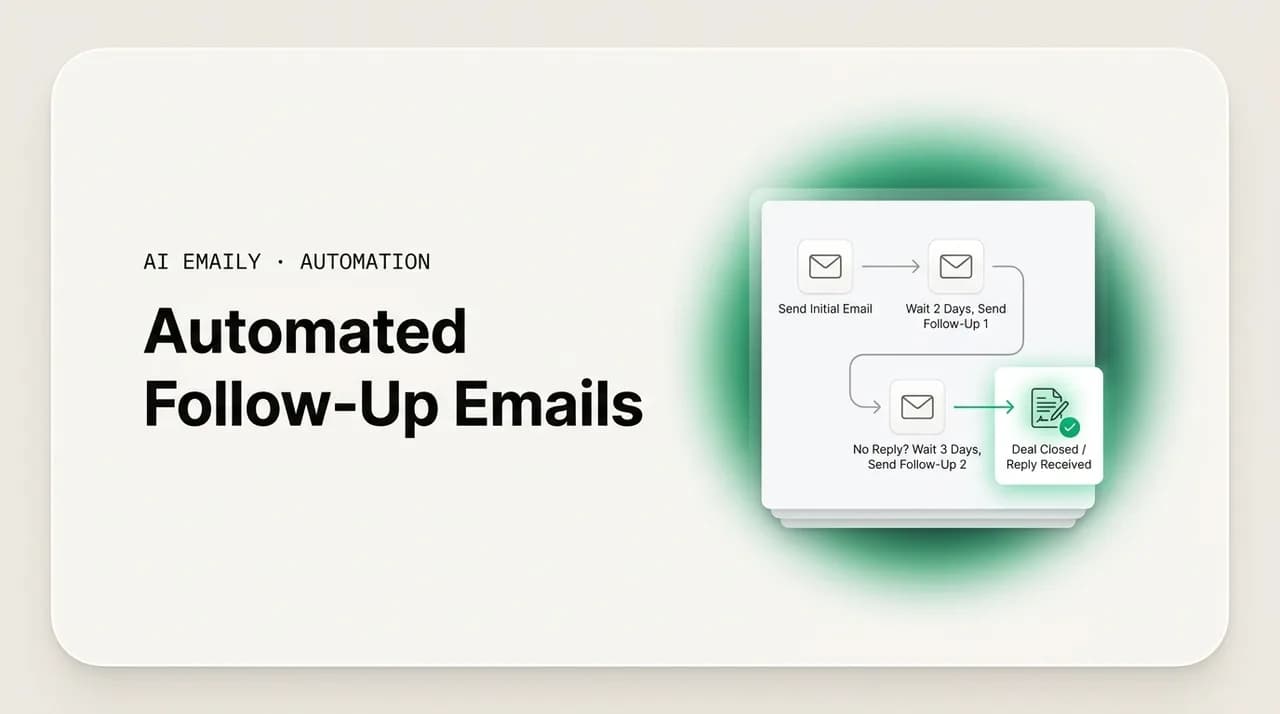
Automated follow-up emails fix this by turning that invisible non-event into a reliable trigger. Instead of relying on you to remember that a thread went quiet, you set up a rule: if there is no reply after a set number of days, send a follow-up. The system watches the thread, waits the gap you chose, sends the nudge, and — the part that makes the whole thing safe — stops the moment the other person replies. You stop being the engine of follow-up. You become the person who set the rules and reviews the output.
This guide is the practical how-to. We will cover exactly how follow-up automation works as a mechanism — trigger, wait, send, stop — and then get specific about every decision you have to make: what fires the follow-up, how long to wait, how many touches to send and how to space them, how to write nudges that do not read as machine-generated, how to build a bulletproof stop-on-reply, how sales follow-ups differ from relationship follow-ups, and which tools handle which jobs. Then we will show how AI Emaily's follow-up autopilot does all of it in your voice, with a hand on the brake. By the end you will know how to make sure the follow-up that wins the reply is the one that actually gets sent.
How do automated follow-up emails actually work?#
At its core, follow-up automation is a simple loop with four steps: a trigger fires, the system waits a defined gap, it sends the next message, and it checks for a reply that ends the sequence. Everything else — personalization, cadence design, tooling — is detail layered on top of that loop. If you understand the loop, you understand the category, and you can evaluate any tool by how well it handles each of the four steps.
The trigger is the condition that starts the clock. For most follow-up, the trigger is the absence of a reply: you send an email, and if no response arrives within a set window, the follow-up is queued. Other triggers exist — a form submission, a meeting that ended, an invoice that went unpaid, a link that was clicked but not acted on — but the no-reply trigger is the workhorse of follow-up automation because it maps directly onto the open loops that matter most: the asks you made that went unanswered.
The wait is the spacing between the trigger and the send, and between each subsequent touch. This is where a lot of follow-up automation goes wrong, because the wait has to be long enough to respect the recipient's time and short enough to keep the conversation warm. Send too soon and you read as impatient; send too late and the context has cooled for both of you. We will get specific about the right gaps shortly, but the principle is that the wait is a setting you tune, not a guess you make once and forget.
The send is the message itself — the actual follow-up that goes out when the wait expires. The stop is the rule that ends the sequence: when the recipient replies, every pending follow-up is canceled, immediately, before any of them can fire. The send is where personalization and voice matter; the stop is where the whole system earns or loses trust. A follow-up loop that fires reliably but does not stop when someone responds is not automation — it is a machine for annoying people. The four steps are inseparable, and a good setup gets all four right.
It is worth being precise about what this loop is not, because the category is crowded with tools that share the name and not the behavior. A real follow-up system is reactive: it watches the actual state of each thread and behaves accordingly — chasing only what went quiet, stopping the moment a reply lands. That is fundamentally different from a blind drip campaign, which fires the same template at everyone on a fixed timer regardless of what they do. A drip runs on the clock; follow-up automation runs on the conversation. The difference sounds subtle on a feature list, but it is the entire gap between a system that helps you and one that embarrasses you in front of the exact people you were trying to reach.
Trigger, wait, send, stop
Why do the follow-ups you never send cost the most?#
The case for automating follow-up rests on a single, well-documented pattern: the reply you want usually does not come from the first message. Across large bodies of outreach data, a majority of replies arrive on follow-ups rather than the initial send — by many measures more than half. One analysis of cold outreach found that while the first email earns the single highest reply rate, the remaining follow-ups together contribute roughly 42% of total replies, and that campaigns with four to seven touches achieve a 27% reply rate against just 9% for campaigns of one to three emails. The first email opens the door a crack; the follow-ups are what get it open.
Sit with what that means in practice. If most of your replies are waiting behind a second or third message, and you reliably send only the first, then you are systematically leaving the majority of your potential responses on the table — not because your first email was bad, but because the follow-up that would have earned the reply was never sent. You did the hard part: composing the outreach, making the ask, getting the context right. Then you skipped the part that statistically does most of the converting. It is the equivalent of running most of a race and stopping a few steps before the line, over and over.
There is a famous sales statistic that 80% of deals require five or more follow-ups to close, while a large share of salespeople stop after one or two attempts. Whatever the exact figure, the shape is consistent across studies: persistence pays, and most people are not persistent — not because they decided the follow-up was not worth it, but because the moment to send it arrived while they were busy, and then it passed. The gap between how many touches close deals and how many touches most people actually send is precisely the gap that follow-up automation closes.
This is why the follow-ups you never send are the expensive ones. A follow-up you send badly is recoverable — the recipient still sees it, and an imperfect nudge still beats silence. A follow-up that never goes out is a silent failure: no error, no notification, just a reply that does not arrive on a thread you have stopped thinking about. Automated follow-up emails attack exactly this failure. They do not make you better at writing follow-ups; they make sure the follow-up happens at all, which is where almost all the lost value actually is.
| The follow-up problem | Manual approach | What it costs you |
|---|---|---|
| Knowing a thread went quiet | Remember you sent it; happen to notice no reply | Quiet threads stay invisible until you go looking |
| Deciding when to nudge | Guess, or react whenever you happen to remember | Nudges land too early, too late, or never |
| Actually sending the follow-up | Find time, reconstruct context, compose from scratch | Friction makes you skip it on a busy day |
| Stopping after a reply | Notice the reply before the next nudge fires | Awkward double-messages when you miss it |
| Doing this across many threads | Hold every open loop in your head at once | The louder threads win; the rest go cold |
What should trigger an automated follow-up, and when?#
The trigger is the most important configuration decision in any follow-up setup, because it determines what gets chased and what gets ignored. The default and most useful trigger is no reply after a set number of days: you send a message, the system watches the thread, and if no response lands within the window, the follow-up is queued. This maps directly onto the open loops that matter — the asks, questions, proposals, and next steps you sent that went unanswered — without you having to track any of them by hand.
But not every email you send needs a follow-up, and a good trigger knows the difference. A one-line "thanks, got it" does not need chasing; a proposal with a clear ask does. If your trigger fires on every sent message that lacks a reply, you will end up nudging people about emails that were never meant to start a back-and-forth — which is worse than not following up at all. The discipline is to scope the trigger to messages that genuinely expected a response: a question, a request, an offer, a defined next step. Crude tools fire on everything; thoughtful ones (and AI agents in particular) judge whether the original message was even the kind that opens a loop.
Now the timing of the first follow-up, which is where the data is clearest. The optimal window for the first follow-up is roughly two to three business days after the initial email — long enough to respect the recipient's time, short enough that the conversation is still fresh. One widely cited finding is that waiting about three days before the first follow-up produces a meaningful lift in replies compared with chasing the next day, which can actually reduce responses because it reads as impatient. The instinct to follow up the morning after sending is almost always wrong; give it a couple of business days.
Beyond the first touch, timing should be context-aware rather than a single fixed countdown. A warm internal thread can be chased a bit sooner than a cautious first approach to a new contact. A follow-up about a time-sensitive deadline behaves differently from a gentle reminder on a long-horizon ask. And the day and time of send matter too: mid-week sends — Tuesday through Thursday — consistently outperform Monday and Friday across open and reply rates, and morning sends in the recipient's own time zone tend to do best. A good system lets you set the rhythm and adjusts within sensible bounds, rather than firing every follow-up on an identical clock regardless of the thread.
Wait two to three business days before the first follow-up
How many follow-ups should you send, and how should you space them?#
Two questions decide the shape of every follow-up sequence: how many touches, and how far apart. Get them right and the sequence feels like a diligent assistant; get them wrong and it feels like a malfunctioning robot. The good news is that the data points to a clear, defensible default that works for most professional follow-up, which you can then adjust for your context.
On the number of touches, the honest answer is a handful, not a dozen. The research cuts two ways and you have to hold both. On one hand, sequences with four to seven touches dramatically out-reply sequences of one to three — by some measures roughly tripling the reply rate — because most replies live in the follow-ups, not the first send. On the other hand, an analysis of millions of cold emails found that pushing past four messages in a sequence more than triples spam complaints, and enterprise contacts in particular punish persistence, ghosting after two or three touches. The reconciliation: more follow-ups capture more replies up to a point, after which each additional touch returns less and risks more. For most professional follow-up, a total of three to five touches — the original plus two to four nudges — is the sweet spot.
On spacing, the principle is to start tight and widen as the sequence progresses. The first follow-up comes a couple of business days after the original, while the conversation is fresh. Subsequent touches space out — roughly four days, then a week, then ten to fourteen days — both to avoid inbox fatigue and to catch the recipient at a different moment in their week. Widening gaps signal patience rather than pressure; they say "I am still here when you are ready" rather than "why haven't you answered me." Each touch should also taper in length and intensity — the later nudges are shorter and lighter, because you have already said the substantive part.
The table below lays out a sane default cadence you can adapt. The exact numbers are yours to set; what matters is the shape — a small number of tapering touches, spaced a few business days apart and widening over time, with a hard stop on any reply. Treat it as a starting point, watch your reply and complaint rates, and tune from there. A relationship-warm audience tolerates more touches; a cold or enterprise audience tolerates fewer.
| Touch | Timing (from original) | Tone & length | Stop condition |
|---|---|---|---|
| Original send | Day 0 | The full ask, with all context | Reply → no follow-ups ever fire |
| Follow-up 1 | Day 2–3 | Brief, warm reminder referencing the ask | Reply → cancel all remaining touches |
| Follow-up 2 | Day 6–7 | Shorter; add one new useful element | Reply → cancel the remaining touches |
| Follow-up 3 | Day 12–14 | Light nudge, easy to answer in one line | Reply → cancel the final touch |
| Follow-up 4 (optional) | Day 20–24 | Graceful close; signals you'll stop here | Reply → sequence ends; else it closes |
More follow-ups is not always better
How do you write automated follow-ups that don't feel automated?#
A follow-up only helps if it reads like a human sent it. Most people have received the kind of automated follow-up that announces itself immediately — the slightly-too-formal phrasing, the bolted-on "just circling back," the tone that belongs to no one in particular. A follow-up that reads as machine-written does worse than no follow-up at all, because it tells the recipient you have outsourced the relationship to a script. So the central craft question is: how do you automate the sending without automating the soul out of the message?
The first rule is to kill "just checking in." It is the most common follow-up opener in professional email and the least effective — a phrase that adds no value and signals you have nothing new to say. Outreach research is blunt about this: each touch should add a genuinely useful element — a relevant case study, a fresh data point, a specific idea, an answer to a likely objection — or it should not be sent. A follow-up that gives the recipient a new reason to respond out-performs one that merely reminds them you exist. The reminder is implied by the message arriving; your job is to supply the reason.
The second rule is real personalization, not variable-stuffing. Inserting a first name into a fixed skeleton produces a message that is technically customized and obviously generic; experienced recipients spot a mail-merge instantly, and reply rates for obvious templates sit in low single digits. Genuine personalization references the specific conversation — the proposal you sent, the question you raised, the next step you proposed — and the obvious shared context. The difference is stark: "Hi {{first_name}}, just following up" lands nothing, while "I know you wanted to revisit this after your team's planning cycle" lands as someone who actually paid attention. A useful rule of thumb from the field: if you start from a template, customize at least 20–30% of it before sending — the structure can repeat, the specifics must be earned.
The third rule is restraint and brevity. Follow-ups should get shorter and easier to answer as the sequence goes on, never longer or more demanding. The later touches in particular should be answerable in a single line — a yes/no, a one-word reply, a quick "not now" — because the easier you make the response, the more responses you get. And the tone must never escalate into guilt or pressure. "Wanted to make sure this didn't fall through the cracks" is fine; "I've reached out three times now" is not. The recipient should feel reminded, not cornered. This is where an AI agent that drafts in your established voice, grounded in the actual thread, has a real edge — it writes a specific, brief, on-tone continuation rather than pasting a template, every time.
Why is stop-on-reply the most important safety rule?#
Stop-on-reply is the rule that ends a follow-up sequence the instant it has done its job, and it is the single most important setting in any follow-up system. The instant the recipient replies, every pending follow-up on that thread must be canceled — automatically, immediately, before any of them can fire. There is no failure in follow-up automation more damaging than chasing someone who has already responded: it tells them, in the plainest possible terms, that the follow-up was not from a person paying attention but from a script that does not know they are there.
Picture the failure concretely. A prospect replies to your first follow-up with genuine interest and a question. Two days later, your automated second follow-up fires anyway — "just wanted to make sure this didn't get lost" — because the sequence never checked whether they had answered. In one message you have converted a warm, engaged lead into someone who now knows you are running them through a machine. Whatever goodwill the conversation had is gone. This is not a rare edge case; it is the default outcome of any sequence that does not enforce stop-on-reply, and it is exactly why so many people distrust automated follow-up in the first place.
A good system treats an incoming reply as a hard interrupt: reply detected, sequence stopped, no further nudges, full stop. This is what makes it safe to set up a multi-touch cadence at all — you can schedule four follow-ups knowing that if a reply comes after the first, the other three simply never happen. Without that guarantee, every additional touch you schedule is a liability; with it, the cadence becomes a safety net rather than a risk. The stop is not a nice-to-have feature layered on top of the cadence — it is the thing that makes the cadence trustworthy.
Smart setups extend the stop beyond just "any reply." You should also stop on a clear "not interested" or unsubscribe, because continuing to chase after an explicit no is its own kind of failure — and, for marketing-style mail, a legal one. Bounces should end the sequence too; there is no point chasing a dead address. And you want a master pause: one switch that halts everything at once if you go on vacation, a campaign goes sideways, or you simply want to stop. Before you automate any cadence, confirm the system handles all of these — a reply, an explicit no, a bounce, and a manual pause — because the cost of getting the stop wrong is measured in burned relationships, not just bounced emails.
Never chase someone who already replied
How do sales and relationship follow-ups differ?#
Not all follow-up is the same, and the biggest mistake people make when they first automate is applying one cadence to two very different jobs. Broadly, there are two kinds of follow-up: outbound sales follow-up, where you are chasing a response from someone who may not yet know or trust you, and relationship follow-up, where you are nudging an existing contact — a colleague, a client, a warm introduction — on a thread that already has context and goodwill. The trigger and the stop are the same in both; the cadence, tone, and tolerances are not.
Sales and outbound follow-up runs on volume and benefits from persistence, within limits. Because most replies come from later touches, a sales sequence justifies more follow-ups — typically the full three-to-five-touch cadence, sometimes more for a warm, receptive segment. The tone is value-forward: every touch adds a new reason to respond, because the recipient has no prior relationship obligating them to. But the risk is also higher: cold audiences punish over-persistence with spam complaints and unsubscribes, enterprise contacts ghost fast, and deliverability is on the line. Sales follow-up needs tight stop-on-reply, careful volume control, and an eye on complaint rates. It is also the kind of follow-up most likely to fall under marketing email law, so an easy opt-out and honest sender identity are non-negotiable.
Relationship and internal follow-up is gentler and shorter. When you are nudging a client about a deliverable, a colleague about a decision, or a contact about an introduction, the relationship already carries the weight — you do not need to sell, you need to remind. The cadence is usually fewer touches (often just one or two), the spacing can be a touch tighter because the thread is warm, and the tone is simply a brief, friendly continuation. Over-automating here is a different failure: a colleague does not want to feel processed by a sequence, and a single well-timed "any thoughts on this?" is almost always enough. The art is matching the machinery to the relationship rather than running everyone through the same funnel.
There is also a deliverability dimension that separates the two. Cold outbound follow-up is sent to people who never opted in, which means it lives under stricter scrutiny — both from spam filters and from law. The same study of millions of cold emails that showed follow-ups earn most replies also showed that piling on too many touches more than triples spam complaints, and complaints are what poison a sending domain. Relationship follow-up rarely carries that risk because the recipient already knows you and expects to hear from you. So the cadence you can safely run is partly a function of how warm the audience is: a known contact will forgive a fourth nudge that a cold prospect would mark as spam.
The practical implication is that you should not have one follow-up cadence — you should have a few, scoped to the kind of thread. A cautious first approach to a cold prospect, a warm internal request, and a client deliverable reminder each deserve different timing, tone, and number of touches, even inside the same inbox. The table below maps the two ends of the spectrum so you can place your own follow-up types between them.
| Dimension | Sales / outbound follow-up | Relationship / internal follow-up |
|---|---|---|
| Goal | Earn a first response, build interest | Remind and unblock an existing thread |
| Touches | 3–5 (sometimes more for warm segments) | 1–2 in most cases |
| Spacing | Widening: ~2, then 4, then 7+ days | Tighter; the thread is already warm |
| Tone | Value-forward; each touch adds a reason | Brief, friendly continuation; no selling |
| Top risk | Spam complaints, ghosting, deliverability | Feeling processed instead of remembered |
| Must-haves | Easy opt-out, honest identity, tight stop | A single well-timed, on-tone nudge |
Match the machinery to the relationship
What tools can automate follow-up emails?#
The follow-up automation market splits into a few categories, and choosing well starts with knowing which job you actually have. Broadly, there are native email features (basic and free), dedicated sales sequencers (built for outbound volume), CRM-bundled sequences (for teams already living in a CRM), and AI-native email clients (which fold follow-up into how you run your whole inbox). Each handles the trigger-wait-send-stop loop, but they differ sharply in how much they personalize, how well they stop on reply, and how much of your actual inbox they understand.
Native email tools are the floor. Gmail and Outlook offer scheduled send, basic templates, and snooze, and you can rig a crude no-reply nudge with rules or third-party add-ons. This is fine for the occasional manual follow-up but it is not real automation: there is no reliable no-reply trigger, no sequence management, and crucially, no automatic stop-on-reply — you are still the one who has to remember. Dedicated sales sequencers (the outbound-focused tools) sit at the other extreme: they are built for high-volume cold outreach, with multi-step sequences, no-reply triggers, A/B testing, and deliverability tooling. They are powerful for sales teams running campaigns, but they treat email as a campaign channel rather than your actual inbox, and they can be overkill — and over-aggressive — for everyday professional follow-up.
CRM-bundled sequences live inside the tools where sales teams already work, logging every touch against a contact record and triggering follow-ups from pipeline events. They are the natural choice if your follow-up is tightly coupled to a sales process and you need everything recorded against the deal. The newest category — AI-native email clients — takes a different angle: instead of bolting a sequencer onto the side of your workflow, the follow-up logic lives inside the email client itself, where the agent can read the actual thread, draft in your voice, and stop on reply because it sees the reply land in real time. That last category is where follow-up stops feeling like a separate machine and starts feeling like an assistant who runs your inbox.
The table below compares the categories on the dimensions that actually matter for follow-up: whether there is a real no-reply trigger, how strong personalization is, whether stop-on-reply is automatic, and who each is best for. Match the row to your situation. If you mostly need reliable, in-voice follow-up across your normal email — not a separate cold-outreach campaign machine — an AI-native client is the closest fit, which is the case for AI Emaily.
| Tool category | No-reply trigger | Personalization | Auto stop-on-reply | Best for |
|---|---|---|---|---|
| Native (Gmail / Outlook) | Manual / add-on only | Templates + tokens | No — you must notice | Occasional manual follow-up |
| Sales sequencer | Yes, multi-step | Tokens + some AI | Yes (campaign-scoped) | High-volume cold outbound |
| CRM-bundled sequence | Yes, from pipeline events | Tokens, CRM fields | Usually yes | Teams living inside a CRM |
| AI-native email client | Yes, reads the thread | Drafts in your voice, grounded | Yes — sees the reply land | In-voice follow-up across your real inbox |
Pick the tool that matches the job
How does AI Emaily's follow-up autopilot do this in your voice?#
AI Emaily was built as an AI-native email client, and follow-up is one of the clearest places its agent earns its keep. Rather than bolting a sequencer onto the side of your workflow, the follow-up logic lives inside the client itself: the agent watches the mail you send, recognizes the threads that expected a reply and went quiet, drafts the follow-up in your voice, schedules it on the cadence you set, and stops the entire sequence the instant a reply arrives. Because it lives where your mail lives, it does the part you keep forgetting — the reliable triggering and the from-scratch drafting — while leaving the judgment and the final say with you.
The drafting is what sets it apart from a template tool. The agent learns how you actually write — your length, tone, openings, and sign-offs — by reading your sent mail, and it has the original thread in front of it, so each follow-up is a specific, on-voice continuation of the real conversation rather than a generic "just checking in." It can reference the actual ask, add the kind of brief useful detail a good follow-up needs, and taper the later touches to short, easy-to-answer nudges. That is personalization by grounding, not variable-stuffing — the specificity is genuine because the thread itself is the source material.
What makes this safe to rely on is that follow-up runs through the same three autonomy levels that govern everything the agent does. In Manual, the agent surfaces the threads that went quiet and drafts the nudges, and you send them yourself — a memory and writing aid, nothing more. In Copilot, it prepares each follow-up and queues it, then waits for your approval before anything leaves; you get the full leverage of automated chasing while keeping a hand on every outbound message, which is the right home for most follow-up. In Autopilot, it sends routine follow-ups on its own within the bounds you set, while you keep the ability to review, undo, and stop at any moment. You choose the level per scope, so a cold first approach and a warm internal thread can run at different settings in the same inbox — exactly the sales-versus-relationship distinction this guide is about.
Two safeguards turn hands-free follow-up from a gamble into something you can trust. Undo gives you a window to pull back a follow-up after it sends, so a nudge that should not have gone out is recoverable rather than final. And a complete audit log records every follow-up the agent drafted, scheduled, sent, or canceled — what went to whom, when, and why — so the agent's chasing is never invisible. Combined with stop-on-reply, the worst cases of automated follow-up are designed out: it will not chase someone who replied, and anything it does send is both reviewable and reversible. AI Emaily is also provider-agnostic and private by design — the same agent and the same follow-up behavior work across Gmail, Outlook, and any other inbox you connect, your mail is never used to train models, and content is handled with care rather than mined. You get an agent that chases your replies the way a diligent chief of staff would, with a clear record and a hand on the brake.
Follow-up runs through Manual, Copilot, or Autopilot
Where does this leave your follow-up?#
The argument of this guide comes down to a single observation: the follow-up is the part of email that most reliably earns replies and most reliably does not get sent — and the reason it does not get sent is not judgment or skill, but the simple fact that it depends on remembering to act on silence days after the fact. That is a structural problem, and structural problems are not solved by trying harder. They are solved by changing the system so the thing that keeps failing no longer depends on the thing that keeps failing it — here, by moving the trigger and the drafting off your memory and onto automation.
The mechanics are not complicated once you see the loop: a trigger fires (usually no reply after two to three business days), the system waits the gap you set, it sends a brief, specific, value-adding nudge in your voice, and it stops the instant a reply lands. The decisions are the trigger condition, the number of touches (a handful — three to five for outbound, one or two for warm threads), the widening spacing between them, and a bulletproof stop-on-reply. Get those right and follow-up automation feels like a diligent assistant. Get the stop wrong and it feels like a robot that does not know you are there.
AI Emaily is built to be the first kind. Its agent detects the quiet threads, drafts the follow-up in your voice grounded in the actual conversation, schedules it on a cadence you control, and stops the moment a reply arrives — all at the autonomy level you choose, with undo and a full audit log so nothing happens that you cannot see or take back. You can start in Manual and let it draft while you send, move to Copilot and approve each nudge, or graduate to Autopilot once it has earned it. The Free plan ($0) lets you feel how it reads and drafts your mail; Pro ($12.42/mo billed annually) unlocks Copilot for approve-before-send follow-up; and the Autopilot plan ($20.75/mo billed annually) adds bounded autonomous sending with the full safety net. The follow-ups you keep meaning to send are the ones worth the most. Let automation make sure they actually go out — at app.aiemaily.com/signup.
Frequently asked
See it in AI Emaily
Keep reading
Sources
- Instantly — Cold Email Benchmark Report 2026 (reply rates, follow-up data)
- Martal — 10 Follow-Up Email Best Practices for B2B Sales (2026)
- Martal — Sales Follow-Up Statistics and Strategies for 2026
- Instantly — Email Sequence Timing & Cadence: Optimal Send Times and Intervals
- MailReach — Email Frequency Best Practices 2026 (B2B Guide)

Written by
Nafiul HasanNafiul Hasan is an entrepreneur and AI automation system builder with 10+ years of experience turning messy, manual workflows into reliable automated systems. He designs and ships AI enterprise solutions end-to-end — the agent logic, the data plumbing, and the product people actually use — and founded AI Emaily to give busy professionals their attention back. He writes here from the builder's seat: what works, what breaks, and how to put AI to work without giving up control.